Aqua-Soft Forums
Originally posted by Photo678@Oct 25 2003, 11:51 PMthats just funny, sorry
eeehehehe...! you're right, too funny... 
[edit]oops, forgot to say what I actually planned to say: nice work![/edit]
Originally posted by Photo678@Oct 25 2003, 11:51 PMthats just funny, sorry
eeehehehe...! you're right, too funny...
[edit]oops, forgot to say what I actually planned to say: nice work![/edit]
Originally posted by Flarex@Oct 26 2003, 04:19 PMhas anyone figured out how to make the image in the backround link to an external image, for example, i change the name of the image i want in the backround to, lets say bg.bmp and the logon takes that image and puts it in the backround.
BTW: great theme
PS: how do you change the backround in the logonui? Do you need a program?
If you want to replace the bg, you gotta use reshacker. Open it and in the tree on the left: Bitmap > 100. Here you can replace it. I don't know if it's possible from outside the Reshacker. Maybe someone could write a script? Dunno.
@Goku: saved me again :woot: Thanks bud, you truly are the man on the right place! Thanks! :bow:
Originally posted by gahbmwM5@Oct 25 2003, 08:16 PMGoku,
Very nice man, you are presently on a 'Panther roll', it's always nice to play with a new OS...
One thing that I would like to mention is when loading it up in Logon Loader, there is no 'Preview' because there is no small screenshot.jpg to be display for 'Preview'...
I like the new Apple style, on the Panther background, but I also have Xero's OSX & Ice LogonUI's and both of these have a 278 x 208 .jpg (Ice) & 500 x 320 .jpg (OSX) file in their folders...
It just makes it nice and complete...
Regards
attached image

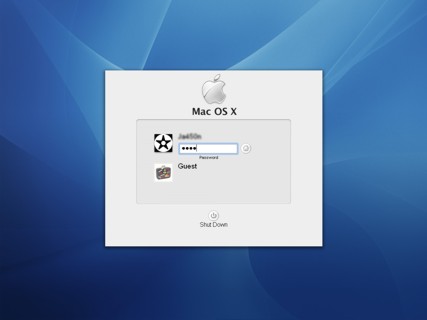
I like it but I didnt download it, Im a Mac Basher.
Originally posted by ja450n+Oct 26 2003, 03:32 PM-->QUOTE(ja450n @ Oct 26 2003, 03:32 PM)
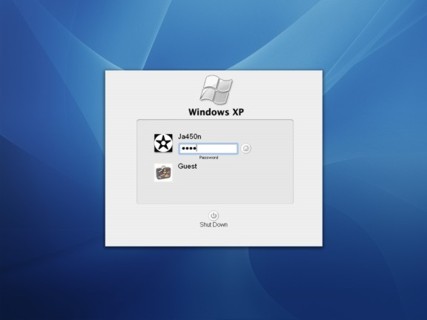
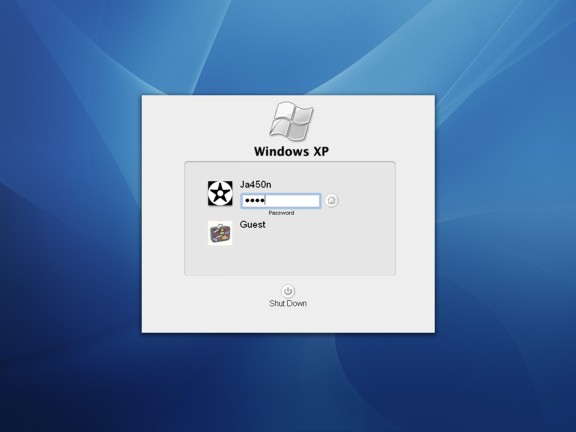
Don't the logons use plastic buttons? Cause I swear I saw a screenshot of Panther Server and it uses plastic buttons.
Nice, grabbed both versions. Currently using the flagged one. Great job! :who's your daddy:
Panther uses buttons just like those. I was playing with it at the local mac store.
Nate Posted on Oct 27 2003, 10:01 AMDon't the logons use plastic buttons? Cause I swear I saw a screenshot of Panther Server and it uses plastic buttons.
I watched the new features video on apple.com today and it shows the logon screen with plastic buttons
Originally posted by Adam Haslip@Oct 28 2003, 09:07 PM
Nate Posted on Oct 27 2003, 10:01 AMDon't the logons use plastic buttons? Cause I swear I saw a screenshot of Panther Server and it uses plastic buttons.
I watched the new features video on apple.com today and it shows the logon screen with plastic buttons
how can you tell what kind of buttons it has, when the movie is at such a LOW resolution..
Goku has a Mac, and is pulling from that, for accuracy.
how can you tell what kind of buttons it has, when the movie is at such a LOW resolution..Goku has a Mac, and is pulling from that, for accuracy.
i watched the high resolution video and when it shows omars logon, AND in the filevault demo you can see it, plus have you seen the new release for the logon screen?
dbbis Posted: Jun 27 2003, 11:26 AM
Hi!
Unfortunately, I do not know how to create a login screen for Windows XP.
But a look at a SpyMac picture, showing the new login screen from Panther, could give to the ones who know to do that such an inspiration.
I've seen the Panther logon and it has the whitish buttons, not the plastic ones. sorry to tell you.
Originally posted by Adam Haslip@Oct 29 2003, 07:28 PM
how can you tell what kind of buttons it has, when the movie is at such a LOW resolution..Goku has a Mac, and is pulling from that, for accuracy.
i watched the high resolution video and when it shows omars logon, AND in the filevault demo you can see it, plus have you seen the new release for the logon screen?
dbbis Posted: Jun 27 2003, 11:26 AM
Hi!
Unfortunately, I do not know how to create a login screen for Windows XP.
But a look at a SpyMac picture, showing the new login screen from Panther, could give to the ones who know to do that such an inspiration.
please provide a link to the high resolution video.. or PM me, and i will do what i can to correct both logon screens..
also, that screenshot, is of the Panther BETA logon..
Sweet. :who's your daddy:
This is quite the nice logon, especially after replacing the bakground with my own wallpaper (I'm not that huge on accurancy, I just want things to match!). Much thanks to all involved.
The beta login screen would look kinda cool for Windows XP
Originally posted by starforge@Nov 4 2003, 02:55 AMThe beta login screen would look kinda cool for Windows XP
it's already been released..
Is anyone willing to modify this Login Screen to fit 1280x1024 resolutions? It's frustrating to go looking for certain things on the Net, and find stuff for 1024x768 max... :cry:
Thanks again!
Originally posted by Myuu_EXE@Nov 5 2003, 02:09 PMIs anyone willing to modify this Login Screen to fit 1280x1024 resolutions? It's frustrating to go looking for certain things on the Net, and find stuff for 1024x768 max... :cry:
Thanks again!
does it not already work?
if you are getting a black border.. around the blue background..
i know what the problem is..
and i'll fix it..
this logon. however, was originally designed, not to be dependent on resolutions..
Wait, this is a User Login screen or a Boot Screen? 
Could anyone give me the link for it? ^^;;;
Thankies!