Mobydock Bug Report

Originally posted by moby@Oct 23 2003, 05:39 PM

there are problems running mobydock with specific dual-monitor setups, especially when the second monitor has negativ screen coordinates

Swapping my primary display and swapping the connectors fixed the problem. Thanks for the hint, it's working like a champ now!

#68357

there is a bug when for example i'm browsing a folder by the dock (ie: my computer) and that a new window open in background (MSN message, IEpopup...)

it simply freez the animation, the folder content disapear and the icon stay zoomed, i have to go on another icon to make it normal... it should come back automaticly or not disapear (for me the background windows doesn't have to take the hand on the dock)

Thanks for all

#68388

When using the "Blank" screen saver, the screen saver activates for a split second, then exits and the current app. bounces in the Dock. The screen saver functions normally when MobyDock is not running. I do not have the MSN, e-mail, weather, clock, or screenshot items on the Dock. "Blank" seems to be the only affected screen saver.

#68453

there are problems running mobydock with specific dual-monitor setups, especially when the second monitor has negativ screen coordinates. i hope to fix this with the little update that is expected at the weekend !

Just editing my "settings.ini" by hand i solved the trouble with my "second monitor with negative screen coordinates" and now the dock appear just in the middle of my big 19" right screen :D

[Offsets]

-----> xOffset=-1150

yOffset=0

Your dock is almost flawlessly Mobi, this is an irrelevant little bug. Keep doing this GREAT work :D

BTW I understand there are some many "tunning stuff" to do for an 1.0 version but this is an incredible work, and a very nice concept too.

#68471

hi, im having an issue, when i close the dock, i won't start again until i log off, restart, or delete settings.ini

any suggestion moby?

Thanks and thanks for this excelent dock ;)

#68561

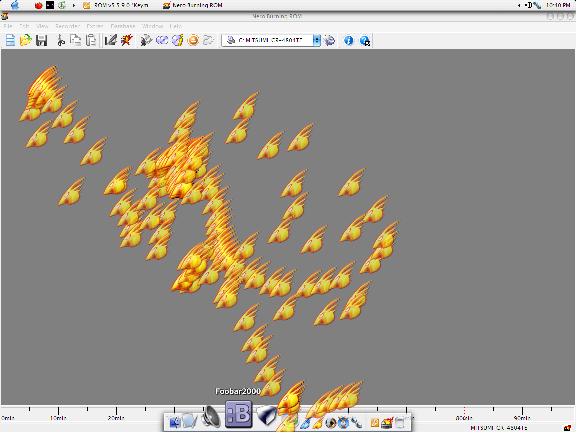
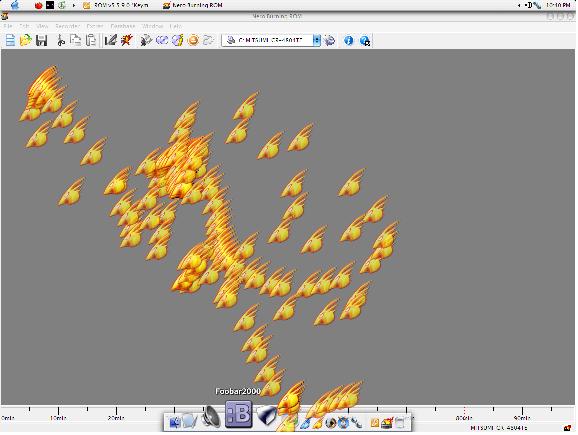
Check out this nifty little illness I've induced. I clicked on my Firebird icon, and instead of launching it stuck to the cursor, got dragged around the screen, and left prints of itself everywhere. The other dock items reacted to it like a normal icon being dragged, and after clicking it onto the dock a few times it stuck there.

The icons stayed all over the screen until Mobydock crashed..

There is a very high chance that this is just an error with my system. I have been having many hardware problems the last few days, so unless someone can reproduce, don't waste your time on it. I mostly posted because it looks cool <_<

post-856-1066963676_thumb.jpg

mobydock.jpg
mobydock.jpg

#68573

I've had the same problem with this and the previous version of mobyDock. Just 2 or 3 times total, I think.

Although it pissed me off until it crashed and let my cursor loose, it really looks good. A hidden feature rather than a bug, maybe? :rolleyes:

#68591

Why, if i use fireworks

bug1.jpg

click to enlarge

when i minimize the window i lose the palette

bug2.jpg

click to enlarge

while in other programs i haven't this bug...

#68624

Hi!

I did set Mobydock to load on system startup (winxp pro), position is top center of the screen. The dock is set to "autohide", but it doesn't autohide directly after booting, instead I have to "touch" the dock with the mouse, then after i drag the mouse away again the dock hides...

Is this a bug or a feature? :-)

(Same thing happens on my notebook (winxp home))

Still Mobydock is very good work, thanks...

#68752

Sometimes clicking an icon (such as Internet Explorer) does not cause a running indicator to appear on it, but it does bounce and load the program. Left clicks on the same icon create new instances instead of switching to the existing windows.

Forgive me if this is not a bug: When you click on an icon with a running indicator in the normal part of the Dock, it minimizes the window but does not use a screenshot. A screenshot is only created on the Dock if you minimize the window using the icon in the Running Processes section.

#68839

Originally posted by Mad_Mike@Oct 24 2003, 10:09 PM

Sometimes clicking an icon (such as Internet Explorer) does not cause a running indicator to appear on it, but it does bounce and load the program. Left clicks on the same icon create new instances instead of switching to the existing windows.

Forgive me if this is not a bug: When you click on an icon with a running indicator in the normal part of the Dock, it minimizes the window but does not use a screenshot. A screenshot is only created on the Dock if you minimize the window using the icon in the Running Processes section.

1. A few desktop items such as Internet Explorer, My Computer, Outlook, etc. are not "normal" Windows shortcuts. If you dragged any of those to the dock, it's highly possible to behave the way you describe.

If this is the case, go to C:\Program Files\Internet Explorer and drag IExplore.exe to the dock.

2. Minimizing is not 100% bug-free. There are apps that never create a thumbnail and others that occasionally do that, no matter which part of the dock they reside. Check what happens when you minimize windows the normal way (minimize button!)

Good luck!

Ken

#68843

i agree with you ken, but you last point is one thing i'd like to see changed and i can be done, because od shows a thumb when min a window using the min. button. I'd really like to see this on mobydock. And the other similar issues 'might' be addressable.

All in due time though

#68851

Ken, I only have the EXE's on my Dock since I can't rename system items (plus I'm not sure if the Ignore list would apply to windows created by those items). And minimizing using the titlebar buttons does not produce screenshots.

Thanks for your suggestions, and for hosting a site that benefits the community. :D

#68862

A bug on the icon labels, it's longer in the version 0.87a that's cool but when you got a scrolling title (in winamp for example) the label doesn't update when the cursor stay over the icon without moving, you have to move to refresh the label, maybe is it easy to make it update after 500ms when you are over the icon without moving?

thanks for the new version it's a very very good work!!! :own: :woot: :woot:

#69550

just posting to say i had the same problem as arch (the sticky icon thing, but with most of the shortcuts), but it disappeared as soon as i stripped everything off the dock. I then built all my shortcuts and everything is fine.

so maybe its something in the default setup.

i have 9000 ati 128mb, p4, xp, latest drivers etc. mdock .87a

The bug has entirely disappeared.. just posting in case it helps.

#69563

Originally posted by kerin@Oct 26 2003, 06:05 PM

A bug on the icon labels, it's longer in the version 0.87a that's cool but when you got a scrolling title (in winamp for example) the label doesn't update when the cursor stay over the icon without moving, you have to move to refresh the label, maybe is it easy to make it update after 500ms when you are over the icon without moving?

This only happens with Winamp. Why add such a feature that is rarely needed but would slow down performance (maybe), having to count the time the cursor is over an icon and re-read the window label? :blink:

#69630

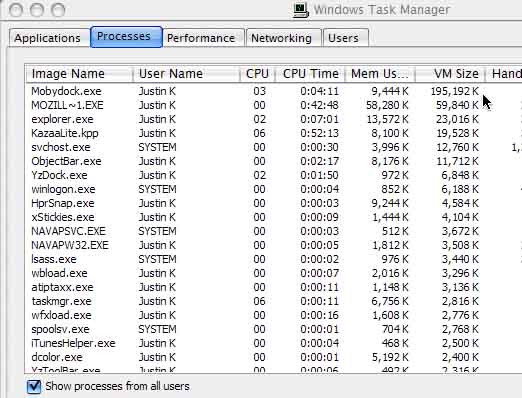
hey moby or mike, (i noticed you've said to post here for bugs so i'll address you i guess) i'm wondering if moby ever found a way to dump memory...

if i have the dock open for a while, virtual memory keeps climbing and climbing untill it hits almost 200,000 K. Is that normal? :blink:

post-2262-1067229794_thumb.jpg

Untitled_1_copy.jpg
Untitled_1_copy.jpg

#69826

I'm trying to just keep running applications on the right side of the separator, but when there are no apps running the shortcut to the left of the seperator moves over to the right. How do I fix this?

#69851

Originally posted by Arch@Oct 23 2003, 09:47 PM

Check out this nifty little illness I've induced.  I clicked on my Firebird icon, and instead of launching it stuck to the cursor, got dragged around the screen, and left prints of itself everywhere.  The other dock items reacted to it like a normal icon being dragged, and after clicking it onto the dock a few times it stuck there.

The icons stayed all over the screen until Mobydock crashed..

There is a very high chance that this is just an error with my system.  I have been having many hardware problems the last few days, so unless someone can reproduce, don't waste your time on it.  I mostly posted because it looks cool  <_<

This happened on my system too a couple of times, but it happens very rarely. I have a feeling it has to do with the fact that the graphic rendering engine isn't perfect yet. Since this dock is hardware accelerated, it's much more complicated than a CPU accelerated dock like Y'z or OD. Such graphical bugs are expected. I don't think it's that big a deal since it's just happened twice in 3 months of usage for me.

#69855

All of the sudden, mobdydock .87b wont start anymore :(

here parts of the error, i can send more when needed:

AppName: mobydock.exe AppVer: 0.8.7.0 ModName: mobydock.exe

ModVer: 0.8.7.0 Offset: 000168ee

#69907

Originally posted by Ken@Oct 26 2003, 08:57 PM

This only happens with Winamp. Why add such a feature that is rarely needed but would slow down performance (maybe), having to count the time the cursor is over an icon and re-read the window label?  :blink:

yeah sure it can slow the performences i didn't thought in this point of view... :)

i don't realy care of this bug, it was just to repport it... i got my titles scolling on my desktop (samurize powa) so...

thanks for the work anyway it rox!!!

#69923

Originally posted by johnny5w@Oct 26 2003, 11:36 PM

I'm trying to just keep running applications on the right side of the separator, but when there are no apps running the shortcut to the left of the seperator moves over to the right. How do I fix this?

That's interesting. I'm sure most people won't encounter this problem cause they keep the trash on the right.

I haven't heard/known of this before until earlier today.

funnily, i was doing to opposite. I was trying to get my folder icons to appear after the separator.

I did this by adding the control panel and then editing items.ini so that the folder shortcuts appear in the right side between the mobydock control panel and the trash. It worked for a while but when i removed the control panel, the folder icons just shifted to the left of the separator. :(

yeah it's excatly opposite of what you are trying to do but i guess there is no way of messing with the task section of the dock.

#70282

arf a litle bug:

In the task list, when you clic on an existing task that run in background to set the focus on it... the icon animate but the window doesn't come on the foreground... i'd the problem on the 0.87 with the MSN window when it was not reduced by clicking on the dock but using the button on the window.

The problem is now generalized to all the windows (IE, Explorer, winamp...) i have to use ALT+TAB to change the focused window

another thing with this bug, i've set to ignore the class "MSNMSBLClass" (this is the contact list of MSN the main window) and when i'm chating i got the window of the chat (IMWindowClass) that appear in my dock... no problem at all, but when i clic on the icon of my chat window, this is the main window that appear and not the chat window...

thanks

EDIT and CORRECTION

i know where the problem come from, i've just activate the "open a new instance by default", this option disable the focusing function of the dock in the tasklist.

Is it possible to activate this option in the "Dock item properties", a check box to set it on or off... so that for example on clicking on the Internet Explorer icon it always start a new instance if it's on and on clicking on Outlook it only give it the focus (or start it) if it's off...

merci beaucoup, (oups french...) thanks for the support

#70410

I created a folder in my document which contains several games, this folder is called 'my games', i put it in the mobydock bar.

When i left click on the icon the menu of the folder content appears, no problem, but when i click on a icon game to start it the game crashes !

Ok now i open the folder using the right mouse button and i click a icon game, the game starts !

If i put a game icon in my mobydock bar, no problem, i can start it !

What's the problem ?

What's wrong with the folder menu ?

Thanks.

#74747