[release]xml Desktop Weather

a new version of the desktop weather script has been released by badboy, unlike its predecessors this script utilizes the weather.com XML feed. I've noticed a significant increase in how quickly weather is updated.

you can get it here http://www.samurize.com/modules/mydownload...ewcat.php?cid=9

#65636

thanks for telling us.

i've downloaded it, but haven't tried it out yet, since the other desktop weather script is working fine now.

but if there are a lot of improvements/benefits, i just might try it.

still, thanks for letting us know. ^_^

#65638

Help please, still not working for me. :(

#65659

could u be more specific...

you have to change the config to match the filepaths on ur computer

#65673

I got the window displayed on my desktop fine, however everything is [not executed yet] no matter how many time I reload the config file. :(

#65680

mee too :(

#65694

never mind i got it working (Y)

#65702

did u guys get your locid to plug into the visual basic script?

did u guys have problems getting weather to work before ?

did u doublecheck the readme to see if u did everything?

#65704

for getcachefile, what do we put for fileurl 1 and 2?

#65706

Originally posted by dreamz@Oct 16 2003, 03:47 AM

for getcachefile, what do we put for fileurl 1 and 2?

Are you referring to these lines?

file1 = getCacheFile(mins, x30minURL, x30minFile)

file2 = getCacheFile(mins, x120minURL, x120minFile)

mins is set before these lines in getCacheFiles()

x30minFile and x120minFile are defined at the beginning of the script

Also, I have contacted Badboy and given him the following function to allow retrieval of the users loc_id without intervention.

Function FindLocationID(CityName)
GetURL = "http://xoap.weather.com/search/search?where=" & CityName
Dim Http
Dim thexml,thelist,thehandle,numitems,thetext
Set Http = CreateObject("Microsoft.XMLhttp")
Http.Open "GET",GetURL,False
Http.Send
thetext = Http.ResponseText
Set Http = Nothing
Set thexml = CreateObject("Microsoft.XMLDOM")
thexml.async = False
thexml.LoadXML(thetext)
If thexml.parseError.errorCode <> 0 Then
 FindLocationID = "Weather.com Data UNAVAILABLE"
 Exit Function
End If
Set thelist = thexml.getElementsByTagName("loc")
numitems = thelist.length
If numitems > 1 Then
  For i = 0 to (numitems - 1)
    Set thehandle = thelist.item(i)
    If thehandle.text = CityName Then
      FindLocationID = thehandle.getattribute("id")
      Exit Function
    End If
  Next
Else
  Set thehandle = thelist.item(numitems - 1)
  FindLocationID = thehandle.getattribute("id")
End If
End Function

The above function returns the loc_id which matches the City, Country or ZIP code that has been entered.

I got this function from the Weather 2003 Pro script on samurize.com and made a few adjustments to it. I take no credit for the original script.

#65715

is that a necessary function? mine is working perfectly (knock on faux wood desk) and i don't have that one. i do have 'getcachefiles', but not 'getcachefile'.

#65716

yeah, i just tried getcachefiles and it works. just like the original desktop weather script, i guess. thanks for the help, guys! :woot:

edit: just wondering, what are the performance differences between the xml and the normal version? i know idicula said it updates faster, but anything else? is this xml version better because it's unaffected by site changes? all these ****ie questions... :shy:

#65719

ya this version is here to stay because weather.com wants all weather apps using its data to use its XML feed, I guess to lighten the load on its servers

#65730

nice, but how we can make it look nice like the another version? ( i mean like original konfabulator weather)

Thanks

#65747

I have made it, but I don't know anything about permission to ask, so if you help me with permission I can release it

#65778

Originally posted by jumpers@Oct 16 2003, 06:26 AM

nice, but how we can make it look nice like the another version? ( i mean like original konfabulator weather)

Thanks

If you mean something like this (using XML with localized days)

then just edit config file and replace images with old ones...

post-1374-1066306818_thumb.jpg

Capture03.listopad.2003_01.26.5916.10.2003_00.15.44.jpg

#65792

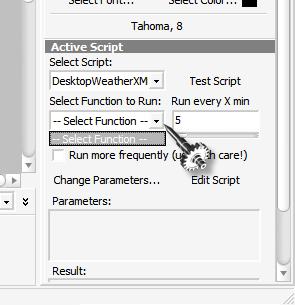
I can't get it work also. I tried to examine the meter under samurize config, there is no function for me to choose.

post-1970-1066316406_thumb.jpg

untitled.JPG
untitled.JPG

#65833

Originally posted by crni@Oct 16 2003, 12:19 PM

If you mean something like this (using XML with localized days)

then just edit config file and replace images with old ones...

yeah, i'd like to use the old images too. don't we need to edit the script also? and can we change the main image? i.e. copy and paste it to the folder and rename tempmain or whatever to now.png? and do that for all the images? what did you do exactly? sorry for all the questions.

#65868

Originally posted by dreamz+Oct 16 2003, 05:12 PM-->
QUOTE(dreamz @ Oct 16 2003, 05:12 PM)

#65872

thanks, but i still can't get it right.

i've set up my own config and added the script and all the meters i wanted.

to add the images, i go to add draw object > 32 bit png, then i go into the desktopweatherxml folder, go into the temp folder, then add now.png and day 1.png. if i try to load the images from the other desktop weather script, i can get the weather images to appear, but they won't update (naturally, since i'm not using that script).

#65876

Did you rename the icons and do you have them in the 2 different sizes in their respective directories? The original Desktop Weather had names for the icons like mostlycloudy.png and heavyrain.png, and they were only one size, whereas the XML version uses the original numbers - 16.png, 35.png, etc.. with 2 different sizes, 128x128 and 32x32.

this was something i had asked about in this forum:

http://www.aqua-soft.org/board/index.php?s...opic=7402&st=30

basically, if you want 'mostlysunny' icon from the original set, you would find the one(s) that match mostlysunny in the XML version 128x128 folder. Rename the original set one to that number and then copy it into the 128 folder, overwriting the one there. (I had to do some editing of those original icons in photoshop to bring them to 128x128... they didn't work otherwise?)

#65901

For the xml desktop weather, i followed the instruction, when I click http://xoap.weather.com/search/search?where=XXXXX, but I get :

<?xml version="1.0" encoding="ISO-8859-1" ?>

- <!-- This document is intended only for use by authorized licensees of The Weather Channel. Unauthorized use is prohibited. Copyright 1995-2002, The Weather Channel Enterprises, Inc. All Rights Reserved.

-->

Then I went to get registered at weather.com, but still don't konw how to obtain my loc id :nuts: .

Any help is appreciated, thanks in advance.

#65905

^Close, chief.

Where the readme file sez 'http://xoap.weather.com/search/search?where=XXXXX", you need to change the XXXXX to your zip code, or your location.

ergo; XXXXX = 12345

Then, you'd enter http://xoap.weather.com/search/search?where=12345 into the URL address bar, and retrieve your LocID that way.

After that, it's all downhill from there.

TYT

#65912

To all those wantiong to use the old images, get the latest version (DesktopWeatherXML 1.1). This version will let you choose which images you want by altering one constant.

const IMAGES = "old"   ' Set this to which images you would like to use (VALUES = [ new or old ]).

new = The Weather Channel® images

old = Konfabulator images

Can also be used to add other images that you have, as long as they are named correctly (0.png, 1.png, 2.png, ... , 47.png, na.png).

#65925

Thank you TYT, now I got my loc id:

City, CA (91***)

Then I put my zip to "const LOCID = "91***" ' Set this to your "loc id" from the above ", (I suppose that my zip is my locid,) but still got N/A or not yet executed on every part.

Yet, I got nothing under the select function pull down menu in Config.

#65931