 Aqua-Soft Forums
just wonderin if someone could post a screenie of the stuff that this patch updates
[release] Croka99s Sys Files Installer
Originally posted by genuine143@Oct 21 2003, 04:14 PMhello people..
Is it only me or is some of the icons blured ?
If a Icon is blurred, it's because many color depths were taken out to make the shell 32
as small as possible. Just replace the blurred Icons with Icons from another shell 32. Worked for me. 
cheerz man !! got some png files of www.kde-look.org <_< I know they are a linux site but the have two complete macosx iconsets !! :woot:
Cheerz
im sorry that windows media player doesnt work cuz the files in my installer is for WMP8.
2. those of you who dont see much of a difference, you need to apply one of the themes ive included, and rebuild your icon cache using TweakUI.
3. Depending on the size of your icons, the largest icon size ive included in the installer was 72 pixels by 72 pixels.
you may need to refresh the icon cache or lower/raise icon display size!
Eeek! This messed up my operating system!!! I had to reinstall windows, i guess there are just some of us who get good luck and us who dont. I'm one of the two. Great job anyways, i can see that people really like it.
~DrEw
im sorry!
Originally posted by artyboy1234@Oct 23 2003, 06:48 PMEeek! This messed up my operating system!!! I had to reinstall windows, i guess there are just some of us who get good luck and us who dont. I'm one of the two. Great job anyways, i can see that people really like it.
~DrEw
Can I ask why you simply didn't set a system restore point before using this?
C'mon people, do I have to yell this more? This is a great feature, use it.
Croka: Is there a way to have your installer automatically create a restore point? Ive seen installers do this before.
ill look into how to create a restore point in NSIS.
Any hope for updated support for WMP9?
i will think about WMP9 it will take some time for me to update my installer to include WMP9.
and BTW my version 5 installer will include new features!
I do have one request. Previously in one of you earlier installers, shortcuts were called alias'. Is there a way that you could change the test to Alias's instead of Shortcuts ??
Thanks,
FatAxl :own:
the alias context are all there since version 2
opps actually i dont now how to, since i didnt make the mods, i just took the resources from the old and into the new.
Just thought I would ask. Is Alias suppose to still be there, because I haven't seen it since V2 ??
if your talking about alias in context menus then your shell32 may not have it, cuz in my installer my shell32 that i made to be like yours has alias'.
Contra: ive made a new installer and it has an auto System Restore Point option.
Help me croka
At me a problem!
When I installation Aqua mod ver 1 - 5? There are two problems.
1. I cannot go in a mode of protection against failures, the picture simply becomes transfixed.
2. Applications are not established arises a mistake, she is visible on a screenshot.
My operational system Windows Xp Professional (Service Pack 1 file of version 1.16.121.0) 133 Mb from August, 29, 2002.
Croka if you after Service Pack 1 put other patches, lay out them please on a site in archive rar www.modosis.com/croka99, I shall be very grateful.
I Apologize for English
Igor K
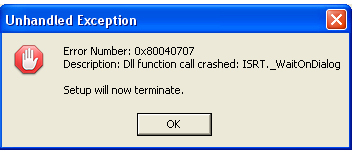

hey i tried to uninstall using the installer and it wouldnt uninstall i have the newest version of this program. i wanted to go back to the default xp login screen and i know ur program makes backup's of every dll so i tried using reshacker and restoring it..checked all the bitmaps and everything..i even restored all of them in all the right folders and it says it changed but when i restart it is still the aqua one...?!!? any ideas?? >.
huh? please explain your problems in more detail.
my installer should only work on english sp1 or later. the installer uses all of the most recient files available from windows update.
and why would you need reshacker to go back to regular logon screen when you only have to replace the aqua logon!
I noticed a couple of MINOR points after the latest pack was installed. Now I don't really care about these enough to re-install the pack or anything, but the about windows option from the explorer help menu has what appear to be toolbar images in instead of the MacOSX image. Also, 'My Network Places' and 'Entire Network' had been changed to 'Airport' and 'Appletalk Network' respectively, but after I installed the last installer, they went back to the original Windows designations.
BUT, I love the over all changed applied and don't want to re-install anything until a newer installer is released.
Great work Croka!
Hi, I'm new to this forum, and I would just like to bring something to everyone's attention: the link is not working anymore. It says I do not have permission to download it. The thing is, I REALLY want it. I'm not exactly sure what it is, but I downloaded a similar installer before reformatting called "Mac OS X Conversion" and it changed my icons, logon screen, and everything! It was so cool! Would this be the same thing? If so, I really want that link fixed. >
From everything ive heard i cant wait to install it croka! but im still timid due to the wmp9 *not a hint I swear to god* but im bitting at the bit to see it match my g5's look ;-)
wmp9 is easy, I installed the pack, and wmp broke, then just downloaded and installed wmp and eveything worked fine, not that I use it anymore since itunes
Cheers!