 Aqua-Soft Forums
This is already implemented like that (since previous versions). 
Feature Requests For V5.6
hello
precious dock
my requests :
option No effect to minimize to dock and docklet to see the applications that are running (similar to the task of y' z dock) http://www.dockex.com/items/18
sorry mi bad english
This is already implemented like that (since previous versions).
Where is this feature... don't work for me...
you speak about hide/show optio...
i want, instead, the dock on top of all opened windows (when it isn't minimized)!
i'm speaking about windows that cover the dock, but aren't maximized!
Now, for back on top, i've to move mouse on bottom of the screen and press a button...
i want the same work without the button pressing...
By Panta: merged. No need for double posting; use 'Edit' instead. :slant:
Here is Some of my feature Requests:
- System Tray implementation or docklet
- Possibility to Change the Place where the dock is (ie. put the dock on the top, left, right...)
- Possibility to Change Effects when Clicking a Icon (Like Bouncing, Shaking..)
- Option to Hide the Windows Taskbar.
...that is it, thanks and sorry my bad english
LOL You wrote for me xD., thanks ^^ One more suggestion 
-Stack view likes to KKMenu

What would be wonderful is to add the ability to unable window reflection when a window is maximized (because now causes the icons to reflect themselves and it's not refreshed often enough so it's not beautiful...)
Excellent soft BTW
What would be wonderful is to add the ability to unable window reflection when a window is maximized (because now causes the icons to reflect themselves and it's not refreshed often enough so it's not beautiful...)Excellent soft BTW
you mean disable?... I use something to make the window stay away from the dock (work area by matonga, or something like that) and the windows stay far enough away for the reflection to not show up
haven't read all the posts so sorry if this has been requested. BUT
how about an option do delete something from 'stack from explorer'
example:
you have a 'stack from explorer' showing the desktop, and the desktop icons are hidden. so when you download something to desktop, they aren't visible (cause they're hidden) but when you click the stack you can right click and delete an item and it'll also delete it from the desktop.
Makes sense...haven't read all the posts so sorry if this has been requested. BUThow about an option do delete something from 'stack from explorer'
example:
you have a 'stack from explorer' showing the desktop, and the desktop icons are hidden. so when you download something to desktop, they aren't visible (cause they're hidden) but when you click the stack you can right click and delete an item and it'll also delete it from the desktop.
panel -->[*]show dock on mouseover
:slant:
Edit:
better yet, panel -->
[*]Always on top
But if i have a window that isn't maximized but only cover the dock, it doesn't work (and i don't want an always on top dock)!!!
To be precise: not only work when the window that cover the dock isn't maximized and the borders are completely over the dock (if there is at least a pixel between the border of the window and the border of the screen IT WORKS)
But if i have a window that isn't maximized but only cover the dock, it doesn't work (and i don't want an always on top dock)!!!
I just tried it, it works for me (see screenshot as proof). Please try my settings (second screenshot), and report back in the Bug report forum, if your dock behaves different.
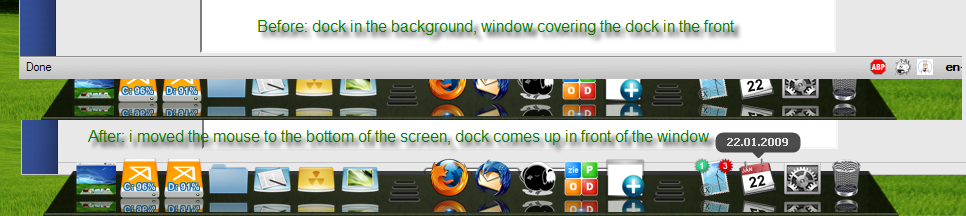
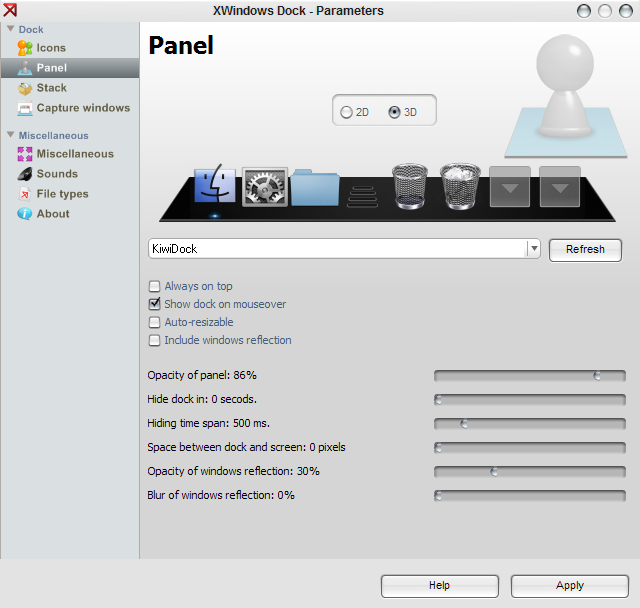
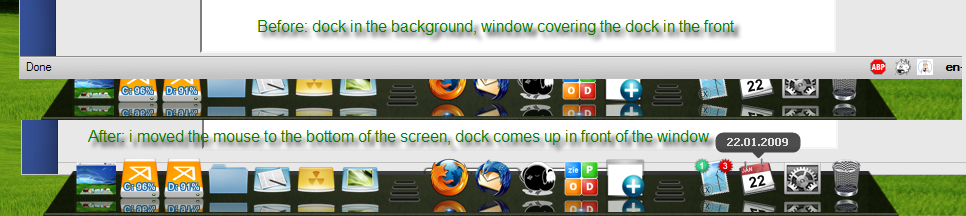
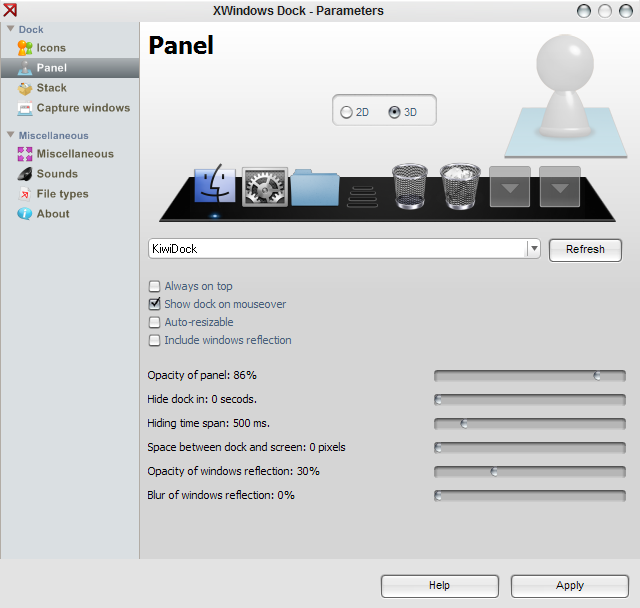
i got another request...i like the function "reserved screen edge" like objectdock inside XWD... i like to keep the bottom screen edge so that i could see my dock without the need to hovering it so that it came out..
btw... the new release XWD is quite heavy.. require lots of ram.. but it is still okay for me coz i'm using amd athlon 64 +6000 n 4gb ddr2 ram... but the smoothness of the stack is very poor.. to me it is quite lag when i click on it.. and become smoother after i click it many times... did anyone have any problm like me?
sorry BOBAH13.. i didnt have enough time to browse all the contents inside the forum... so maybe i skipped some important details.
to PANTA, i got ur point.. but when used the XWD 5.3, the icon quality is no different when i used custom icon... so the new release XWD has better quality now... btw, how can i edit the skin if there is skin for the border of the stack...
I just tried it, it works for me (see screenshot as proof). Please try my settings (second screenshot), and report back in the Bug report forum, if your dock behaves different.
To be precise: not only work when the window that cover the dock isn't maximized and the borders are completely over the dock (if there is at least a pixel between the border of the window and the border of the screen IT WORKS)
To be precise: not only work when the window that cover the dock isn't maximized and the borders are completely over the dock (if there is at least a pixel between the border of the window and the border of the screen IT WORKS)
It works for me, whether the window covers the dock completely or not! Whether it is maximized or not! Please try my (exact) settings, if these don't help please post further information in the Bug Forum.
It just works for me, and for most other people too. If it doesn't work for your, the problem must be somewhere on your system. Therefore we need more info (your XWindowsDock Settings, your OS, other running Applications etc...). But please post this in the Bug forum, because your "requested feature" is already implemented.
OS Microsoft Vista...

You can see that i resized a window to cover the dock (no pixel between window and border of the screen)... i pointed with the mouse on the bottom but the dock don't come on top...
OS Microsoft Vista...
You can see that i resized a window to cover the dock (no pixel between window and border of the screen)... i pointed with the mouse on the bottom but the dock don't come on top...
Ok, now i can reproduce your problem: the dock does not show up, if the Windows-Border is exactly at the bottom line of the screen (covering the XWindowsDock hotspot). If the border is some pixel below or above, everything is working fine. It looks like it has something to do with the resize-functionality. But like I said: a bug (a very minor one, imho). And like I said: it should be posted in the Bug Report Thread.
about the new skin support for stack grid. I quite like the ability to skin it. However, i find that it is a little limiting. The problem is1. the top/bottom is repeated rather than stretched. If the top, bottom, left and right are stretched, then more effects could be created.
2. There is no grid_body.png. Instead we got to resort to using a color. we need a middle with the stretch mode.
3. there should be an option to move the offset of the arrow on the skin. Currently is starts from the end of the bottom. You become a little limited in the effects you can acheive using this method. An image of what I can't do currently .
http://dl.getdropbox.com/u/163717/stack_cant_skin.png
what i really like about the new release
. the mask for the docks. we should see some very cool skins coming out soon.
. the ability to change the offset off icons from the edge. very cool. maybe it was always there and just missed it.

Of course I can do it, BUT at frist I tryied to make it, and I had got problem, that when stack-grid is too big its animation isn't animation at all, because this skin of grid must be painted so fast, and if we use this skin (background-skin) it won't be able to make stack so fast like now. So... what can you offer me ? Also, for the next realese (I don't know when yet) I'm going to fix as much bugs as possible to make dock more stable and usefull for all people using XP, Vista or even Seven. It's first direction of mine about the dock right now I think I'm not far from the end of this project and I very want to finish it successfully. Thanks all.
Alright. Here's some stack animation requests:
I'd like to be able to control the rotation of icons (as a novelty... not really important imo)
The stack window could have a bigger margin (so I can zoom a bit past 100% and come back down, for example)
(This is a big one) The ability to animate the background as well, with controls for opacity, xscale, yscale. I just need to animate the rectangle in the middle. The rest can be drawn by the dock
Edit: oh, and let the animation developer decide what to do with the icon begin size and end size
ok, now i can reproduce your problem: The dock does not show up, if the windows-border is exactly at the bottom line of the screen (covering the xwindowsdock hotspot). If the border is some pixel below or above, everything is working fine. It looks like it has something to do with the resize-functionality. But like i said: A bug (a very minor one, imho). And like i said: It should be posted in the bug report thread.
ok!!! ;-)
Of course I can do it, BUT at frist I tryied to make it, and I had got problem, that when stack-grid is too big its animation isn't animation at all, because this skin of grid must be painted so fast, and if we use this skin (background-skin) it won't be able to make stack so fast like now. So... what can you offer me ?
thanks for the response. speed/stability is way more useful than skin support.
end of project!! the request thread just grows longer and longer . JK. I think this dock far exceeds the others. Hope the project stays alive with at least minor updates from time to time.
you mean disable?... I use something to make the window stay away from the dock (work area by matonga, or something like that) and the windows stay far enough away for the reflection to not show up
Yeah, disable, that's what I meant, sorry (native french). I know about this soft but the point is I would like to keep maximized windows full-screen. So a little "disable window reflection when maximized windows" checkbox in the next release would be my only demand!
@bobah13, a skinner request:
Make the icons overlay the indicator
Bad (actually)(ps don't look the position's indicator, it's a wip)

Good (example):
http://giraffecrack.deviantart.com/art/Red...uccess-99307977
@bobah13, a skinner request:Make the icons overlay the indicator
Or let skinners choose? Some indicators look better in front.
About indicator, new skin file will have new option IconHigherThanIndicator
IDEA...
preview support
minimized in the launcher
similar to linux dock
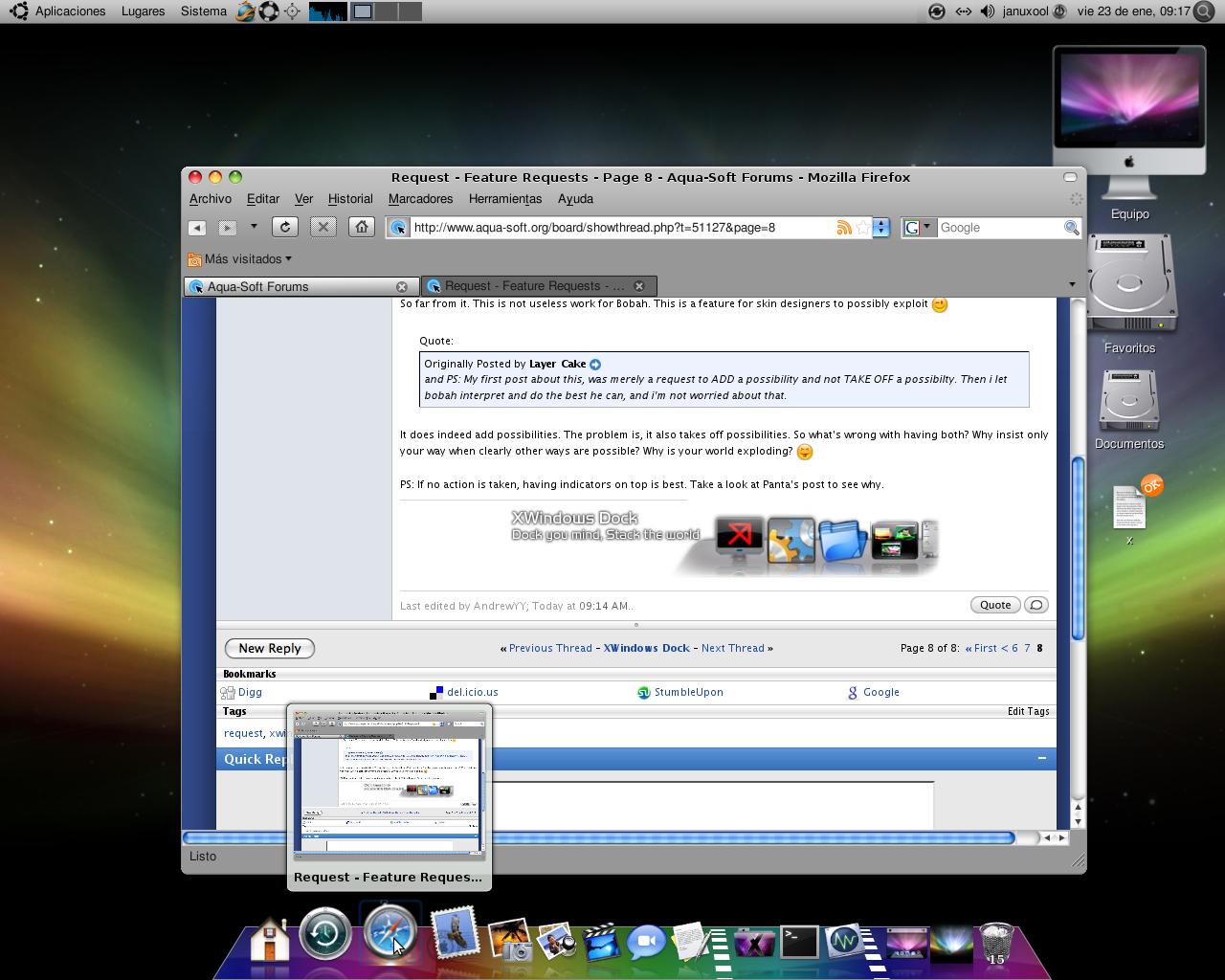
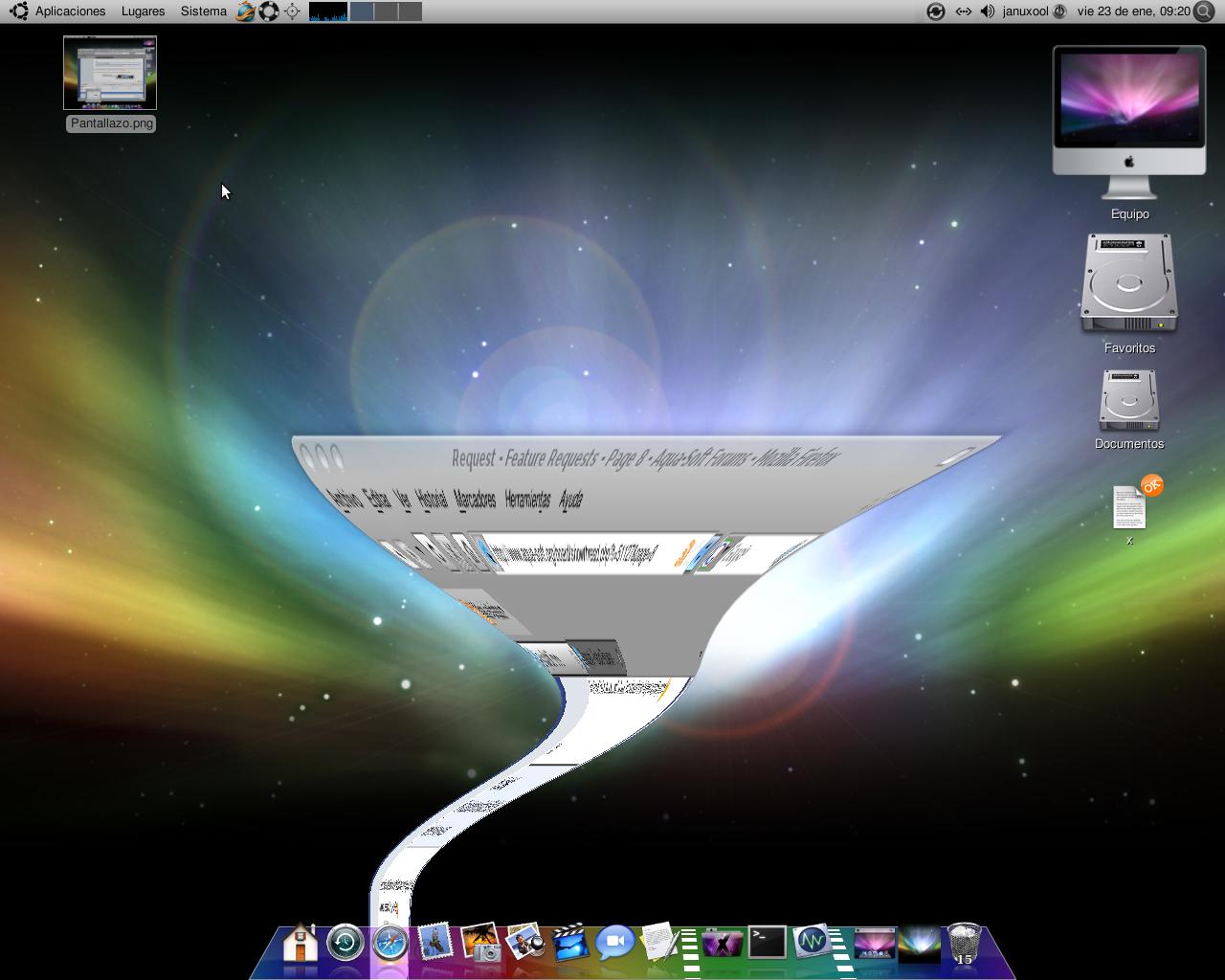
@Layer Cake, AndrewYY: I've moved the whole contents of tour discussion to the off-topic thread...
Layer Cake, I'll not argue with you; instead, consider yourself officially warned! Next time I'll report you to the administration proposing your suspension!! :slant:
Panta.