
shlog: window shutdown and logoff apps

Updated to version 1.1

Hello,

Shutoff is a windows shutdown/logoff util.

Why another shutdown/logoff util?

First, windows default shutdown/dialog box is plain ugly and modifying them require reshack. Even with reshack, the box is still limited to bitmap mod and lacks transparency feature. can't stand the square logoff/shutdown in XP.

And I have not found a good enough logoff and shutdown program replacement. I only know three ones available: shedko shutdown, iShut, and Gehrunnerjunge. Shedko shutdown is over complicated and huge: 1.1 MB, hooking system call. iShut lacks logoff functionality and skinning is limited to background only. Gehrunnerjunge 2.0 is the best one among the three but 1) it lacks png support 2) it still uses dialog box, and 3) it has no screen dimming.

Come shutoff, a window logoff and shutdown util.

Features:

- skinnable (and dead easy)

- png support (e.g. shadow box, transparency etc...)

- fully customizable dialog, can be any shape and size

- fully customizable buttons, can be any shape and size

- unzip and run, no installation

- screen dimmer (look into the ini files for dimmer setting suiting your taste)

- small size (only ~300K)

See the screenshot.

Report bug below.

If you like the program, do not forget to vote for this :) (and if you don't like, do forget to vote)

--------------------------------------------------

Update: the attached file has been updated on 11/05/2008

Current version :1.05

Change log:

- program name changed to shutoff

- dimmer animation (really cool)

- add suspend/hibernate actions

- support arbitrary number of buttons

Update: the attached file has been updated on 11/08/2008

Current version :1.1

Change log:

- added fading in and out for the dialog box

- now you can click anywhere except the buttons to close (very convenient!)
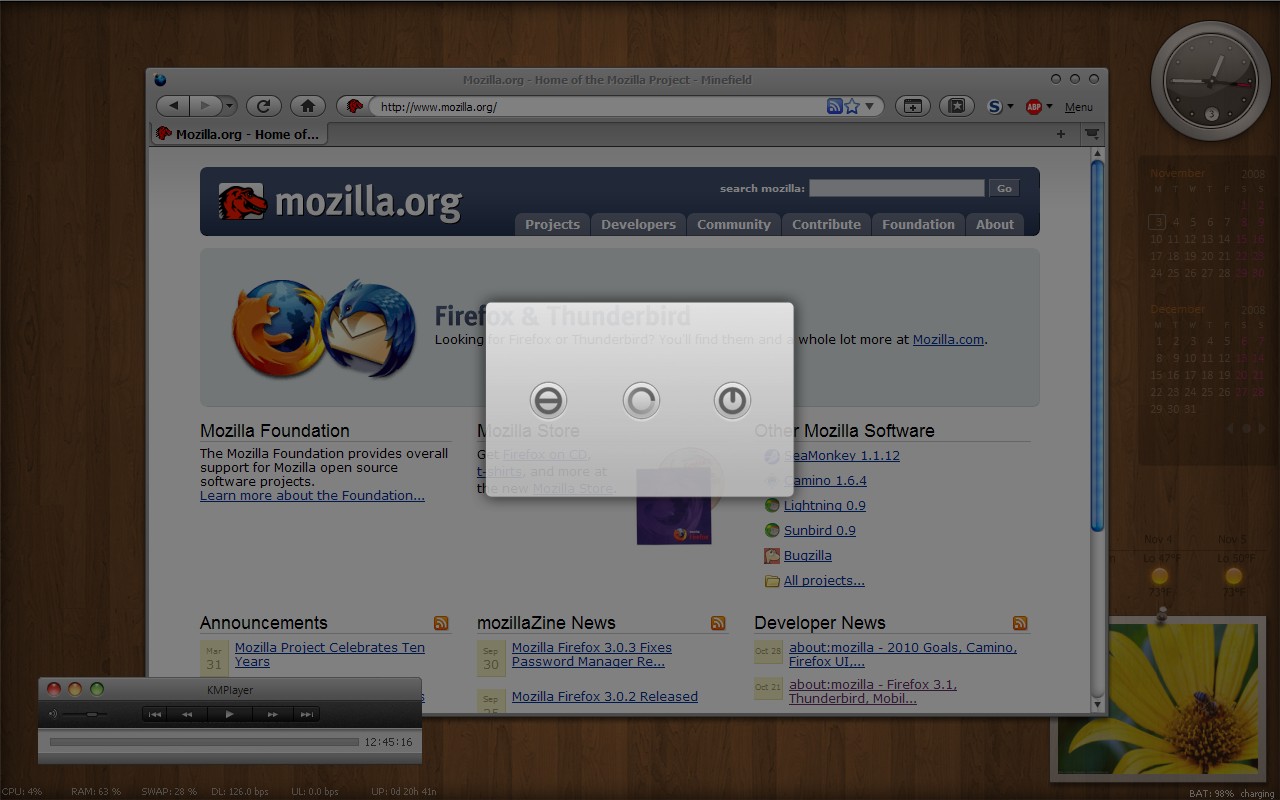
post-90205-1225740252_thumb.jpg

shutoff.zip

screenshot.jpg
screenshot.jpg

Attachment: shutoff.zip

#513397

Well, it looks nice, I didn't test the functionality, though I'm sure it works fine.

However, it wasn't quite centered, and clicking to move it also moved the bg.

Apart from that, very nice :)

#513401

It seems to be a nice little prog!

But... you forgot to include 'Close' buttons for default skin. ;)

#513402

However, it wasn't quite centered

--> that can be changed easily in the setup file. Just adjust the coordinate in the ini file. The dialog can be placed anywhere, not just center, for maximum flexibility.

and clicking to move it also moved the bg.

---> thanks. never check that. I can just disable moving. Who want to move the logoff dialog box around ? :)

#513422

It seems to be a nice little prog!

But... you forgot to include 'Close' buttons for default skin. ;)

You can enable or disable close button by setting ShoeCloseButton=1 or 0 in the ini file. Personally, I just like to use Escape to quit and have no close button for aesthetic reason.

#513423

How do I go about replacing log off with Stand by instead?

PS: Nice app

#513425

How do I go about replacing log off with Stand by instead?

PS: Nice app

Now, I have include suspend (standby) and hibernate function for action. Use Action1=suspend or Action1=hibernate. You can include more buttons for suspend and hibernate if you like. Make sure to change the number of button in the ini file to correct number (and close button must always the last one).

Download the updated prog in the next post.

#513429

Update:

- disabled window moving

- added suspend/hibernate

- enabled the capability of including more buttons in the ini file

shlog.zip

Attachment: shlog.zip

#513430

thanks jeffz!

#513440

wow. great util man.

especially darkening the bg is very good. now we need some more skins :D

#513443

It's cool. But it'll be better if you add text for each button ;) thanks

#513444

It's cool. But it'll be better if you add text for each button ;) thanks

i agree but it can be done with skin editing. i mean writing shut/restart/logoff on skin with an image editor ;)

as a suggestion you can add timer. just an quick idea ;)

#513454

i agree but it can be done with skin editing. i mean writing shut/restart/logoff on skin with an image editor ;)

as a suggestion you can add timer. just an quick idea ;)

Yeah, I thought about including text before but then realize that the text can be incorporated into the images. That way, you can have text shadow, text glowing on over, text change on over, text disappearing etc... as well!

If the text does not change, one even doesn't need to include it into the button images; the text can be on the dialog box image.

ArchDevil: I don't know why anyone would like a timer. Either you click a button in few second or quit. The default window logoff doesn't have timer as well. But the timer could be a neat feature for those wants it. Btw, timer could be useful when the app is used as an app launcher (the buttons can have custom commands).

#513499

ArchDevil: I don't know why anyone would like a timer. Either you click a button in few second or quit. The default window logoff doesn't have timer as well. But the timer could be a neat feature for those wants it. Btw, timer could be useful when the app is used as an app launcher (the buttons can have custom commands).

I vaguely recall to have seen this timer in Mac OS X reboot dialog. Or was it while installing Mac OS X?

#513530

I vaguely recall to have seen this timer in Mac OS X reboot dialog. Or was it while installing Mac OS X?

This is how the different dialogs look like.

Choose Action (appears if you press the power button)

960e2787f90e9f7212de6943cc3ea74e.png

Shutdown Dialog (with timer)

74d9b5d7d8e5d21a04e00db8fe32aaf6.png

Restart Dialog (with timer)

06b3ae3e7b8757015c3f235b4b675bc7.png

Log Out Dialog (with timer)

eca172a9cd39b45952f113ad1713c61b.png

#513534

@schmrom:

Sorry to be a little off-topic, but, do you know some app to do screencaps in Mac OS X? Something like Fraps (but Fraps is for Windows only, so... :)) Edit: ok, not exactly like fraps, I mean, it should capture all the screen (or some region of the screen) not just video / opengl surfaces.

#513536

@schmrom:

Sorry to be a little off-topic, but, do you know some app to do screencaps in Mac OS X? Something like Fraps (but Fraps is for Windows only, so... :)) Edit: ok, not exactly like fraps, I mean, it should capture all the screen (or some region of the screen) not just video / opengl surfaces.

Images

Hole screen Command + Shift + 3

Choose area Command + Shift + 4

Window Press Command + Shift + 4, then press Space

Video

ScreenFlow, is not freeware costs 100$

#513537

schmrom:

thanks for screenshot.

Coding a timer is not difficult but I wonder if anyone ever uses it. Have you actually ever let the timer run out? (unless during automated setup as matonga points out). Since this app is launched by users (likely from dock or desktop shortcut), the user knows exactly what he/she wants and just click the button right away.

Trying to figure out the util of a timer here.

#513605

I haven't test the app with vista. Anyone who has tried this on vista please report.

Thx.

#513606

Can admin change the thread title to " shutoff: window shutdown + logoff app"?

I haven't figured out how to change the thread title.

thx

#513607

I'm on vista, working fine.

I thought the emerge desktop logoff window was ugly, so I replaced it with this :3

#513608

nice! thank you very much!!!

#513611

schmrom:

thanks for screenshot.

Coding a timer is not difficult but I wonder if anyone ever uses it. Have you actually ever let the timer run out? (unless during automated setup as matonga points out). Since this app is launched by users (likely from dock or desktop shortcut), the user knows exactly what he/she wants and just click the button right away.

Trying to figure out the util of a timer here.

Thats right, I never used it until now ;)

#513615

Can admin change the thread title to " shutoff: window shutdown + logoff app"?

I haven't figured out how to change the thread title.

thx

You can do it yourself.

Edit the very first post of the thread, and change it's title :D

#513621

You can do it yourself.

Edit the very first post of the thread, and change it's title :D

I did change the title of the first post but the title of the thread doesn't change :(

#513639