Digital Clock Docklet for Object Dock

A simple digital clock docklet & stopwatch for ObjectDock

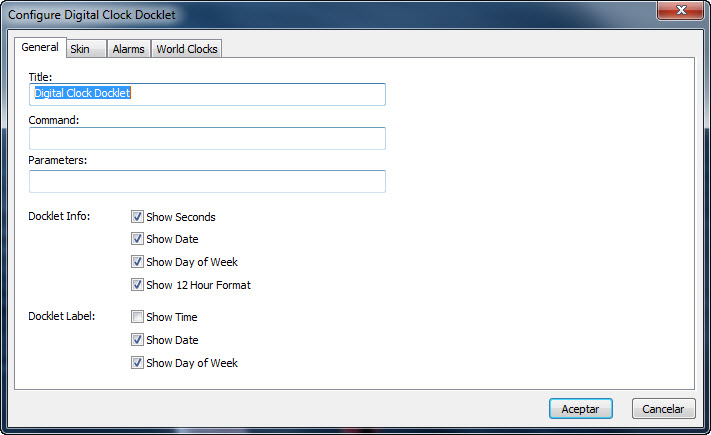
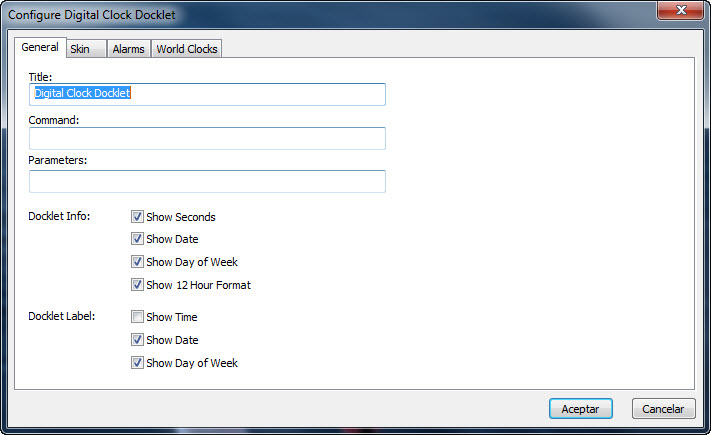
You may configure the docklet to optionally show:

- Show/hide Seconds

- Show/hide Current Date (use the Windows locale)

- Show/hide Current Day of Week (uses the Windows locale)

- Use 12/24 Hour format for time display

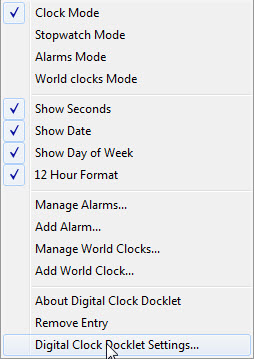
The previous options may also be set directly from the left-button context menu.

The docklet is still under development, it does not have a lot of functionallity yet. I have thought about adding support for alarms or a stopwatch.

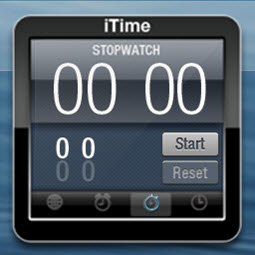
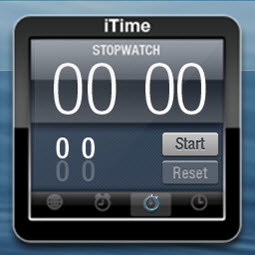
The Docklet supports stopwatch mode. Clicking on the stopwatch icon toggles stopwatch mode and lets start/pause/stop & reset the counter.

It is possible to start the counter and return to clock mode, the count will continue in the background.

Updates:

09/19/2008

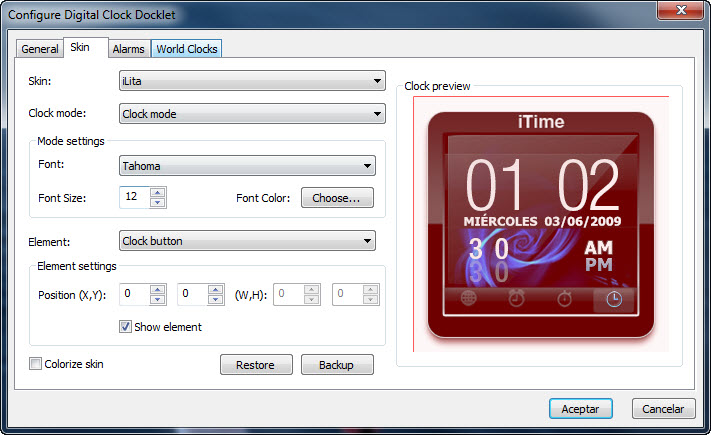
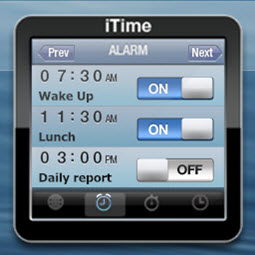
+ Added options to configure font, color & size of text to support an upcoming skin by Ghostwalker (take a look at the preview).

+ Fixed :ome configuration dialog bugs that prevented to swith the skin.

Major update:

04/27/2009:

+ A new version of this docklet is available. The new version includes support for easier and more complete skinning, letting you configure the in-docklet position and region for the elements of the clock (digits, buttons, hot-spots, etc.) as well for the stopwatch. It also lets you backup & restore skin settings for later reuse or sharing.

TO-DO:

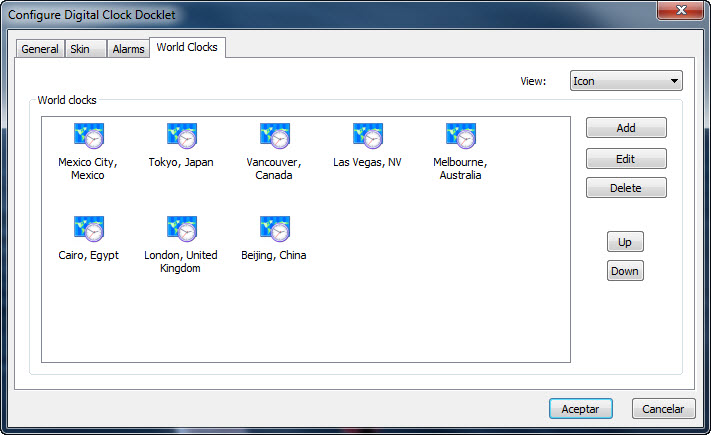
- Multi-time zone support. Done: Still needs refining and thorough testing

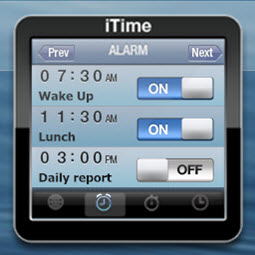
- Multi-alarm support. Done: Still needs refining and thorough testing

- Full support for upcomig Ghostwalker's iPhone skin. Done: Skin might still change a bit.

Update 05/24/2009:

+ Meged digits sets on a single image, merged background on a single image.

+ Modified the mode switching code to provide faster update times.

+ Added even/odd highlights to alarms & world clock modes in order to provide visual feedback while scrolling among configured alarms & clocks.

Update 05/26/2009:

+ Modified alarms configuration dialog to support introducing alarms when 24 hour format is set.

+ Modified the skins settings tab to include a clock mode selector. Hopefully this will make it easier for skinners to understand what elements they are working with.

Update 05/29/209:

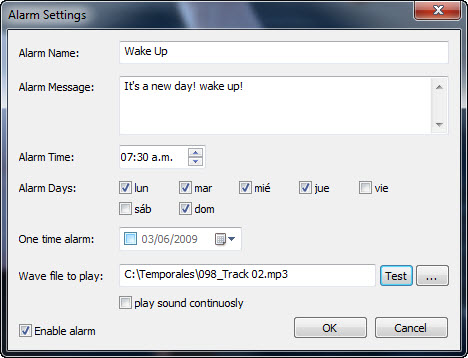
+ Added support for playing MP3 & WAV files when an alarm is fired. Two additional alarms-related options where incorporated: Play media file continuously when the reminder is shown and keep reminders windows on top. (I have conducted very few testing with this... many bugs may be present)

+ On the skin settings tab the preview will correspond to the currently selectd clock mode in the docklet.

+ Incorporated latest Ghostwalker's skin (as of today of course).

+ Added options to add alarms & world clock directly from the docklet context menu.

Update 05/29/209 (daytime ;) ):

+ Fixed some bugs related to the sound player/reminders. It now should work better when multiple alarms are fired.

Update 05/29/2009 (night - again ;) ):

+ Added code to check current locale settings to disable 12 hour format option when there are no AM/PM indicators available.

Update 05/31/2009:

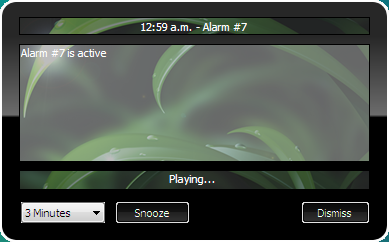
+ Implemented snooze functionallity for Alarm reminders.

+ Added options to change clock mode via the context menu.

+ Implemented double-click for alarms/world clocks lists in the configuration dialogs. TO-DO: Implement Enter/delete keyboard functionallity.

Update 06/02/2009:

+ Implemented Insert/Enter/Delete for alarms/world clocks lists in the configuration dialogs. Select an Item an press the ENTER key to edit it or the DEL key to delete it. Pressing INSert key adds a new alarm/world clock.

+ Added requested Manage Alarms/World clocks menu items to the context menu.

+ Added option to remove the docklet from the context menu.

+ Reorganized the menu items to facilitate its usage.

Update 06/03/2009:

+ Reorganized configuration dialog to accomodate lower resolution screens.

+ Modified world clock date format to respond to general settings options (Show date/show DoW).

Update 06/06/2009:

+ Added an option to delete all saved skin, alarms & world clocks configuration files upon docklet deletion.

Update 06/11/2009:

+ Added basic skin support for alarms reminders. Skin made by myself (it really sucks).

+ Fixed few assorted minor bugs.

Update 06/27/2009:

+ Added support for per-pixel alpha skins (Modified previous skin by adding alpha channel effects).

Update 02/28/2010:

+ Code optimizations and bug fixes. Added date format so you can configure it as needed.

Update 03/26/2010:

+ Some bug fixes here and there, fixed worldclock to use updated wheaterchannel web service.

Note on MP3/WAV support: For now I decided to go with MCI API for sound playback... I'll wait for your feedback on stability and availability. BTW, I recently found I was able to select MP4 & AVI files.

Note: Snapshots are a couple of revisions outdated, I'll update them shortly.

You /ay download it from Digital Clock Ver.2

Latest Alpha release v.0.2.0.5b attached to this post.

Please give it a try and send me your feedback & suggestions.

post-79521-1244052681.jpg

post-79521-1244052688.jpg

post-79521-1244052699.jpg

post-79521-1244052708.jpg

post-79521-1244052716_thumb.jpg

post-79521-1244052730_thumb.jpg

post-79521-1244052743_thumb.jpg

post-79521-1244052756_thumb.jpg

post-79521-1244052772_thumb.jpg

post-79521-1244052787_thumb.jpg

post-79521-1244786882_thumb.png

post-79521-126966135622_thumb.png

DigitalClock - 0.2.0.5b.zip

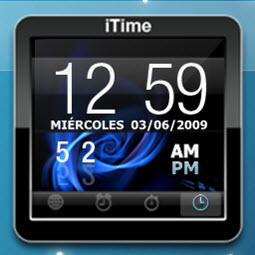
dcd_clock_mode.jpg
dcd_clock_mode.jpg
dcd_stopwatch_mode.jpg
dcd_alarms_mode.jpg
dcd_alarms_mode.jpg
dcd_worldclocks_mode.jpg
dcs_context_menu.jpg
dcd_general_settings.jpg
dcd_skin_settings.jpg
dcd_alarms_settings.jpg
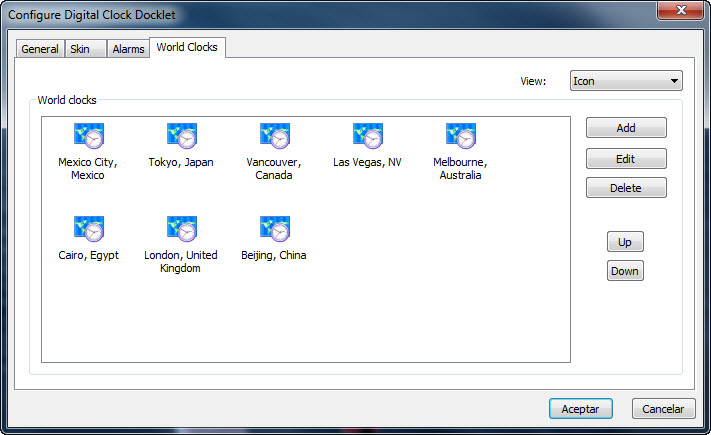
dcs_worldclocks_settings.jpg
dcd_alarm.jpg
dcd_alarm.jpg
dcd_reminder.png
dcd_reminder.png
dcd-worldclock-settings.png

Attachment: DigitalClock - 0.2.0.5b.zip

#503865

Downloaded it and it shows the docklet in my dock but the time does not show up in it. I am using XP if that helps any.

#503912

I did not have the time to test it thoroughly under XP... next week I will take a look on it.

Edit: I have faced this issue here on vista too, but clossing/reopening ObjectDock seems to fix it... as I said, next week I will further debug it.

Downloaded it and it shows the docklet in my dock but the time does not show up in it. I am using XP if that helps any.

Edit: I have done some testing under vista and found a bug there... unfortunaley I have still not nailed it. What I have found is that the behaviour you are describing is present in vista too... I have been able to reproduce it only when starting OD/OD+ automatically when windows session starts up, since my OD is configured to open manually I did not noticed that situation before, if OD is closed/re-opened then the docklet works fine.

#504011

working better this time. Still had to refresh OD (no big deal). The only other thing is that i can not change my title on mouse over. I went into the options and changed it and its still the stock title.

Nice work.

#504126

That looks very neat.

(Haven't tried it, I have too many clocks anyway <___<)

#504146

Still trying to solve the OD refresh issue...

working better this time. Still had to refresh OD (no big deal). The only other thing is that i can not change my title on mouse over. I went into the options and changed it and its still the stock title.

Nice work.

Now on the title issue, that parameter is only meant to be shown while the docklet is being setup... after that the current date & time will be shown.

Would you like me to change that? If so, what would be the expected behaviour?

#504176

Well i have it set up and have even refreshed OD and my title says "Docklets Digitalclock Icon" where can i go to change this.

I personally think it would be better to show the date rather then the time.

Also is there any way to link it so it opens up windows calendar when clicked on?

Still like it though.

Thanks,

MF

#504216

I am currently trying to solve the problem with the dock not loading at startup.

I believe you have downloaded an intermidiate version I uploaded in order to test... I will try to have it fixed by weekend. The final version will have an option at the configuration dialog to choose to show the time, date or both.

On the other hand, the docklet already supports that, I have inclided instructions on how to configure the Command & parameters to to exactly that.

Just click & hold the left button on the icon for a couple of seconds and it will run whatever command & parameter you have configured.

BTW: Thank you for helping me debug the docklet!

Edit: I have just changed the normal behavior of the command spawning to a simple click on the docklet... the version I will upload next weekend will work that way.

#504242

I have no problem helping debug. Thanks to you for releasing such a nice docklet. I will be looking for that new updated release.

#504248

Unfortunately, I can't download it. Can you please upload it anywhere else, like ZShare.net?

#504260

I did an small update yesterday,

Although the autostar bug still prevails, it now supports calling the configured command & parameters via a single click on the docklet (the readme includes instructions on how to configure them to open the data/time applet in vista).

Additionally, I added some config options to define the label of the docklet. It now supports selecting either date, day of week or time (or a combination of them) or just the "Title" by deselecting the previous options.

Give it a try...

I have no problem helping debug. Thanks to you for releasing such a nice docklet. I will be looking for that new updated release.

#504263

Done... http://www.zshare.net/download/1457412335556a63/

Unfortunately, I can't download it. Can you please upload it anywhere else, like ZShare.net?

#504264

Done... http://www.zshare.net/download/1457412335556a63/

Thank you! I just tried it with RocketDock and it works perfectly!

#504271

I have nailed the OD's statup bug... I think you should download the latest version since it includes some additions to control the label of the clock.

#504301

that works so much better.

Now do you or anyone know the folder i can find the .exe to open up windows Date Time window? I would like to link that to this docklet.

Works so much smoother now. Thanks for this. Nice work.

Thanks,

MF

#504323

have you tried this:

Command: C:WindowsSystem32Rundll32.exe

Parameters: shell32.dll,Control_RunDLL timedate.cpl

#504336

thanks again.

#504347

@Ghostwalker

Thanks for a great skin. What about a matching skin for the up-time docklet?

#509813

Thanks for a great skin. What about a matching skin for the up-time docklet?

Sure let me find the link to your docklet I don't have that one.

#509815

If and when you have time make the docklet less 'digital' if you know what i mean. Tat will be greatly appreciated and more easily readable.

#511166

I am afraid I do not quite got you... but maybe a skin is what you are looking for.. but again... it's maybe not me the one to ask for it... since I can't do 2+2 with CG.

If and when you have time make the docklet less 'digital' if you know what i mean. Tat will be greatly appreciated and more easily readable.

#511180

Wonderful docklet, I'd like to know if you plan to release some skins. Could you also make the popping up label more customizable, kind of ddd dd-mm-yy, hh:mm:ss syntax support? Are you going also to write a calendar only docklet?

#526457

nice, ill donwload as soon as my parents decide when my punishment it over and give my laptop back, this desktop sucks!

#526466

I'm afraid the skin stuff is out of my reach, I am just a programmer... my skins suck! On the other hand, I surely can adjust the docklet label as you are suggesting.

Wonderful docklet, I'd like to know if you plan to release some skins. Could you also make the popping up label more customizable, kind of ddd dd-mm-yy, hh:mm:ss syntax support? Are you going also to write a calendar only docklet?

#526537

Maybe do a skin contest? ;)

#526538