 Aqua-Soft Forums
Mouse gesture , PLEASE SIWU!!! PLEASE!!! MOUSE GESTURE!!! I BEG YA!! :baby: :bow:
[Preview] Iex Comments/bugs/suggestions
I saw last month the true expose on a mac.
If you had seen it too, you would cry now.
iEx is great but seriously, it is impossible to have something like Expose.
Can't wait Panther on my G5!!!! (15 days left...)
Originally posted by Heinzoliger@Oct 9 2003, 04:56 PMI saw last month the true expose on a mac.
If you had seen it too, you would cry now.
iEx is great but seriously, it is impossible to have something like Expose.
Can't wait Panther on my G5!!!! (15 days left...)
You are absolutely right.
For various reason:
- Whistler graphic engine doesn't to make such resizes
- Whistler graphic engine isn't as smooth as Panther
- we don't know the algorithm that organizes the windows
I love this program - it's exaclty what me desktop needs 
I do have a slight problem with it's preformance on my machine, though - whenever I hit the letter "p", it acts as a hotkey and does exactly what, say, f9 does.
As you can imagine, a little bit of an annoyance while trying to type. Any suggestions regarding why something like this might occur?
edit: I reinstalled Iex and it seems to work fine now, must have been something I had done wrong while editing the ini file.
Hi,
iEx doesn't run on my machine. it cannot find the function "PrintWindow" in USER32.DLL (on Windows 2000)
what's wrong here?
Chris
Originally posted by Chris101@Nov 20 2003, 07:44 PMiEx doesn't run on my machine. it cannot find the function "PrintWindow" in USER32.DLL (on Windows 2000)
latest iEx works only on windows xp because PrintWindow is not included in older windows versions.
but if you think try to get a user32.dll from a windowsxp and overwrite your user32.dll (i think it won't work/it'll crash your system).
i'm sorry.
Ok i'm using Iex for 2 weeks now and there are some comments suggestions...
Comments
This app is very very good!! lol
i haven't seen the interest of the Thumbnail Selective... for me it just show the desktop, as the other option "Hide All" so maybe have i missed something about it 
Bugs
#with Winamp (i don't know if it's fixable, winamp seems to cause many troubles with the declaration of the window's class that are not fully supported by windows, this is the case with OD.
So in Winamp, i've set the classes:
Winamp EQ=0
Winamp PE=0
Winamp Video=0
So that the equalizer, the playlist editor do not appear in thumbs, but... they are not reduced by IEX when showing thumbs, they stay in background and accessible
#Just about the "Hide All", when i go for instance in the top right corner, it hide all the windows (nice) but if i hit ALT+TAB nothing is accessible!!!! (only IEX and Winamp) even if i got an explorer, notepad and myie2...
so maybe
Suggestions
Is it possible to implemente like in Panther the SCREEN SAVER options:
- Start screen saver
- Do not start screen saver (if you have a text to read and you don't move the mouse, screensaver will not start)
and the traditionnal:
can you make a IEX config interface??? but for me the INI is all right, the config tab will be for further versions
Anyway i wanted to THANK YOU very much cause your app rox!!! simply!!
et puis bon comme tu es francais je fais un pti 
cya
siwu and I are working out 1 last issue and then I can release this program which should help you out (it's the one marked "Coming soon"). :moon:
Is there any way to hide the Photoshop palettes when I view all windows using iEx?
Great work.
Using iSettings [latest], and have 11 Firefox windows open, along with one IE, Lotus Notes R5, Outlook Express, and an Explorer window. when I press F9, only 9 windows show-up, although I have 15 open.
The bigger problem, however, is that clicking on one window opens another, which means that the screenshots are not linking to the correct windows. I'm not sure if you already know about this problem, I'm sure you do, but I wanted to alert you. System specs available upon request.
why the crap do you have 11 firefox WINDOWS open, you could just have tabs
That isn't the point, I just wanted to point-out that the window images weren't correctly corresponding to the windows themselves.
As for why? I wanted to see what would happen, to be honest.
Hi, I love your program!!!!
I am using it and I should say that I can't do anything without it. Actually I am thinking about buying a Mac soon.
The thing that bugs me now is, sometimes it can only show 9 windows in a 3X3 layout. I think you will fix it on your next release.
Keep on doing the fantastic work!!!
P.S. in the screenshot attached, I actually have 12 active windows.
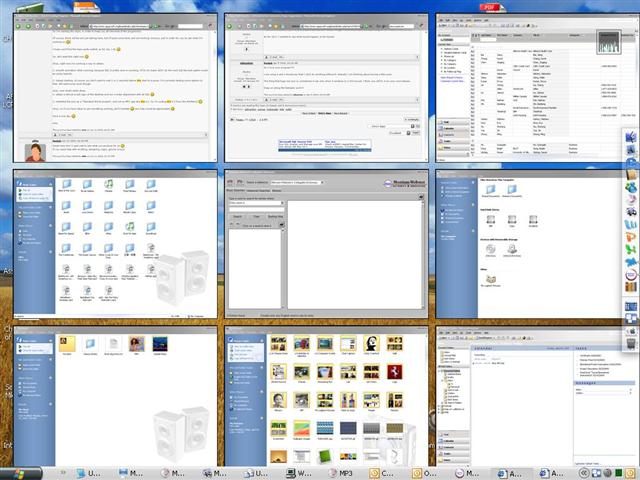
Originally posted by stryke3@Apr 4 2004, 05:26 PMThat isn't the point, I just wanted to point-out that the window images weren't correctly corresponding to the windows themselves.
As for why? I wanted to see what would happen, to be honest.
I have the exact same problem. Also, I tried to set it so all I have to do is click the middles-mouse button (the scroll wheel) to activate the functionality but that doesn't work. It would be more convenient for me to do that than throw my mouse up in the corner of the screen. Especially since I accidently set it off all the time.
love ur idea...its really great...however.......
when i open Opera browser, together with other things like explorer and email, after i showed all the thumbnail and choose the window that i want, it show the border of that window (like the FIle Edit View buttons etc) but the content of the opera browser (which is webpage), after that i realise actually its only the opera APPEAR to be on top, if i scroll the window, the content would come back......wondering wat can be done.........
another program is the photoshop, when in the all thumbnail view, the tool panes at the left and right doesnt go to thumbnail but still in the normal view....yap so far i've encountered these problems....
cheers