Winexpos�

The more windows open, the more WinExposé takes to show up. The solution is to have a screenshots caché, but I haven't time to implement it yet. :(

Winexpose is one of the hottest shit around, regardin the increase in workflow AND eye-candy. To be quiet honest, the only thing that prevents me from using it, is the missing img-cache. To have it loading my windows once is fair, to wait 4 secs everytime disturbing. And yes, I am one of those freaks having 10 windows open at the same time. :)

If you implement the cache, I'll make an german translation for you, or do you have one already? :)
#525941

Signed.

#526152

Can't wait for screenshots cache to be implemented. Then it will finally be practically usable.

#526221

Hey Matias,

included Dutch (nederlands) language file beneath.

great app man!

Nederlands.zip

Attachment: Nederlands.zip

#526311

Hey Matias,

Great job on this app. And your endurance in keeping it maintained...!!! That's what I call Commitment!!!

I really think your app is on par with simulating the real deal. But am looking forward to further improvement.

Also, it doesn't work very well with MySpaces which is the other great functionality that's been sorely needed on Windows. Can you coordinate with that developer to make the two work together better. Just a request... Thanks.

#526932

Hey, I just wanted to say, you are a pure app genius never has my Windows Vista been so close to being a twin to the Mac.

It works almost perfectly on my system. *applauds*

(Btw, first post. w00t!)

#526969

Incredible app! but I've identified a problem.

The application can be killed by an alt+F4 key combo.

I usually clear my opened windows with a alt+F4 key combo and if you press it again once all the windows are cleared, Winexposé is killed.

Other tray based desktop apps (or other desktop assistance apps) are not killed with a alt+F4 combo.

Great job and I and many more look forward to further revisions (although this current revision is really excellent).

... and one other request, have a setting to hide the tray icon :)

#527169

Incredible app! but I've identified a problem.

The application can be killed by an alt+F4 key combo.

I usually clear my opened windows with a alt+F4 key combo and if you press it again once all the windows are cleared, Winexposé is killed.

Other tray based desktop apps (or other desktop assistance apps) are not killed with a alt+F4 combo.

Great job and I and many more look forward to further revisions (although this current revision is really excellent).

... and one other request, have a setting to hide the tray icon :)

1. To hide tray icon:

Right click windows task bar time, choose Properties, last option says "Hide inactive icons", make sure it is checked, click the button "Customize..." or something like that (to the right of the checkbox), search for WinExpose in list, and choose "Hide always" for it.

2. Alt+F4 problem:

I see... I make WinExpose window to be always out of screen, but still visible, so DirectX and OpenGL acceleration will always be available instantly. I think I can make it to ignore Alt+F4 when it is not being shown, though. :)

#527213

I deactivated Windows method of hiding tray icons as that there are many times that Windows does not handle the hiding of icons correctly (whether it is a problem with MS or a problem with how the program was coded. There are apps that when the tray icon is hidden by Windows, on subsequent restarts of the OS that the tray app is visible again).

As is, I try to run a minimal system as possible but there are some programs that function really well with a tray icon and others could do without it.

This program could essentially operate without a tray icon (just like the program Katmouse, in which the tray icon can be deactivated once all the settings are made, but the settings window can be called up by running the program again while it is already running).

If you could (create a setting to hide the icons), that would be great!

Great programming!

#527285

agree. hiding tray icon + implementing image cache.

thats basically everything it desires for this little prog to go 1.0. (at least for me :)

#527457

Yes, the implementation of image cache would make this application from a nice gadget to something extremely useful and a part of my workflow. I hope this motivates you to build in this functionality! :)

#527647

This latest version works great. Except that when I launch an application with elevated rights (right click -> run as admin) WinExposé won't display that application window contents. I think it is somehow possible, as the taskbar can show thumbnails of every window. As far as I know there is some API exposed to use those thumbnail, it is like getting and address to a bitmap representing the window "canvas", then you can resize it the way you want. By doing that you will be able to display OpenGL and DirectX window contents as well.

#527749

@rholdorf:

Yeah, I guess you mean the DWM API. Download Insentinet's Switcher instead, with proper customization it can almost match Mac OS X's Exposé (and behaves like it).

#527757

now, that's odd.

Have you've given up production on winexpose?

#527784

Not exactly like that. Let's see:

- WinExposé allows Windows XP users to have a freeware Exposé emulation. Insentinet's Switcher can't run on Windows XP because it needs DWM. TopDesk can run under XP but it's not freeware.

- Switcher allows Windows Vista users to have a freeware Exposé-like thing, taking advantage of the new DWM API.

I think making WinExposé to support DWM is just useless, because there's already a freeware app which does it, and it's pretty stable (yes, I mean Switcher).

#527814

Hi, long time no see. Here's the updated german language file.

Deutsch.zip

Attachment: Deutsch.zip

#528082

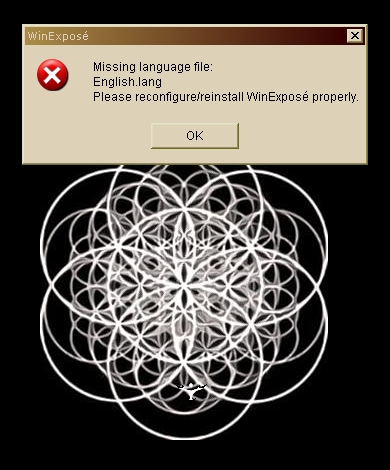
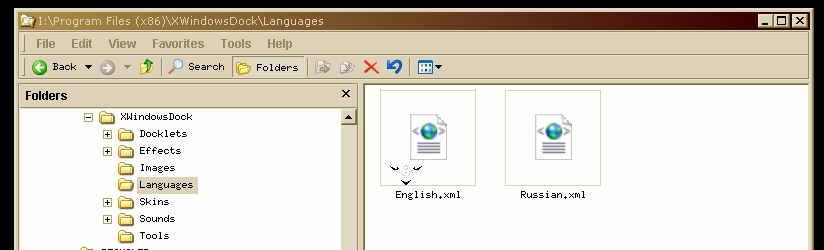
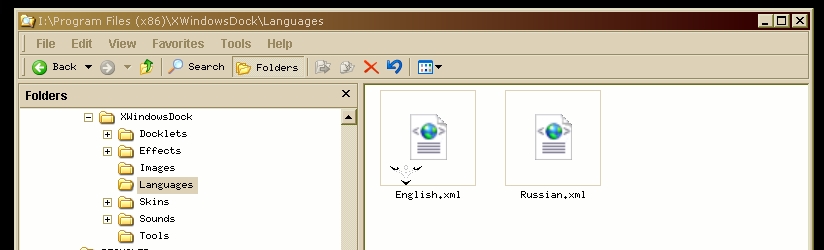
Hi. I like WinExpose. I have the latest version running on Win XP Pro x64. Everytime WinExpose starts, or after applying settings, I receive the error message: Missing language file: english.lang Please reconfigure/reinstall WinExpose properly. I have reconfigured / reinstalled it a few times, always have the enlish language file english.xml in the language folder. It still gives the message.

Nonetheless, WinExpose works fine, a professional app. I would like to disable this message, though.

Is there anyone else with this message occurrence?

Is there a way to disable the message by either finding the right language file or editing some program files?

post-101463-1243241023_thumb.jpg

post-101463-1243241009_thumb.jpg

Screenshot_20090524_1.jpg
Screenshot_20090524_2.jpg

#528088

This is a problem with WinExpose or with XWindows Dock? Your screenshots really confuse me.

The file missing is English.lang, not English.xml. WinExpose doesn't use XWindows Dock language files at all, indeed it is probably incompatible with them too.

To install, proceed like this:

Download the zip file.

Extract Zip file contents into C:\Program Files (x86)\WinExpose (maybe you'll need admin rights to create the WinExpose folder and to install app there).

You'll see you now have a WinExpose.exe file and lots of .lang files in same folder, with English.lang among them.

Did this help?

#528237

Great app, Thanks for your great effort! :)

Things to consider adding..

VLC Support, maybe a live video feed when playing a movie. might be too hard to do but would be a cool feature. Also if vlc is playing and you activate expose it detect the program and leaves it in the background.

Drag and Drop files.

Dragging a file from desktop to a folder using with expose active.

#528727

Are Folder Windows supposed to show up on Winexpose? because they aren't.

Screenshots; 1.Opened Windows 2.Winexpose Desktop

Is it also possible to make it so that you still see your main desktop even when you show Winexpose?

Just wondering. Very awesome program though. I've been looking for this forever. X D

#529099

Excelente aplicación!

Sólo un pequeño problema, uso Vista Home Basic on I Gb de RAM y me parece que el programa corre muy lento aún cuándo estoy en alto rendimiento.. será mi computadora o un pequeño bug?

#529103

Can't wait for screenshots cache to be implemented. Then it will finally be practically usable.

+1

is there any mentionable progress on that?

#529398

It's been quite for a while. But matonga usually returns when you don't expect it. Let's hope for the best

#530032

Just to tell my opinion,

sorry for Matonga, but i prefer DExpose2 which is faster to activate, and windows thumbnails are exposed always in the same place and free too.

( http://devrexster.googlepages.com/dexpose2 )

#530085

oh great matonga,

ye greatness shall overcome. hold unto winexpose, hold unto thee!

in short: any progress? :)

#530456