PSManip 0.1 Preview – Lets you make your Photoshop CS2 look like on Mac

Ok Guys, this is new for me.

The other day, I started working on a program, which let my Photoshop CS2 look like on Mac, you know, without this ugly grey background thingie.

Things which always barred me from macifying Photoshop:

  • The reserved taskbar space. Windows being pushed back from the edge of the screen (May only occur on systems with taskbar on top)

  • The minimum window height. Photoshop lets you only resize it vertically to a height of 126px, which still shows the ugly background. Yuck.

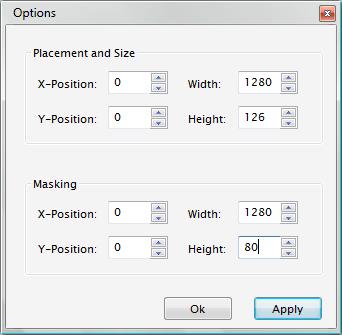
PSManip lets you manipulate the Position, Size and visible Area of Photoshop CS2's main Window.

The App does neither alter the Registry nor impregnates your dog.

Just unzip the folder and start psmanip.exe. The Prog does not (yet?) feature a sophisticated GUI, it sits in the Systemtray where it awaits your orders.

Right-click it to access its functions or use the hotkeys.

Update: I'm working on an improved version which will (hopefully) feature a more obvious way to handle the masking.

I plan on adding additional features, like:

- Auto-Re-Manipulating ADDED

- GUI aided Masking and Sizing

- Forcing yzShadow to accept masked window as new window size (or own shadow solution)

- Individual transpareny for Palettes ADDED (well, sort of)

- Hiding annoying dialogs

- Hiding the ToolWindow

This is my first attempt on coding something, so please bare with me and report any bugs you may find.

PSManip 0.3 is out :)

+AutoManip the Photoshop window

+Click on a Palette and hit Win+T to make it Transparent. Win+Z to revert.

+Small Bugfixes

Download here:

Download ZIP (197 KB)

Pictures:

Menu

Before PSManip

After PSManip

So, what do you think?

#402880

Sounds and looks promising.... downloading now !!

Will let you know soon about my experience... :)

#402882

an interesting start. had to play with the numbers a bit to figure out what does what. here's my first impressions/critiques: if i minimize then restore ps, i have to re-manipulate. as long as the your prog is open, it should remember the settings. also, 126px is too big to have as the minimum height. i can still see about 20px of background. get rid of the 126px barrier.

otherwise, off to a nice start, thx!

(btw, me, personally, i don't like the way ps is handled on the mac. i prefer the pc way. but i'm sure there are those who disagree.)

#402888

Thanks for testing, shmengie :)

126px is the minimum size for photoshop, it does not allow to be resized any smaller

The minimum window height. Photoshop lets you only resize it vertically to a height of 126px, which still shows the ugly background. Yuck.

Because of this, I need to mask out the remaining part :)

if i minimize then restore ps, i have to re-manipulate. as long as the your prog is open, it should remember the settings

Thought about adding that, too. I think I'll make it optional.

#402891

Well... yeh, Sometimes I like the way PC PS works sometimes I just like the way it's on Mac.

As for program, as our dear puppy-pounder said (;).. just kidding).. it's a good start. Even I had to figure out playing out with numbers to get it done. If not permanent change, at least program should Detect and Auto manipulate PS window., as long as PSManip is running in background.

As far as Performance hit is concerned, your little utility remains stable at 5 mb mem usage, even while manipulating it goes up only by 200 kb max. So that sounds like good coding on your part. But I still feel that it should me much lesser for such nifty utility. I hope I'm not asking too much.

Overall it's a really good start, this has been a pending issue for long. :)

EDIT :

Following are the settings that worked for me

0,1600

0,126

0,1600

0,80

So basically, if you notice it properly... you have to just change the value that's 1600 in my post or 1280 in shmengie's post with WIDTH of your monitor resolution.

Leave 126 at is in Options dialogue and see if 80 or 82, whichever works with you. :)

#402892

sorry, i had misread your original post. i didn't realize that that was a limitation of ps. i thought it was you.

in case anyone else tries this, here's the settings that work for me:

0,1280

0,126

0,1280

0,80

woo hoo!

edit: oh yeah, now get it to work with y'z shadow...

#402893

yeah, I'm working on a way to force yzShadow to accept the remaining window as the new size of the window :)

Glad it works! :D *dances*

Oh, Btw: the Name is provisional, as is the Icon. Any Ideas?

#402894

maniPS? BGbGone? PhotoShade? CsYaLater?

edit: i for got to say: wow! this is your first coding attempt? pretty awesome!

#402896

Can't say I like any of those Names :P But hey, this is low priority ;)

This Prog is done via AutoHotKey, which provides unbelieveably rich and flexible possibilities.

It took me just an evening to work out the structure of what I wanted to do and compiling my first exe – But thank you anyway :)

I'm currently working on a way to auto-re-manipulate the window on any change that differs with the values from the ini, it's about 80% done.

Also on the To Do List:

- Force yzShadow to accept remaining Window as new Size (or provide own Shadow solution)

- Provide better visualization for entered values (eg. Frames being drawn)

- Add transparency Support for Palettes

- YACF – Yet Another Cool Feature :P

#402986

shmengie, if it's not too much, could you make a screenshot of your options, please ?

It would be really appreciate. :)

#402994

i'm not crazy about those names either. what dummy came up with those?!?

post-4735-1152581215_thumb.jpg

PSManip.jpg
PSManip.jpg

#403013

Hm, I didn't imagine there'd be some potential for possible confusion about the values, seems like I'll have to simplify things.

Problem is, Visual Styles with a 0px border tend to actually need more width than the current screen resolution (Can anyone confirm this?).

Samui 2.0 Safari substyle needs values like X=-4 and a width of like 1611px to fit my screen. Weird.

That being said, I don't want to automate the whole process of window placement, unless I can ensure the ideal placement of the window.

I could, however, add some "default" values for the User to choose from. I'll think about it.

Thank you guys for testing, it's mucho appreciated :)

Chazoul, what do you think about it?

#403084

Hey philou...good work matey!

#403094

Don't kick me, but does this work for Photoshop CS (not CS2) too?

#403114

Don't kick me, but does this work for Photoshop CS (not CS2) too?

it's a stand-alone app, and not an install. just try it.

#403138

No it doesn't. It checks the registry for 9.0, but does not yet display an error if it doesn't find the key, however, if you try to start photoshop via hotkey it'll alert a missing Photoshop.exe.

It does not work with Photoshop versions earlier than CS2, because this version introduced the ability to seperate Child windows from the parent window. Since CS does not allow that, masking out the window would render Photoshop useless, 'cause you won't be able to access you opened files anymore.

I'll add the registry check in a couple of minutes, and I'll update the first post (it's messy :P )

Edit: Added Registry Check, it now complains and exits if Photoshop CS2 is not installed on your system. (I might remove this, as I add more features that are not CS2 independent)

#403150

@philou

[german]... genau das hatte ich vermutet :(... Verdammt![/german]

So I have to upgrade... Sorry for the german, but it's better to swear in your own language :D

@shmengie

It's becourse I'm at work at the moment and can't test it!

#403153

d:bug, lmao XD You're right, but the english language offers all possible and impossible combinations of the word f*ck, it's just amazing :D

#403158

It isn't hiding the window back for me :(

EDIT: I'm using settings shmengie posted above. If you need anything else I can get it, my photoshop window just looks like the before picture in the first post. :S

#403165

Uh-Oh, first bug. :o

Okay, first, re-download the archive. Then do the following:

- Delete the old PSManip folder. I've used some new safe default settings, which are displayed when you're launching PSManip for the first time.

- Start Photoshop

- Start PSManip

- Apply the default values. Your Photoshop window now should've been moved to X=100 Y=100 with a width of 500 and a height of 200.

- The Mask hides everything outside its area, you'll notice that the mask width is equal to the window width per default. Now decrease the width about 50px (or the height) and Apply.

- PSManip should cut off a part on the right of the Photoshop window.

If it doesn't, I'll jump off the bridge.

Naah, okay I won't.

But you please do tell me what OS you're using (although I assume it's XP), Which Photoshop version (9.0 or 9.01) you're using, do you use some kind of window managing program or anything else that could interfere with PSManip in any way? :)

Oh boy, how I do hope it's fixed with new version :D

#403179

shmengie, thanks for the screen. Unfortunaly it doesn't work for me.

I don't worry about it, I'll take more time for it. ;)

#403186

*jumps off bridge*

#403188

btw, anyone notice that that screen is from vista? yeah, i'm cutting-edge...

#403191

BUT WAIT!! DON'T JUMP! We need you to fix it!! ;)

I did everything you said and it went ok until the decrease 50px and it flickerd the right side like it was trying to todo what you said above but it didn't hide it.

Here is my info..

Windows XP

1280x1024 resolution

Photoshop CS2 9.0 (Maybe I should update and try it?)

I'm running:

Avedesk

RKlauncher

Objectbar

WindowFX

That's about it..

If you need something else just ask ;)

EDIT: Oh and I shut all that stuff off and tried it and it still doesn't work..

EDIT EDIT: And when I set the mask width or height to 0 it hides the window completely. weird.

EDIT EDIT EDIT: I've updated photoshop and it didn't fix it :'(

#403192

My resolution : 1280 x 1024

Placement and size :

X-P: 100 - Width: 500

Y-P: 100 - Height: 200

Masking :

X-P: 0 - Width: 50

Y-P: 0 - Height: 200

Please tell me where I'm wrong ... :(

And I'm using PS CS2 too.

#403194