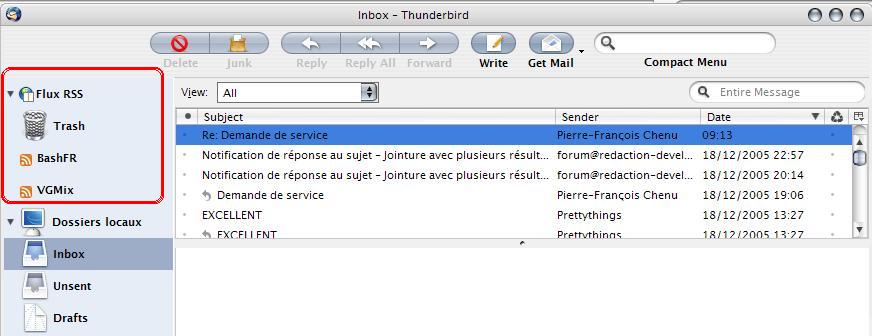
[release] Tiger Mail for Thunderbird 1.5+

wonderful work, i love it, been waiting long time for this, anyway, got few questions ...

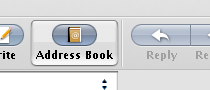
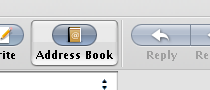
- how to remove the small gap between Delete & Junk or Reply& Reply All& Forward buttons u can see in the screenshot attached

- is there any way to change the font???

- is there any way to change the bottom of the window to look like it is in this screenie ... http://images.apple.com/macosx/features/ma...new20050412.jpg

#340925

how do i put in the search bar, also get rid of these white border lines. also the link to compact menu in your DA page dosnt work.

#340975

- how to remove the small gap between Delete & Junk or Reply& Reply All& Forward buttons u can see in the screenshot attachedhttp://images.apple.com/macosx/features/ma...new20050412.jpg
I believe the gaps are there because of the theme you're using. You can adjust the values by editing primaryToolbar.css in the theme file.

#340994

the only problems I have with this are:

The delete button has transparent space. Flexible spaces are much better for centering buttons.

I have no clue how to change the compact menu to look like the searchbar.

i can't figure out how to change the wording of "compact menu" to "search"

- how to remove the small gap between Delete & Junk or Reply& Reply All& Forward buttons u can see in the screenshot attached

All the above have been fixed in the latest version 1.5.5

- is there any way to change the font???

-> Use the following to change the font everywhere in the user interface—folder pane, message-list pane, menus, dialogs, toolbar buttons, etc.

/* Global UI font */

* { font-size: 11pt !important;

font-family: Verdana !important;

}

-> Instead of changing the font globally, throughout the user interface, you can change it for only specific elements.

/* Folder pane font */

#folderTree > treechildren::-moz-tree-cell-text {

font-size: 10pt !important;

font-family: Arial !important;

}

-> Use the following to change the font for all menus.

/* Menu font */

menu, menulist, menuitem {

font-family: Times New Roman !important;

font-size: 12pt !important;

}

- is there any way to change the bottom of the window to look like it is in this screenie ... http://images.apple.com/macosx/features/ma...new20050412.jpg
Unfortunately, Thunderbird is not designed to handle the extra functions for the 3 action buttons at the bottom of the folder pane, namely: add new mailbox, action, splitter handle. Hopefully extension developers out there can make an extension that can do this one day.

#341029

your:“Platinum“-bmp  up here!  Ok?    Thanks

LOL done. Platinum Aqua link updated at top of thread.

#341034

how do i put in the search bar, also get rid of these white border lines. also the link to compact menu in your DA page dosnt work.

See top of thread for updated search bar installation instructions. The link to compact menu is working. You need to right click (save as) to save from your browser.

#341038

i don't know why this mod just wasn't released along with the theme.. so here is the fully moded compact_tb.xpi, so it should display the searchbar, as well as say "search" along with it..

i'm getting a weird error though, where i can't uninstall the compact menu extension - it's ot showing up under my extensions list.. so i can't fully confirm that this works.. although, it should

#341041

Thanks! Be rated as a perfect work

#341043

thanks a lot for this. waiting for this..

#341049

really long awaited - looks good on the 1st glance - works even on the older builds like 1.02 - not fully - ok - the blue white stripes u don´t get rid of and s.o - so u really have to work on it - but the "old" applemail from magbi9 which i still usin cause it´s so easy to install on differnt machines and get a easy smile from all ur friends -

but nevertheless -great work

#341057

I'm OH so bad at using Mozilla apps and winrar.

Seriously, I'm clueless.

It would be simply terrific... wonderful. No, wait... AMAZING. If someone could attach a zip with the modified Compact Menu.

Thanks in advance.

#341108

I'm OH so bad at using Mozilla apps and winrar.

Seriously, I'm clueless.

It would be simply terrific... wonderful. No, wait... AMAZING. If someone could attach a zip with the modified Compact Menu.

Thanks in advance.

Look 5 posts above you. ;)

#341111

I'm OH so bad at using Mozilla apps and winrar.

Seriously, I'm clueless.

It would be simply terrific... wonderful. No, wait... AMAZING. If someone could attach a zip with the modified Compact Menu.

Thanks in advance.

'

oh holy wow

#341130

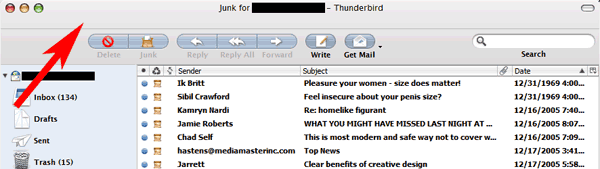
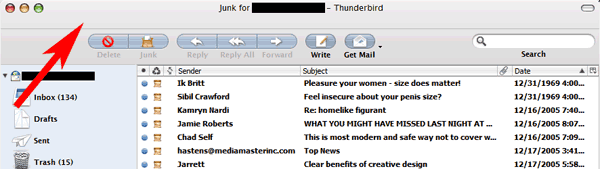
after activating the compact menu extension, the bar where the menu (file, edit, etc) resided still remains. any advice on how to remove it? (see red arrow pointing to the bar im talking about in the attachment.)

post-20069-1134981103_thumb.png

mail-space.gif
mail-space.gif

#341145

@Roycifer: Just move all the icons in the upper bar, then disable the Mail Toolbar using the View menu.

@toyo-snow: Hey, this theme is really cool ! But you forgot some icons for the RSS feeds... Is there a way to fix this ?

post-23664-1134982445_thumb.jpg

rss_tiger.jpg
rss_tiger.jpg

#341147

thanks kemenaran!

does compact menu not work in the new message/compose window or is it just me?

#341150

Fine work, just wonderin if theres a way to get rid of the mouse over backbutton. See the pic :

post-12464-1134992587_thumb.png

toolbar.png
toolbar.png

#341186

@Toyo-snow: is there any way to change the "new mail" icon over in the folder pane? When I get new mail in a folder, it changes to this small ugly yellow folder icon...

Other than that, this looks spectacular. Great job!!

#341211

Awsome Release!!! But I have a special Question:

Where can I change the Text of the "Reply", "Reply all", and "Forward"-Buttons? I have the German Version (cause I'm German... ;)) and the Text is too long in German, so I will shorten it! See my Problem at the Picture in my Attachment.

I hope someone can help me out, to fix this Problem.

DJ Fall

#341314

'

oh holy wow

HA! Sorry. I didn't see your thing when I posted that. I thought it was some error post ^_^'

#341334

beautiful, thank you!

#341430

How about making a custom Tiger Mail looking startpage?

#341455

oh that's gorgeous.

#341491

the only problems I have with this are:

The delete button has transparent space. Flexible spaces are much better for centering buttons.

I also concur. I would love it if you changed this. Thunderbird already provides options for configuring button placement.

#341495