 Aqua-Soft Forums
Please post here all bugs with docklets.
Please also post a download link for the docklet that caused the bug so I can test it myself.
Thank you.
Please post here all bugs with docklets.
Please also post a download link for the docklet that caused the bug so I can test it myself.
Thank you.
Ah, I posted too fast?
Anyways, my docklet bug is in the BUG REPORTS thread. Hope that'll be fixed soon.
hei!
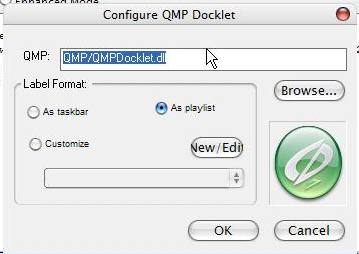
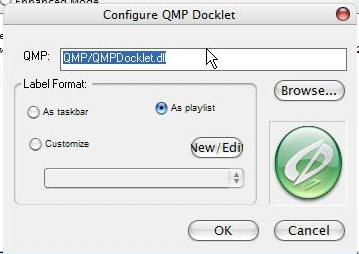
I have a problem with the QMP docklet.
The problem in fact is not remembering the path to the player.
Now, i belive that has something to do with the configuration: (extras from my "itemlist.conf"):
[RKDockItem]type = docklet_od
name = QMPDocklet
icon = DockletPath:qmp.png
show = normal
path = QMP/QMPDocklet.dll
loaded = 1
configIniFile = dockletstemp.ini
configIniGroup = Docklet
Path = QMP/QMPDocklet.dll
Image = docklets/QMP/qmp.png
Customize = -1
LabelMode = 1
I have no ideea how all this docklet stuff is working, but IMHO i belive that has something to do with what i underlined.
I have no ideea if is rk's fault, but i hope i'll have an answer.
Tx for the help and great job!
Always have to reset the icon for the network docklet
I have several problems with the best Winamp Docklet for ObjectDock (IMO) :
- I seems that double-click, central-clic and the scrool wheel on a Docklet aren't handled
- You should be able to customize the Docklet icon, but it doesn't work
- Additionnals PNGs showing Winamp staus shoudl be drawn, but sometimes it doesn't work
I'm using this Docklet all the time, and only this is preventing me from switching to RKlauncher... I would be very thanksfull if you could take a look at this 
Thanks for you great work !
A little problem with Task Docklet v0.2 http://www.dockex.com/index.php?pageId=docklets&dkview=18 Though that could be a problem of the docklet.
Problem: I can't assign a different task icon to programs.
The system tray OD docklet doesn't work.
DL link:
http://www.wincustomize.com/download.aspx?...=29&SkinID=3916
Please help as this is the only thing that prevents me from using this magnificent software on a daily basis.
A little problem with Task Docklet v0.2 http://www.dockex.com/index.php?pageId=docklets&dkview=18 Though that could be a problem of the docklet.Problem: I can't assign a different task icon to programs.
Read the readme for the tasks docklet 
Problems with mailcheck docklet for y'z dock.
when i added it, the dock crashed. I started it again and my dock appeared in the upper left corner of the screen.
it was small and magnified, didn't move when i got the mouse over it. i had to close it with the task manager and i had to replace the files in my folder with the ones in the zip file.
Great work for this dock, it will be my default dock as soon as it can remember the custom icons for open apps.
you're a great man
Read the readme for the tasks docklet
Oops, you know, I'm maintaing the documentation and the FAQ for an opensource project and am always quick to point out that people should read the FAQ/Readme before pointing out "bugs"...
Guess I should do that, too
I'm not 100% sure if this is a bug, but here goes.
I'm using the Y'z Recycle Bin docklet that is included with RK Launcher, and I am unable to drag files into the recycle bin when the dock is set to "locked add/delete/drag". It would be nice to have the dock locked (so i dont accidently drag stuff on or off it), but still be able to drag stuff into the recycle bin.
Thanks.
Fixed all problems for docklets posted so far except:
Task Docklet v0.2
and drag to recycle when locked
really? That was fast!
And now what? Wait for the next release? No problem! U rock!
PS:
Can u tell us what was going wrong?
oh man! I cant wait!
The comic docklet never works when RKLauncher is loaded at bootup. You need to quit and reload the launcher for the comic feature to work.
The comic docklet never works when RKLauncher is loaded at bootup. You need to quit and reload the launcher for the comic feature to work.
please always supply a link of what docklet you are talking about, I cannot possibly know about all docklets 
The Yz Trash bin docklet (included) doesn't seem to work on non-english Winblows.
I'm using Swedish XPpro SP2.
Not a big problem, but since it's included with RK......
I found a nice digital clock.
http://www.wincustomize.com/ViewSkin.aspx?...D=2249&LibID=29
It has default icon on every startup, which is kinda bad, since you cannot see the digits then.
The Yz Trash bin docklet (included) doesn't seem to work on non-english Winblows.I'm using Swedish XPpro SP2.
Not a big problem, but since it's included with RK......
I found a nice digital clock.
http://www.wincustomize.com/ViewSkin.aspx?...D=2249&LibID=29
It has default icon on every startup, which is kinda bad, since you cannot see the digits then.
it works fine with hebrew enabled XP
The comic docklet never works when RKLauncher is loaded at bootup. You need to quit and reload the launcher for the comic feature to work.please always supply a link of what docklet you are talking about, I cannot possibly know about all docklets
I think the docklet he is talking about is this one:http://www.dockex.com/index.php?pageId=docklets&dkview=13
RK Launcher keeps crashing whenever I try to load SysStats:
http://dockex.com/index.php?pageId=docklets&dkview=38
(or)
http://dockex.com/index.php?pageId=docklet...age=1&dkview=42
It does the same for AveDesk too. I dunno what's happening!
Hey, it seems that Firefox 1.5 rc3 does nto minimize to the dock, is it the dock or the browser @ play causign the problem?
Thanks.
Hey, it seems that Firefox 1.5 rc3 does nto minimize to the dock, is it the dock or the browser @ play causign the problem?Thanks.
I get the exact same problem. Everything else seems to minimize correctly, any ideas on the problem?
I get the exact same problem. Everything else seems to minimize correctly, any ideas on the problem?
Don't worry guys, i'm using the latest beta and it works well ^^
Problem solved, thanks to Radu!