Aqua-Soft vB 3.5 Discussion

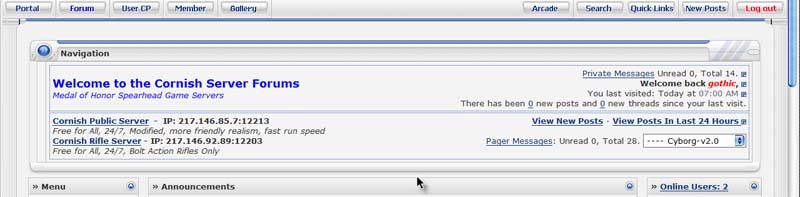
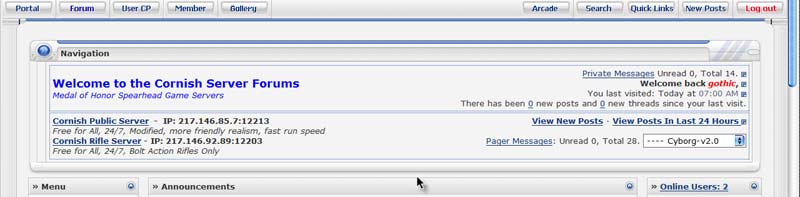
Timan, please, is there an easy way for me to modify the breadcrumb to include our modified content as in the thumbnail?

The problem I had was the height. When I tried it, the lower components of the navbar 'bled' over the top of the forumdisplay.

We like to have this information instantly available when a member logs on/opens the page, and I must admit to being totally flummoxed by the coding in this theme. (not detracting from the fact that it IS the best theme I have ever seen, and my community think it's the best thing since sliced bread.. :D)

Any advice would be most welcome.

Thankyou
post-40770-1138779024_thumb.jpg

nav_1.jpg
nav_1.jpg

#355397

Not sure, that looks kinda like a Welcome mod, don't know how the templates are for that.

#355447

Not sure, that looks kinda like a Welcome mod, don't know how the templates are for that.

I designed it myself, when I get home from work tonight I'll PM you the templates and details if that ok with you boss?

#355479

Great skin, thought, I'd just report a bug though, got the skin after donating a few days ago.

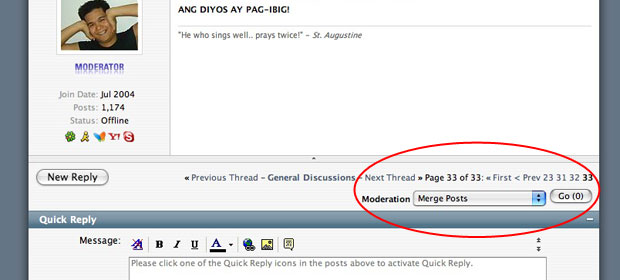
This applies to moderators with that extra breadcrumb at the bottom (not the inline mod beside the display views)

On the post view (as in like what you're viewing now) the moderator breadcrumb is INLINE with the new reply, previous/next, and pagenav. So for those posts with long titles (or boards with small widths) the whole row tends to "squish" not in a good way ;(

Looking at the thread view, the moderator breadcrumb seems to be in a new row (as it should be). I'm guessing the postview just slipped the developers mind, so I thought I'd mention it here.

#355604

Could you take a screen cap of what you're trying to explain? Might help me understand what exactly it is you're referring to.

Thanks

Those wanting help with the mod(s), I'll try to get some time this week to get those templates updated to work with the skin, if possible.

#355610

Here's the screenshot,

I've already "fixed" it at this point. But the original was that the moderator breadcrumb was INLINE with the pagenav.

What I did was just put it out of the whole

Cheers

Also, for some reason, changing the post icons after the they're set seem to not reflect immediately... short of having to rebuild post caches, is there any other way to hack around that so they immediately show the changes? Or is this a vBulletin issue already and can't be addressed by the brilliant minds here? ;)

post-41477-1138853612_thumb.jpg

screen.jpg
screen.jpg

#355614

Another problem:

I adjusted the "code/php/html" boxes in the "All style options" which work just fine and reflect the changes on new posts.

But when i "rebuild post caches" they revert back to the "bigger" (default?) box sizes... which is wierd since I already changed the default size as mentioned above.

Editing and re-saving the posts will bring the code boxes back to what I set.

Very strange behaviour indeed.

#356079

Hey Nargalzius, I'm not really sure whats causing your last problem, or the post icon issue. Doesn't really sound like a skin issue to me more of a vbulletin one.

#357018

In the Private Messaging screen, in vBulletin skin, I can click one button and it selects all the PM's from that day. Makes it easy to delete/file many at once. One day at a time.

This button doesn't exist in Aqua Soft. The only "select all" button selects every PM in the entire list.

Would love to see this button in A-S ... it seems to be the only function my users miss ever since we switched over.

#358440

hell tim, just installed your skin on my forum with a slight mod. But seems like the alternate row is not displaying correctly on the forumlist. I haven't modify any css, so could you take a look and tell me what should I do to make the alternate row show correctly

http://www.osx-e.com/forum/index.php

#366665

Yep, you need to login to your admincp, and number your forums correctly, (display order in forum manager or something)

#366666

its work. Thanks

#366678

How do I solve this problem (check screenshot), I'm sure its not suppose to look that way right?

And one more thing, how can add a new dropdown toolbar like "quick links". I have estore extension installed on my forum and seems like I cann't get the menu to work.

post-2043-1141837053_thumb.jpg

threads.JPG
threads.JPG

#366789

I've found an omission in Aqua-Soft's customized skin.

When a poll is created for a thread, the poster has a choice to make the poll results "public" (ie: show who voted for what, on the results page.) In Aqua, these sorts of polls are NOT being identified as "public" on the initial votes page, which can result in an impolite surprise.

Voters need to know ahead of time that their votes are NOT anonymous and that all visitors will see who voted for what, after the fact. A warning (designated via the public_poll_users_see_choices phrase) shows up properly in VB's generic skin.

Therefore, the polloptions_table template of Aqua-Soft needs the following:

<if condition="$show['publicwarning']">$vbphrase[public_poll_users_see_choices]</if>

#387877

This is majorbug in the script.

When I try to post a thred as a guest. It wouldsay

"You did not specify a username for your post."

and there is no box to put username.

#388789

I've found an omission in Aqua-Soft's customized skin.

When a poll is created for a thread, the poster has a choice to make the poll results "public" (ie: show who voted for what, on the results page.) In Aqua, these sorts of polls are NOT being identified as "public" on the initial votes page, which can result in an impolite surprise.

Voters need to know ahead of time that their votes are NOT anonymous and that all visitors will see who voted for what, after the fact. A warning (designated via the public_poll_users_see_choices phrase) shows up properly in VB's generic skin.

Therefore, the polloptions_table template of Aqua-Soft needs the following:

<if condition="$show['publicwarning']">$vbphrase[public_poll_users_see_choices]</if>

Where exactly in the code will we put this line?

#389240

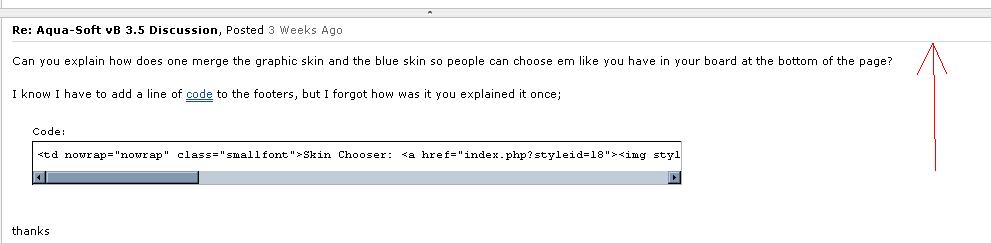
Can you explain how does one merge the graphic skin and the blue skin so people can choose em like you have in your board at the bottom of the page?

I know I have to add a line of code to the footers, but I forgot how was it you explained it once;

<td nowrap="nowrap" class="smallfont">Skin Chooser: <a href="../../../../unavailable.html"><img style="vertical-align:text-bottom" src="../../../../unavailable.html" alt="Aqua" /></a> <a href="../../../../unavailable.html"><img style="vertical-align:text-bottom" src="../../../../unavailable.html" alt="Graphite" /></a></td>

thanks

#390869

Making some Styles from scratch in VB 3.5.4.

I am unable to locate where to change the following line's colour....

post-49353-1150433900_thumb.jpg

changelinecolor.JPG
changelinecolor.JPG

#396882

In Postbit or Postbit_legacy, you should see

<!-- icon and title -->
<div class="borderbottom2"

Just change that class to whatever, or change the color in the css. Hope that helps.

#396883

I wasn't very clear sorry.

Attached is an image of the line i'm talking about.

post-49353-1150759810_thumb.jpg

forumhelp1.JPG
forumhelp1.JPG

#397800

This attachment is what the current line looks like.. it's black and can barely see it :/

post-49353-1150759853_thumb.jpg

forumhelp2.JPG
forumhelp2.JPG

#397801

And my previous post is how to change that.

#397807

<!-- icon and title -->
<div class="smallfont">
<if condition="$show['messageicon']"><img class="inlineimg" src="../../../../unavailable.html" alt="$post[icontitle]" border="0" /></if>
<if condition="$post['title']"><strong>$post[title]</strong></if>
</div>
<hr size="1" style="color:$stylevar[tborder_bgcolor]" />
<!-- / icon and title -->

I changed hr size to 2 and it displays a line.. but it puts it lower than the other forums. And changing the color to red or something doesn't work.

Changing

to

ps. Sorry to be a pain i'm new to this.

#397810

Hey Timmeh... guess what ol' Jelsoft is going to be releasing soon ;)

http://www.vbulletin.com/forum/showthread.php?t=186803

#398056

I bet they'll release around september, 3.5 betas came out in june and it hit final in sept. So will see the same thing I bet.

The current skin will work flawlessly on vb3.6 but the new features must be added in.

#398059