[release] DeskPhoto

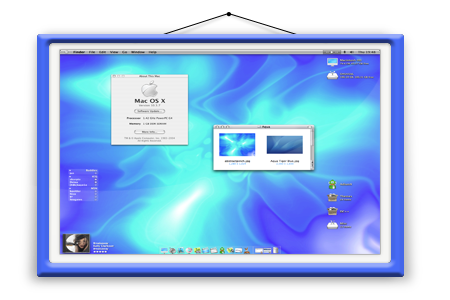
DeskPhoto is another alternative to show random pictures in a frame.

This is the first release (alpha stage).

If you'd like to make a nice frame, please contact me!

Some invisible buttons that you should know:

To Exit: double click anyware in the frame area (not picture area).

Options: click the upper left side of the picture area.

Change picture: click the middle part of the picture area.

Download:

http://www.closetosoftware.com/DeskPhoto.zip

Screenshot:

dp.gif

;)

#275518

Hmmm....this application can be run more than once for difference sets of pictures. This is getting interesting. Also, great job...and can you change the frame simply by substituting another picture?

#275524

Ha ha! Carlos strikes again.

#275553

I love that...Good job, and i try in this moment...look good.. Many frame style option add and its great.

Like that by example...check the link to view some frame style i wish :)

http://img.photobucket.com/albums/v352/ChiLam/21April.png

http://img3.picsplace.to/img3/1742/Metal_Border.png

http://img259.echo.cx/img259/6725/preview1hr.png

#275684

Looks very promising...keep it up! Maybe something for me to finally newspost about ;).

-NC

#275741

DeskPhoto Alpha 2 released

What's new?

Theme manager (Options)

frame theme added

Some improvements

Small bugs fixed

Readme.txt updated

http://www.closetosoftware.com/DeskPhoto.zip

Thank you for your feedback!

#275889

I've uploaded alpha 3 that fixed some bugs and added right click context menu.

http://www.closetosoftware.com/DeskPhoto.zip

#276118

Thanks for this great Tool. ;)

#276191

Cool app! But on both of my machines, the timed picture change isn't working. 350 mHz P3, 2200+ AMD, both XP SP2.

#276312

Did you turn timed on?

Go to Options>Misc then check Interval (seconds)

#276322

Cinema54,

I have uploaded a new alpha that should work properly on your systems.

http://www.closetosoftware.com/DeskPhoto.zip

#276351

Since Alpha 3 I get a Run-Time error "9I' Object variable or With block variable not set. Whenever I open the program.

#276352

Blitz,

What you can do right now: delete all DeskPhoto files and all DeskPhoto registry entries (HKEY_CURRENT_USERSoftwareDeskPhoto). NOTE: DON'T TRY TO DELETE ANY KEY FROM REGISTRY IF YOU ARE NOT SURE HOW TO DO IT. Reinstall and start the program again.

In addition, I will release (soon) a version with an error handler so we'll be able to know what is happening.

#276355

Thisis a great app! Can't wait for more development. If there is anything I could possibly do, don't hesistate to let me know!

#276356

Cheers, thanks a lot dude, deleting the registry key fixed it. I believe you get that error if you don't have the Interval Box ticked.

#276366

Blitz,

You're right about the error's cause. I'll fix it as soon as possible. Thanks!

#276374

Blitz,

The interval bug was fixed.

http://www.closetosoftware.com/DeskPhoto.zip

#276379

DeskPhoto Alpha 6 was released today (24 Apr 2005):

Total control over picture area (top, left, height and width)*

Transition effect added (top to bottom and left to right)

Some improvements

Some bugs fixed

Readme.txt updated

(*) This feature is experimental.

Thank you all for your great feedback!

By the way, if you have a nice frame and configuration, please share with us!

http://www.closetosoftware.com/DeskPhoto.zip

;)

#276402

Hi! This for frame! Download from rapidshare: Frame

#276440

Nice frame tom_7!

#276476

Alpha 7 was released:

"Options>Picture's area" works with pixels instead twips.

Some screenshots:

s1.gif

s2.gif

s3.gif

;)

#276510

This is getting better and better! One problem... I made the image 640 by 480, and made a frame with that size opening. Apparently the program only allows a certain maximum size frame, cutting off anything beyond that. Rather than having frame sizes of "Big... Medium... Small...", etc., you could have "Original size... 75%... 50%..." and so on. Pardon me if I'm missing some key issue here...

Also, it would be nice if a portion of the image could be used to drag the whole thing around, rather than just the frame, so a transparent frame could be used (or the option to have no frame at all).

Great work!

post-28797-1114365256_thumb.jpg

partial.jpg
partial.jpg

#276519

lovely... i like it... :D

#276523

even though i really, really like the whole idea and how this app works i must say that at 11mb of RAM it's just a RAM sucker. As much as i'd like to use it full time i'll have to pass till its RAM usage falls significantly.

But for now it's a great job and i'll be sure to test the new versions as they come out.

P4 2.66 Ghz, 512Mb of DDR 333 RAM, ATi Mobility Radeon 9000 w 64mb of RAM

WinXP Pro, SP1

#276571

I would break the frame up into four pieces--top, bottom, left, and right, and then have those repeat to fit the height/width. That way, you can have whatever size picture you want.

Also, there's a lot of flickering in the options dialog.

Other than that, nice job. Keep your eyes on the front page ;).

-NC

#276603