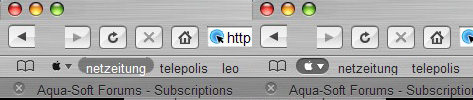
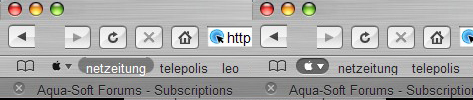
[Release]: Apple Compact menu for Firefox 1.0.2

thanks for this, now for a question.

I've been trying to get Hill's Safari to work on 1.0.2, but following the guide (and with the files provided in his zip file) I keep on getting stumbling blocks.

Either dragging an xpi shows me an error saying it doesn't work with this version of Firefox, or I'm asked to move a jar file to a specific folder, which isn't there (i assume, since there is no xpi file set due to the fact that it isn't supported)

Since I'm assuming you have the knowledge, can you help?

#268696

good evenenig - yesterday was interupted due to "forum maintanance" - so

here we go --

thanx out for stating to change the browser css. in the theme itself - it helped for the

"apple compact icon" - worked out perfectly -

but next troubles still with back/fwd - see screenie

plus

have a look at the "loadbar" in the tab ??? any idea??

anyone knows why bookmark "hover over" is not located correctly in the middle and not rounded fiully at hte top??

and sorry but last:

how to get rid of the title "modzilla" back to safari - and where was the old google image located??

#268698

Zatoichi, as I said In the post, I just changed the css to use the apple image, included the images and sizes, So If you use a theme different from Hills ones, you will get the Apple. If you use a Hills safarifox theme, you will need also to remove the compact menu support.

The problem with the buttons might be for having the compact menu button (*****THAT IS DIFFERENT FROM THE MENU BUTTON*****) from the COMPACT MENU BUTTON. Actually, If yoy put It on the same toolbar than the back/foward buttons you will screw up the entire theme and toolbars.

Only put It on the bookmarks bar and It's ok.

#268765

FatAxl, to fix this uninstall the compact menu extension.

uninstall the theme

reinstall the compact menu extension

install the theme

It Worked for me.

Why happens this? No Idea :-s

#268768

a BIG SUGESTION: DON?T PUT THE APPLE COMACT MENU IN THE SAME TOOLBAR THAN BACK/FOWARD, STOP... BUTONS. this screws up the theme, once again, don't do It!.

See the first screenshot, that's how It sould be :D If you want something like that, try editing the css to show another image, that's more complicated, but you can for example, use a spider button for instead. (If you are editing the css then you may know what are you doing, just specify the rect and image name (maybe you will ned to include the image).

#268769

thanks for this, now for a question.

I've been trying to get Hill's Safari to work on 1.0.2, but following the guide (and with the files provided in his zip file) I keep on getting stumbling blocks.

Either dragging an xpi shows me an error saying it doesn't work with this version of Firefox, or I'm asked to move a jar file to a specific folder, which isn't there (i assume, since there is no xpi file set due to the fact that it isn't supported)

Since I'm assuming you have the knowledge, can you help?

The problem with hills ' one is that is designed for a previous version, tomorrow I'll try to make It work, but Even If you get It, you will need to replace compact.jar in the file, so It's quite useless

#268770

thanks for this, now for a question.

I've been trying to get Hill's Safari to work on 1.0.2, but following the guide (and with the files provided in his zip file) I keep on getting stumbling blocks.

Either dragging an xpi shows me an error saying it doesn't work with this version of Firefox, or I'm asked to move a jar file to a specific folder, which isn't there (i assume, since there is no xpi file set due to the fact that it isn't supported)

Since I'm assuming you have the knowledge, can you help?

Amnesia:

I've forced the compact.xpi extension provided by Hills in the Safarifox zip to work with Newer versions of Firefox. But nothing else has changed. You can try It, But I can't tell you what's going to happen with this, since I'ven tested It. ;)

Grabi It here.

compact.zip

Attachment: compact.zip

#268955

ok - even if i move the compact apple icon to the bookmark bar it won´t resolve da prob of the back/fwd buttom ??

what´s about di other ??

#268966

Sometimes Safarifox themes get screwed up. Try reinstalling (And unninstlling the extension). Also I got some weird stuff, but afther reinstalling It should be ok.

#269018

thanks a lot man you've help a lot.

#269103

Hello all, new to the forums

Felt like I should join since I'm interested in customizing stuff (this is also such a great community) and I thought I could share the mod I did for this apple compact menu for firefox.

I modded it to suit the new pm2k5 safarifox theme which was just released not too long ago by Pe8er.

A preview is below.

acm_prev.jpg

Download pm2k5 Apple Compact Menu Mod

Why I did this mod? The little black apple didn't match the pm2k5 Safarifox skin ;)

To install:

Overwrite the compact.jar file in this directory:

C:Documents and SettingsYour WinXP UsernameApplication DataMozillaFirefoxProfilesdefault.cgxextensions{535bbd25-7a7c-4f9a-80fb-bd832ae22386}chrome

Oh yeah, just to let you know that this replaces the original black apple, so you might want to make a backup of the original compact.jar in case you want to go back to it later.

#269121

can this compact menu icon be modified to work in the "SAFERFOX" 2.41 theme

just curious.

Mike.

#269217

Of course, It can be edited to work with all themes. just replace the images you need and go.

#269392

thanks for this fred :) i dont mind havin a dimple on my browser lol. nice work mate
#269478

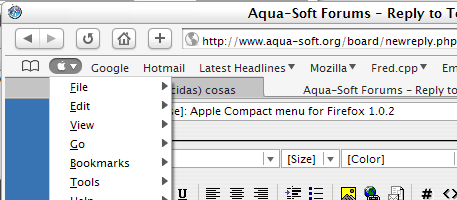
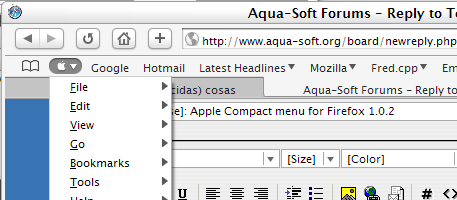
I know, but the apple looks soo cool in my Milky browser

post-28053-1112068007_thumb.png

milkyfox.png
milkyfox.png

#269515

Well, I've done just about everything in this post and on the tips page, but I cannot get this to work. As soon as I uninstall the theme, the apple shows up, but once I reinstall it, the apple disappears. Most of the problem revolves around the browser.css, but no matter how many times I install or reinstall the compact menu or hills' theme, my file has nothing like that. It shows only the following code:

searchbar {

-moz binding: url("chrome://browser/content/search.xml#searchbar");

}

/* ::::: print preview toolbar ::::: */

toolbar[printpreview=true] {

-moz binding: url("chrome://global/content/printPreviewBindings.xml#printpreviewtoolbar");

}

toolbarbutton[type=updates] {

-moz binding: url("chrome://mozapps/content/update/updates.xml#updateStatusbarNotification");

}

#noPreviewAvailable

{

background-color: white !important;

font-size: 12px !important;

}

Any help would be much appreciated. Thanks!

#269687

good evening from berlin again -

concerning back/fwd buttopm:

i deleted / reinstalled all - going through till the end -

but still da same - height !!

so now - perhaps it´s my res 1900x1200 -

so

where and how can i change the height of the toolbars ???

this must resolve da prob??

#269700

Hi from México again.

Sorry Guys, I have the same problem with certain Themes (Winstripe). That's because the author used diferent code to support the compact menu (I think so). Currently I have no solutions for this.

Try another theme, I've done It a few times and are only two themes currently don't display the apple or have weird behavior.

#270068

i have no idea how to remake any of those bugs i tried everything mine works fine. i doubt its because i used my own apple compact menu mod from way back in the day but i moved the apple compact menu to the toolbar and the back forward buttons were still align. i think tabextension has some hand in all this but i too am still not that sure with all the codes.

#270077

ok - back to themes - with the so called proper themes like saferfox nothing happens - all ok - compact menu with apple logo no prob - back/fwd buttom ok -

using hills versions as u know prob starts - but i noticed when i use icons with text the position of the buttoms is ok - but the whole composition on the bars is getting weired - even with changing to

so i made up my mind being sure it has to do with the size of the bars -

so again ??

where can i change the size of the bars -

and as u can see on da pictures :

compact apple is ok when hoovered

bookmarks seem to be in wrong position and not complete rounded???

post-14679-1112278541_thumb.jpg

Capture31.03.2005-15.41.31 copy.jpg

#270218

I still don't understand why you have so much bugs with these extensions/themes.

I'll try to see what's going on, but all looks fine here :/

#270997

back again - changed to safari fx and everything is smooth and easy - get fusion extension really cool

-----in the meantime ----

i installed everything on my other machine which has a different resolution - and viola - all ok

so i was right with my guessing - things mess up using a high res...........

#271180

Hello all, new to the forums

Felt like I should join since I'm interested in customizing stuff (this is also such a great community) and I thought I could share the mod I did for this apple compact menu for firefox.

I modded it to suit the new pm2k5 safarifox theme which was just released not too long ago by Pe8er.

A preview is below.

acm_prev.jpg

Download pm2k5 Apple Compact Menu Mod

Why I did this mod? The little black apple didn't match the pm2k5 Safarifox skin ;)

To install:

Overwrite the compact.jar file in this directory:

C:Documents and SettingsYour WinXP UsernameApplication DataMozillaFirefoxProfilesdefault.cgxextensions{535bbd25-7a7c-4f9a-80fb-bd832ae22386}chrome

Oh yeah, just to let you know that this replaces the original black apple, so you might want to make a backup of the original compact.jar in case you want to go back to it later.

Thank you!!!!

#280961

Is this supposed to work on 1.0.4? Doesn't for me...

#284563

Yes it does work for mine.

#284568