[Release]: Apple Compact menu for Firefox 1.0.2

Thanks to the 1.0.2 Firefox release, I'm uploading my first Moded Extension :cool:

Compact menu for Firefox 1.0.2

It's based on some modifications made previously by hills the author of Safarifox Mod. But All Included in a single extension. as lot of you know, this replaces the standard menus with a small aple logo that can be placed In the bookmarks bar.

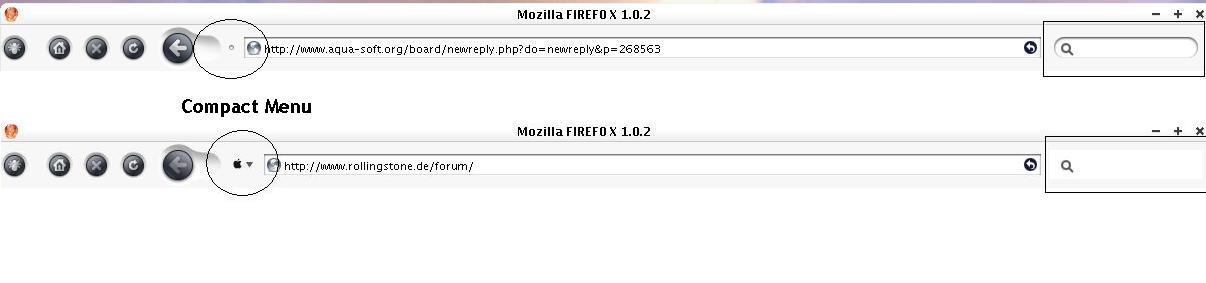
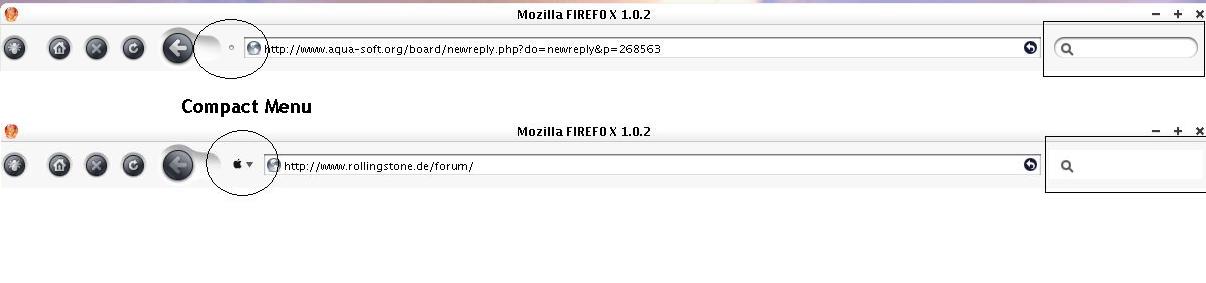
screenshot:

apple-compact-ff102.jpg

You can download It here.

http://www.prodigyweb.net.mx/aquainternet/...ads/compact.zip

#268232

I only Packed the files into the extension, arwork and basic content are hill's work.

Also, I did It cuz I needed to give It to some really new firefox users, maybe will help out someone else ;)

#268233

Thanks a million ! Wish you had been around a couple of months ago - I had to do that the hard way :(

#268280

Thanks! :)

#268282

how exactly do u install this? how do i make it into a bookmark menu?

#268293

^^ http://beverlyhills.web.infoseek.co.jp/safarifox/tips.html Follow the steps and you should do fine ;)

#268333

To Install It just drag the xpi file contained in the zip file to your firefox window, It will ask you If you want to install the extension, say yes.

Close firefox and open It again.

customize your toolbars and drag the compact menu button to the bookmarks toolbar and you are done!

as amistsaraf32 said, the Hill's instructions are the same, but you won't need to replace the files, just install the extension.

#268353

thanks, this is going to be very useful :)

#268366

ok - did dwnld and install but still got buggy probs with icons not showing up and hightprob with back/fwd icon??can u help -oher bug u can see on this page ov as - weirde??

#268425

I can't see the image you tryed to post.

Please try to upload It Again

#268426

manage attchment not working - what´s goin on - is this a prob ov firefox or doam i stucked by so??

ah now u can see all da probs -------------

#268429

Maybe your screenshot Is too big, try to upload only the corner, as the others do.

So, the problem Is that you don't get the Apple image?

#268450

I also don't get the apple next to the down arrow. Is there a way to check or change the image??

#268457

ok -back again - new attach -

as u can see back/fwd buttom are not in the right hight - i did tear them apart so it won´t be too bad for looking at .....but that´s not a solution -

further on the compact won´t show uo as apple?? i did several times ?? also looked up several things - but no way -

and : how to get rid of the dam mozilla top - want back my safari headline -

also if i hoover over the bookmarks they not show uo fully rounded -

the font seems unclear too

?????

#268465

this mod just looks like you copied the compact.css from 1.7.1.1 to 1.7.2. there isn't anything different from that

#268484

me too... how do u change the image to an apple? it just says 'Menu'

#268501

if its a dimple dot. you have to edit the browser.css of the skin and remove support for compact menu get more from hills's tips on his website. if it says menu thats not compact menu extension... thats just the one that came with firefox.

#268507

Haul, I believe your back/forward button problem is caused by compact menu being on the same toolbar.

Try moving it to the far right of the bar, after the search bar but I don't think that will help.

Otherwise try moving it to the bookmark toolbar

#268515

thinks!!!!!!!!!!!!!!!!

#268516

My problem is that if i delete the compact menu entry in the browser.css, then my search bar displays not correct. Only when i click on the search bar then it'll show up.

But the apple symbol is there. See the attachment.

What can i do?

post-28009-1111827481_thumb.jpg

Unbenannt.JPG
Unbenannt.JPG

#268527

this mod just looks like you copied the compact.css from 1.7.1.1 to 1.7.2. there isn't anything different from that
I only packed the files into the extension, artwork and basic content are hill's work

Hank, you may have deleted an extra line, maybe something as simple as a {

#268533

@ fannymites

No, only deleted exactly this entry in the classic.jar -> browser.css (as mentioned in hill's tips).

This entry is located at the bottom of my browser.css:

/* ::::: Compact Menu Support ::::: */

#menu-button {

margin-top: 1px;

margin-right: -7px;

margin-left: -7px;

list-style-image: url('chrome://browser/skin/dimple.png') !important;

-moz-image-region: rect(0px 14px 20px 1px) !important;

}

#menu-button:hover {

-moz-image-region: rect(0px 29px 20px 16px) !important;

}

My theme is hill's Longhorn Inspiriat2. I'm going crazy with this thing. I really don't know why the search bar changes when i delete only this compact menu entry. As mentioned before, when i click on the search bar, it shows up correct. But in "normal modus" it's a white field.

Any suggestions?

#268543

Have you tried moving the compact menu off the navigation bar and onto the bookmarks toolbar?

#268563

Have you tried moving the compact menu off the navigation bar and onto the bookmarks toolbar?

Yes, but it's the same problem. The search bar does not display correct, only this white field. It must have to do with the theme, i guess.

See before - after deleting attachment.

post-28009-1111843676_thumb.jpg

Before - After.JPG
Before - After.JPG

#268569

Hi there, It's me again.

Sorry, I had LOTS of problems to Login, (Even I can't change my Password... ), I hope I can solve all the issues before Logout.

First, Yes, you need to edit the code in the Browser.css in the skin you are using to show the apple and not the dimple (Dot? sorry, my English Is bad).

If you are using a safarifox theme, this could cause you to have the problem described: the search bar acts funny.

This can be solved this way:

Uninstall the teme.

Uninstall the Extension

Install the extension,

Install the theme

remove the code in Browser.css

I got that problem too, but now It works fine.

This problem is only with Safarifox Themes.

I hope with this you get It To work fine (I did)

Regards

post-28053-1111868018_thumb.jpg

safarifox_compact.jpg

#268626