[help] Picture Thumbnails On The Desktop

i was in doubt over the installation initially as well... with stuff like:

There are two missing files in the .msi package. Click here to download them.

and

Dependencies: OLELIB.TLB

and

...Home > Visual Basic 6 > Shell...

vs.

...Home > Visual Basic .NET > Shell...

however, due to rjohnstone's testimonial, i ran the vb6 installer "shlext.msi" and once installation completed (WinXPSP2), my desktop .jpgs were thumbnailed (no reboot required).. i also noticed some other changes to the shell, though i haven't dug around much yet..

to note: the new start menu entries in "all programs" for "Edanmo's VB Page"... ie: "Thumnail Handler," "Context Menu Handler" etc.. are not associated with any program when clicked... i believe Pe8er is experiencing this... neither are they associated with any icons.

Worked for me.. but could anyone be able to explain a little of whats going on behind the scenes? What about those ppl who, once installed were able to selectively install each extension individually from the start menu?

..the thumbnail extension is pretty nice tho/ I hope more people can get it to work
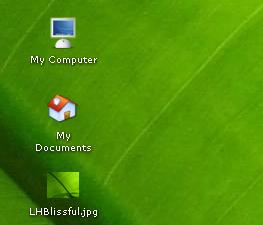
post-20869-1101974921_thumb.jpg

thumbtop.JPG
thumbtop.JPG

#233240

Cool ! A long search has come to an end ;)

#233257

it worked for me too.

#233264

Works perfectly here by just installing the .msi . (WinSP1)

#233269

wow. i'm so glad that i asked this question.

*dances*

#233546

it dosen't support pngs though. what should i do?

#233673

If it doesn't support PNGs, it doesn't support PNGS. There is not much you can do other than finding another program.

-NC

#233749

For those looking for a better way to do this, I found another application on the internet. Interestingly though, not a single download link worked. So I used the Wayback Machine (http://www.archive.org) to go to the site that existed 4 years ago, and the archive machine stored the download! Woo!

All you have to do is extract this zip file, right click the .inf file inside, and click Install. Once done it will automatically be enabled.

http://www.portraitofakite.com/temp/gicons.zip

#234463

Haha, that's very nice. This one works for me, although unfortunately PNG files don't work.

Oh well! Thanks for the link flyakite,

-NC

#234529

O M G thanks Mr Kite, this finally worked for me ^_^

#234537

uuummm...I don't see an .ini file? :confused:

I didn't mean to be a smartass. Anyways how do I install it, when I right-click I don't see an install option.

Well nevermind that, I'm a dumbass instead :(

Finals are a week away, sigh.

#234560

Sorry I meant INF file, I'll edit the post.

#234561

You can also use iconX, it does that and makes your icons bigger and nicer.. I don't know if i said it right.. I know English very good but it doesn't seems right..

#236312

I think this program installed some shell extensions that I don't want: Whenever I right-click on a file, I get these entries in my context menu:

File size

Selected Files >

Does anyone know how I can remove these entries? How I can uninstall this program?

#237815

I removed it via Control Panel > Add/Remove Programs :slant:

#237816

For those looking for a better way to do this, I found another application on the internet. Interestingly though, not a single download link worked. So I used the Wayback Machine (http://www.archive.org) to go to the site that existed 4 years ago, and the archive machine stored the download! Woo!

All you have to do is extract this zip file, right click the .inf file inside, and click Install. Once done it will automatically be enabled.

http://www.portraitofakite.com/temp/gicons.zip

the only thing i can think of that chris can't do is get 8 hours sleep! nice find...

#237827

Hmm, I didn't see anything in Add/Remove Programs...I'm referring to Edanmo's VB6 Extensions...but I found out how to remove them...just delete all the dll's in the folder that is made when you install his extensions! One of them I had to delete from the command line.

#237907

Bad idea...I have a feeling it's rooted more deeply than that. It should be listed under Add/Remove Programs, or download MyUninstall and see if it's listed there.

-NC

#237913

its under the name "shellxt" or somthing, and deleting the DLL's will not fix it, it will only make it worse, its rooted muuuch deeper.

#237940

yea... i just uninstalled Edanmo's VB6 Extensions... went to add/remove and found "shell extensions" or something close. Confirmed the uninstall afterwards. Good luck.

#237991

I hate to bump up this 2 years old thread.. but all the links are dead...

#376593

Check out Xentient Thumbnails, it's still up.

http://nc.needlemen.com/gicons.zip

-NC

#376807

any way to have pngs as tumbs too?

-edit-

works now :) forgot the reboot

#376816

Check out Xentient Thumbnails, it's still up.

http://nc.needlemen.com/gicons.zip

-NC

NC could you please relink this because needlemen is down for good I think.

TIA,

TMac

#379009