Aqua-Soft Forums
gotcha...I don't have this yet but I will do that if it hasn't been done already, when I get it
thanks Manyk 
gotcha...I don't have this yet but I will do that if it hasn't been done already, when I get it
thanks Manyk
I know the point has been made, but just to add, the images posted by Duckie seem to be Arlo's original konfab images.
Not trying to be a party pooper or anything, but in light of this board's (and the customising community's) stand on the issue, I went through the trouble of recreating the images to the best of my ability.
I'd hate to see you guys go through all this work without being able to release, so if you wish, please feel free to use my konfabulator images with you work (they're not quite 1:1).
*editted
Here is my latest revision
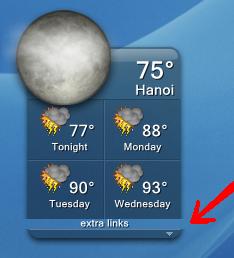
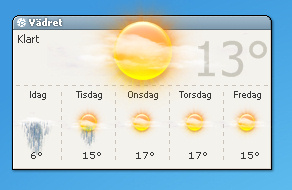
the pic on the left is the original, the one on the right is my editted version OF DZ's
almost 1:1px perfect
Editted:
*All image placements (x,y)
*All text placement(x,y)
*All Text fonts and sizes
*editted images to extend bottom 1px
*editted images to remove overlay fault
NEEDED:
*way to fix image 'cut off' at the top
* way to change 'tonight' image to moon reference
Originally posted by Duckie@Aug 1 2004, 05:33 PMHere is my latest revision
the pic on the left is the original, the one on the right is my editted version OF DZ's
almost 1:1px perfect
<{POST_SNAPBACK}>
@ Duckie
To make the icons a bit higher, you need to make the desklet bigger in Avedesk, Then move everthing else down in Sysstats..
I'm not familiar with the term narc, but I was only trying to be helpful.
All I'm saying is that if those images are konfabulator images (the images you posted are in the same format as those of the original konfabulator widget and look very similar, although I could not say they are the same) you will not be in a position to release, which would be a shame.
Also, may I add, I had the original images around a year ago, which I was precluded from including in my own release, hence the milk suite was created.
Edit:
In case you're wondering, this post was in response to the above post by Duckie which has now been edited.
Ok, here it is...all done.
Now to wait for DZ to wake up so I can send it to him to release the CODE.
OMG Hyral ... BRILLIANT ... why on god's green earth didn't we think of THAT before?!
LMAO
UGH ... ok, this is going to be sweet now.
Suggestion @Duckie ... If YOU are releasing this, I was wondering if in the config if PERHAPS you might think of grouping certain items in composite overlays. That way, it might be a bit easier to move say, all the weather icons in the bottom part as a group, or all the textual parts or whatever.
Just a though.
OK, you type fast .... the final 'product' looks great Duckie ... awesome job!
Try this code with the fonts I added to this thread earlier.
REMEMEBER TO PROPERLY INSTALL THE FONTS BEFORE YOU ENABLE THIS CONFIG!!!
Oh, and I have still not figured out the 'TONIGHT' image
the 'TONIGHT' temp is correct, but not the image

make sure to change file from TXT to INI
Looks good to me Duckie
Been looking all over the place to try and find the "Tonight" icon code.
Now, I'm no genius when it comes to viewing source and such, but it would 'seem' to me that perhaps the tonight icon is actually replaced by scripting.
Now, what I might suggest is perhaps someone who knows what they're doing, write a vbs to read the "//day[@d=1]//icon" in the "Day 1 Weather Icon" slot, and replace it with a set that is just for pm.
SO you get something like
Geticon for "Tonight"
if that icon is 39.png [an am icon]
replace with 45.png [a pm icon]
But only for that overlay
I'm just thinking ... if that's a stupid idea then please forgive me now ... lol.
Here's what I see the problem is:
//day[@d=i]//icon => //day[@d=i]//part[@p=d]//icon
What we need is
//day[@d=i]//nicon => //day[@d=i]//part[@p=n]//icon
Got it
Use the following for the selector for the tonight image:
/weather/dayf/day[@d=0]/part[@p=n]/icon
Originally posted by applelover@Aug 1 2004, 08:21 PMHere's what I see the problem is:
//day[@d=i]//icon => //day[@d=i]//part[@p=d]//icon
What we need is
//day[@d=i]//nicon => //day[@d=i]//part[@p=n]//icon
Got it
Use the following for the selector for the tonight image:
/weather/dayf/day[@d=0]/part[@p=n]/icon
<{POST_SNAPBACK}>
Great job, it works for me.
Originally posted by Duckie@Aug 1 2004, 12:52 PMmake sure to change file from TXT to INI
<{POST_SNAPBACK}>
um how do u do that?
Originally posted by grim53@Aug 1 2004, 02:55 PMum how do u do that?
<{POST_SNAPBACK}>
change the file extension .txt to .ini
applelover saves the day ... erm, NIGHT ! LOL
I don't know how you do it, it makes no sense to me, but it works and thanks!!
I've been holding myself not to put a non usefull " this is great, we want this!" post for the last two days and let the people work...but...this is great, we want this!!!!! 
got it working, awsome job guys.
now lets finish up with our weather docketz and make this one happen and i think were done :naughty:

Originally posted by Manyk@Aug 1 2004, 05:12 PMapplelover saves the day ... erm, NIGHT ! LOL
I don't know how you do it, it makes no sense to me, but it works and thanks!!
<{POST_SNAPBACK}>
when you change this:
//day[@d=i]//icon => //day[@d=i]//part[@p=d]//icon
you change the "@p=d" to "@p=n" d stands for day. n stands for night. at least, thats what makes sense to me.
fantastic job everyone so far, and thank you applelover for your inputs. I can't wait to see this finished and on my desktop
also...we might want to use Tadis's images with this. I read a few posts by him and it would be a shame if we can't release this. so as long as we use different iimages but can use the others as an option, we should be okay
Hi,
Great work
I have two probs:
1º - Im missing two PNGs the post-19-1091309400.png and post-19-1091309401.png
2º - When i click on the widget the weather page that it opens its not mine but the one that come with duckies ini.
Thanks.
Bye.
change the city code in your INI and replace it with either your city code or zip codeOriginally posted by Rissol@Aug 1 2004, 06:34 PM2º - When i click on the widget the weather page that it opens its not mine but the one that come with duckies ini.
<{POST_SNAPBACK}>
Originally posted by MDZ61384@Aug 1 2004, 10:41 PMchange the city code in your INI and replace it with either your city code or zip code
<{POST_SNAPBACK}>
Hi,
I already did that and even put the ini as read only and didnt work, and the weather icon on day 3 is wrong too.
Thanks.
Bye.
I believe there should be a ? mark after the zip code or city code, maybe you deleted that by accident?
post your ini file as an attachment and we'll be better able to see whats up with it
Originally posted by MDZ61384@Aug 1 2004, 10:51 PMI believe there should be a ? mark after the zip code or city code, maybe you deleted that by accident?
post your ini file as an attachment and we'll be better able to see whats up with it
<{POST_SNAPBACK}>
Thanks, but i solved the problem of the id
Everything is fine now
Cya.
PS - What extra links do ?
Originally posted by thanhson@Aug 1 2004, 10:56 PMAnyone have this image (19-1091309400.png) ..?
help me ! please !!! :cry:
<{POST_SNAPBACK}>
ahem ... just read back a bit :-)