 Aqua-Soft Forums
Originally posted by applelover@Aug 1 2004, 05:23 AMHere's what I've come up with so far, still haven't figured out how to get the night image though.
<{POST_SNAPBACK}>
vnice .... looking forward to seeing it on desktop 
Originally posted by applelover@Aug 1 2004, 05:23 AMHere's what I've come up with so far, still haven't figured out how to get the night image though.
<{POST_SNAPBACK}>
vnice .... looking forward to seeing it on desktop
Huge thanks to applelover!!!!
Well, this is what I have - everything auto updates out to a four day forecast. 

Looks good deadzombie ... any word on permissions yet?
I worked from Hyrals script, so he's the only person Im asking for permission...shouldn't be an issue.
Also, Im new at making these things so I sent samples out to see if my .zip file works for other people.
(not certain if I packaged everything correctly)
this looks great.... :woot:
Yeah! Hope you release it soon.... 
Originally posted by deadzombie@Aug 1 2004, 07:22 AMI worked from Hyrals script, so he's the only person Im asking for permission...shouldn't be an issue.
Also, Im new at making these things so I sent samples out to see if my .zip file works for other people.
(not certain if I packaged everything correctly)
<{POST_SNAPBACK}>
If you are using images that Duckie posted you CAN'T relese it unless Duckie is the one who created those background images - but my guess is that those are Konfabs originals...and Arlo DID not give permission to use ANY images created by him...not just the weather symbols...
But DZ if you could release your config but without the images we could all get some images from 'somewhere'
Stardock's or any others for example.
Otherwise if you don't want to release, I wouldn't mind trying it out. For educational purposes 
DZ - just release it with 'alternative' images.
BTW - great teamwork on making this a reality guys
Hey DZ ... in light of all the posts and such here regarding the images for the background, I just thought I'd offer up an alternative ... sure, it's not all semi-trans, but hey, it does resemble SOMETHING ;-) Oh, and made from scratch by me to fit into all the work you've done on this so far.
If interested, PM me or whatever ... I can send you the psd or png.
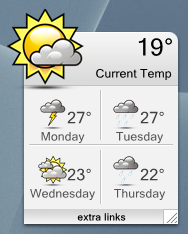
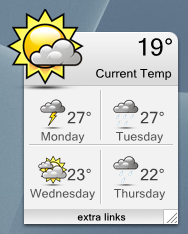
Originally posted by Manyk@Aug 1 2004, 02:07 PMHey DZ ... in light of all the posts and such here regarding the images for the background, I just thought I'd offer up an alternative ... sure, it's not all semi-trans, but hey, it does resemble SOMETHING ;-) Oh, and made from scratch by me to fit into all the work you've done on this so far.
If interested, PM me or whatever ... I can send you the psd or png.
<{POST_SNAPBACK}>
I like that skin also Very nice work Manyk
see next post...
Sorry for the double post, but this is needed...
Ok, this is the REAL KonFab:

This is DZ's:
Here is DZ's editted by me using the real font and settings:
1. Can we change 'Monday' to say 'Tonight'?
2. Can we move that top image up more? When I try, it cuts off the image.
3. We need to include the 'Futura' font with future releases for realism.
4. use secondary(duplicate) items UNDER the main text ares for shadowing effect as I did.
5. Let's not all go SKIN HAPPY before this is even finished...relax, let's work out the bugs FIRST, then you can make as many skins as you like.
extra settings I added:
*duplicated all text with underlays using black at 180 transparency
*used Futura Lt MD font
* moved certain images to better area
wow, its looking great!
Duckie, I'm all for realism and tweaking it so it's exactly like the konfab one ... but uhm, you've neglected to mention whether the images you posted earlier are actually yours or 'borrowed'. [the background ones]
This is the only reason I provided a different background ... well, a screenshot to a possibility that is.
With regard to the big icon being cut off, I believe that is just an issue of providing more space at the top of the 'topper' background. Like, just make it a bit bigger by adding more transparent space so the icon has room to move up a bit more.
I added more transparent space and no luck, it still cuts off the image.
Also, I figured out the 'tonight' weather, but i cant figure out the 'tonight' icon
anyone know that code?
Looking real good there Duckie
@Duckie ... right click on the calendar, select Size, and enter a larger vertical number. That 'might' be the issue cutting off the icon.
no, that distorts the images and sizes
Looking good Duckie... seems you've almost got it finished.
@ Duckie
I dont think you can get the Futura Font.. I tried looking for it but you gotta buy it..
The next best thing is Gill Sans MT.. I recommend using that font..
Here's my mod.. 
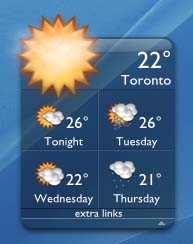
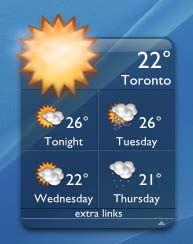
is it just me or does it seem like in everyones screenshots the first columns (tonight and wednesday) text isn't centered correctly? it seems to be off to the right a bit...is there any way to fix this?
Originally posted by MDZ61384@Aug 1 2004, 04:53 PMis it just me or does it seem like in everyones screenshots the first columns (tonight and wednesday) text isn't centered correctly? it seems to be off to the right a bit...is there any way to fix this?
<{POST_SNAPBACK}>
Well, it's off a BIT ya ... just right click, select "Configure Meters..."
On the right column the text for the days is easily configurable.
Just find the right one, select it and hit the configure button, then change the x coordinate. [Draw At: X=whatever]