[help] Start Menu Mod

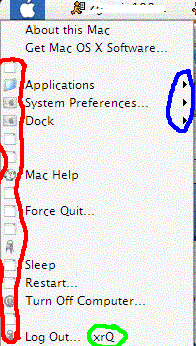
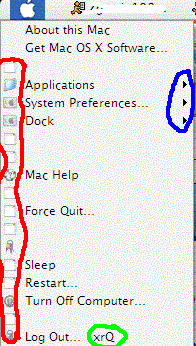
I got it working pretty tight, problem is the

symbols at the end!

arrows

background color

left icons

does anyone knw where i can find the

MENUITEM "&Log Out... xrQ", 402, M

the 402 out of that because if i do i can change the destinations and if it has the icons i believe

also does anyone knw where i can change the arrows

THANKS

----------------------

Don't remove admin/mods messages in your posts! Do it again, you'll be warned!

The Topic Has Been Tagged

\\ Seph
post-15600-1090730869_thumb.png

untitled.GIF
untitled.GIF

#193562

OMG OMG OMG. Can you please tell us what one has to do

to get that ? I presume you have to mod the VS in stylebuilder

or something like that but what values do you change ?

Thanksss :)

#193586

No, I used resacker

and when it is complete i will post the info

#193614

Originally posted by ifido

OMG OMG OMG. Can you please tell us what one has to do

to get that ? I presume you have to mod the VS in stylebuilder

or something like that but what values do you change ?

Go HERE for tutorials.

By reshacking 'explorer.exe' you can do about anything with your startmenu...

thumb-17395.jpg

#193660

I want you modded explorer.exe :D

Plz!

#193669

Originally posted by Detox@Jul 25 2004, 12:10 PM

I want you modded explorer.exe :D

<{POST_SNAPBACK}>

Yeah CRNI,

What did you mod in 'explorer.exe' to get that effect???

greets,

wiebeest

#193690

he moved some things around in explorer.exe.

actually, he could post the code and you could simply copy and paste that code into explorer, overwriting the default, and save/replace.

#193753

204 MENUEX

LANGUAGE LANG_ENGLISH, SUBLANG_ENGLISH_US

{

POPUP "", 0, MFT_STRING, MFS_ENABLED, 0

{

MENUITEM " ", 0, MFT_STRING, MFS_ENABLED

MENUITEM "System Preferences", 0, MFT_STRING, MFS_ENABLED

POPUP "Dock", 501, MFT_STRING, MFS_GRAYED, 0

{

MENUITEM "Turn Magnification On", 0, MFT_STRING, MFS_ENABLED

MENUITEM " ", 0, MFT_STRING, MFS_ENABLED

MENUITEM "Turn Hiding Off", 0, MFT_STRING, MFS_ENABLED

MENUITEM "Postion On Left", 0, MFT_STRING, MFS_ENABLED

MENUITEM "Postition On Bottom", 0, MFT_STRING, MFS_ENABLED

MENUITEM "Position On Right", 0, MFT_STRING, MFS_ENABLED

MENUITEM " ", 0, MFT_STRING, MFS_ENABLED

MENUITEM "Dock Preferences...", 0, MFT_STRING, MFS_ENABLED

}

POPUP "Location", 504, MFT_STRING, MFS_ENABLED, 0

{

MENUITEM "(Empty) ", 513, MFT_STRING, MFS_GRAYED

}

MENUITEM " ", 0, MFT_STRING, MFS_ENABLED

POPUP "Recent Items...", 501, MFT_STRING, MFS_ENABLED, 0

{

MENUITEM "(Empty) ", 514, MFT_STRING, MFS_GRAYED

}

MENUITEM " ", 0, MFT_STRING, MFS_ENABLED

MENUITEM "&Force Quit...", 401, MFT_STRING, MFS_ENABLED | MFS_DEFAULT

MENUITEM "S&ynchronize", 553, MFT_STRING, MFS_ENABLED

MENUITEM "D&isconnect...", 5000, MFT_STRING, MFS_ENABLED

MENUITEM "Undock Comput&er", 410, MFT_STRING, MFS_ENABLED

MENUITEM " ", 0, MFT_STRING, MFS_ENABLED

MENUITEM "Sleep", 0, MFT_STRING, MFS_ENABLED

MENUITEM "Restart...", 0, MFT_STRING, MFS_ENABLED

MENUITEM "Sh&ut Down...", 0, MFT_STRING, MFS_ENABLED

MENUITEM " ", 0, MFT_STRING, MFS_ENABLED

MENUITEM "&Log Out...", 402, MFT_STRING, MFS_ENABLED

}

}

#193979

does anyone knw how to get this pattern on the start menu

#193996

:blink:

How did it get there?? I've never seen that before....maybe change VS or something..

#193999

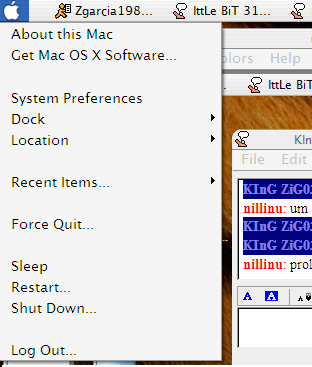
Here it is basicly almost done

post-15600-1090817473_thumb.png

untitled.PNG
untitled.PNG

#194009

Looks awesome, I can't wait to try it out ^_^

#194035

You stole my idea nillinu :P

#194133

nilinu,

can you please post the final code, because the earlier version you posted didn't work properly because of the sys prefs link which doesn't work.

also the xp professional image is still there......

thx

adark

#194163

Is there a complete list of these ID numbers and their functions somewhere? (504 is the Programs menu, 505 is the Control Panel, ...)

edit: crni, what indentifier number did you use for the "Browse Computer" item?

#194182

yes i am getting it from someone and ill post it l8r today (complete list of all numbers)

post-15600-1090866492.jpg

post-15-1090866492_thumb.jpg

untitled.JPG
untitled.JPG
untitled.JPG
untitled.JPG

#194190

For the couple people who wanted it here it is , it is still not done i am working on the recent items and the dock menus

204 MENUEX

LANGUAGE LANG_ENGLISH, SUBLANG_ENGLISH_US

{

POPUP "", 0, MFT_STRING, MFS_ENABLED, 0

{

MENUITEM " ", 0, MFT_STRING, MFS_ENABLED

MENUITEM "System Preferences", 505, MFT_STRING, MFS_ENABLED

POPUP "Dock", 3860, MFT_STRING, MFS_GRAYED, 0

{

MENUITEM "Turn Magnification On", 0, MFT_STRING, MFS_ENABLED

MENUITEM " ", 0, MFT_STRING, MFS_ENABLED

MENUITEM "Turn Hiding Off", 0, MFT_STRING, MFS_ENABLED

MENUITEM "Postion On Left", 0, MFT_STRING, MFS_ENABLED

MENUITEM "Postition On Bottom", 0, MFT_STRING, MFS_ENABLED

MENUITEM "Position On Right", 0, MFT_STRING, MFS_ENABLED

MENUITEM " ", 0, MFT_STRING, MFS_ENABLED

MENUITEM "Dock Preferences...", 0, MFT_STRING, MFS_ENABLED

}

POPUP "Location", 504, MFT_STRING, MFS_ENABLED, 0

{

MENUITEM "(Empty) ", 513, MFT_STRING, MFS_GRAYED

}

MENUITEM " ", 0, MFT_STRING, MFS_ENABLED

POPUP "Recent Items...", 501, MFT_STRING, MFS_ENABLED, 0

{

MENUITEM "(Empty) ", 514, MFT_STRING, MFS_GRAYED

}

MENUITEM " ", 0, MFT_STRING, MFS_ENABLED

MENUITEM "&Force Quit...", 420, MFT_STRING, MFS_ENABLED | MFS_DEFAULT

MENUITEM "S&ynchronize", 553, MFT_STRING, MFS_ENABLED

MENUITEM "D&isconnect...", 5000, MFT_STRING, MFS_ENABLED

MENUITEM "Undock Comput&er", 410, MFT_STRING, MFS_ENABLED

MENUITEM " ", 0, MFT_STRING, MFS_ENABLED

MENUITEM "Sleep", 0, MFT_STRING, MFS_ENABLED

MENUITEM "Restart...", 0, MFT_STRING, MFS_ENABLED

MENUITEM "Sh&ut Down...", 0, MFT_STRING, MFS_ENABLED

MENUITEM " ", 0, MFT_STRING, MFS_ENABLED

MENUITEM "&Log Out...", 402, MFT_STRING, MFS_ENABLED

}

}

#194261

I installed it, works great. I won't post bugreports or requests, I'll let you finish it :)

When you finish it I suggest you to contact Flyakite and let him include your hack in upcoming Sysfiles 6.0 release ;)

#194276

Thx very much

#194293

by the way plz post bugs it will spead it up cause i work in a funny way

#194337

1. I have icons in start menu (system preferences, location and recent items) - how do i remove them?

2. shut down, restart and sleep don't work

3. it would be cool to link dock menu items to objectdock.exe + variables

#194344

ok 1. to remove those icons go to reshack and open shell32.dll and go to icon group then in like 322-340 replace the needed icons with a blank icon which u can HERE n this thread

ok2. the 3 butons i will change that now

ok and 3. downloading .........

blank_icon.ico

Attachment: blank_icon.ico

#194351

I know how to reshack these icons :) But will it remove this margin on the left where they still are (but invisible now)?

Don't download OD! I will give you variables now, gimme a sec...

#194358

Sorry for doubleposting...

Turn Magnification On/Off: -m2

Turn Hiding On/Off: -ah2

Position on Left: -ps2

Position on Bottom: -ps0

Position on Right: -ps3

Dock Preferences: just ObjectDock.exe

#194361

no it wont remove the space but that will prolly be done sum how

no you cant use that , but i did get it so that you can have the dock pref. button working but to get the others i would have to create exes and basicly for every exe a system file has to be lost in its place

what me and ifido did was download the pre-replacer from online and used it to replace ifidodos ipref with control.exe and also replaced aves forcequit with taskmanager

to get the dock prefs u would have to replace the dock prefs exe with a system exe never used and i would use its id

#194365