 Aqua-Soft Forums
Vjay....this is awesome work...and you can make it better? With Ave on the case...I can't wait!
[release] V Animator (includes Buttonanimator V2)
Hi Vjay:
A quick bug report (Sorry, will be more thorough next time  )
)
Using version: vanim v0.0.14
First, seems much more stable each release 
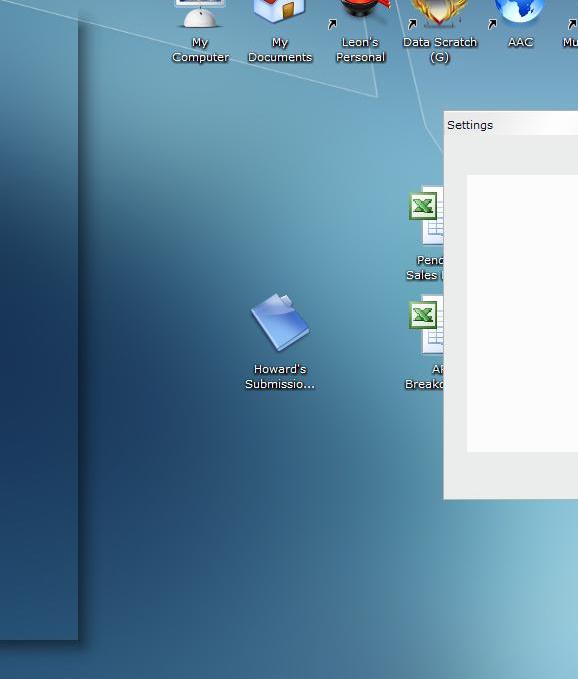
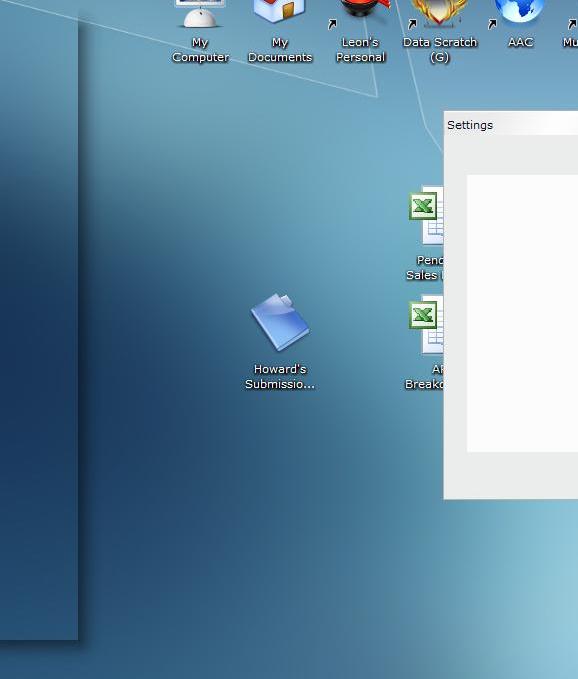
1) I noticed that when i right click on the systray icon to select "settings" the window flashes on the left side of the screen then settles in the right position. It is so fast that i had a hard time getting a screenshot of it, but you can see the yzshadow outline before it disappears and the main window pops up in the right place.
See Image below:
2) I noticed on a download that the progress bar animation would reset, as in the file would be nearing the end of a download and the blue overlay would disappear as if the file had yet to download a bit.. the track (grey glossed bottom, would still remain thought.) After a little time, the progress bar would begin to accumulate again, although now the amount downloaded and the progress bar would no longer be in sync. Please see image below:
Thats about it for now.
Thanks again,
~fc


Ok new release available.
I fixed the progressbar-bug (i hope) and implemented some other things to increase the stability.
Just wondering if this project is still in the works. If the thread has been moved or if possibly a new release has been published. I ablsolutely love the app. Please understand that in no way shape or form to I wish to offend or badger the developer of this app, on the contrary I am very grateful. Thanks vjay, and thanks to anyone who can provide an update.
gracias
Yes, there is a new Version avaliable. But there are no improvements, i hope i found the crashbug now.
I wont build in new features until it runs stable, cause it makes no sense when nobody would use it then  . So you can help me testing if it does what it should do.
I can say the latest version has run very stable on my machine for a long time. Great app. Love it. Congratulations on such a great job.
how did i miss this app? awesome!!!
Hmmm, my computer says the zip file is corrupt.  I was looking forward to trying this out!
Hmmm, my computer says the zip file is corrupt.
try downloding again. hell, i just downloaded it like 45 minutes ago...
I figured out what i did. I did "save as" and it saved it as an html file or something like that. If i had read more carefully i would have realized that i needed to left click.
Good concept. The buttons dont pulse correctly on my computer though. Only the default button pulses, the rest are just normal aqua buttons. The progress bars work though. It might be due to the fact i use windowblinds. Windowblinds can do the buttons anyways so no biggy. Everything else works fine though so far. Good job.
The only bug which prevent me to use this app is the bug with iTunes Multiplugin.
Appart this, I didn't experiment any instability with the latest release.
Sounds good so far.
Only the Default-Button (the button which is clicked, when you press enter in a window) will be pulsed (like in macosX). You can select another Button by pressing TAB or clicking it and moving the mouse away.
The only bug which prevent me to use this app is the bug with iTunes Multiplugin.Appart this, I didn't experiment any instability with the latest release.
You have an exclude-list, where you can add all apps, which should be ignored by VAnim.
oh, my mistake.
Thanks vJay for the update. Sweet app! Remains in my startup folder.
Congratulations Vjay, amazing app! 
It's very stable but i've found two little bugs:
- when i use Tab or arrows to move my selection, the customized
font goes back to the original visual style font!
- when i use the search features in explorer, under the search button
appears the stop button! (please look at my avi)
Thanks again for this!
...!?!Umm very bad english tonight!?!...
Has anyone experienced this problem:
I am running the latest version of iTunes with the latest version of the Mplugin. I added itunes.exe to the exclude list under vanim prefs. Itunes works fine until any kind of a dialog pops up (buffering stream, preferences dialog, add files, etc). When itunes opens any kind of a dialog window, the windows along with itunes changes to an inactive state (as if I had given focus to another program). When I click on itunes it is unable to regain focus, and ceases to be user responsive. The program does not lock up, it still plays music but you can no longer control it, I have to open the task manager to force quit it.
If anyone knows the solution to this problem it would be greatly appreciated.
Has anyone experienced this problem:
I am running the latest version of iTunes with the latest version of the Mplugin. I added itunes.exe to the exclude list under vanim prefs. Itunes works fine until any kind of a dialog pops up (buffering stream, preferences dialog, add files, etc). When itunes opens any kind of a dialog window, the windows along with itunes changes to an inactive state (as if I had given focus to another program). When I click on itunes it is unable to regain focus, and ceases to be user responsive. The program does not lock up, it still plays music but you can no longer control it, I have to open the task manager to force quit it.
If anyone knows the solution to this problem it would be greatly appreciated.
tom, i've got the same problem. i actually (sadly) stopped using this tool for now because of it.
hey, wait a second...what are you doing playing around with this when you're supposed to be working on vosbl updates? get back to work, slacker!
I work for Dunbar Armored, they own me. I work so many hours that I hardly have any time to do anything. The only thing I did lately was install Konfabulator, and V Animator. I still use vanim, I just shut it down when I need any dialogs to pop up in iTunes. I can't stop using it because it's too awesome, I wish I could program something like that.
Awesome job Vjay, by the way what programming language do you use?
I found something on the internet that talks about another area to initiate running the splash screen, instead of setting itself as the shell. The current version has itself set as the shell, it then loads explorer as the shell immediately after.
Supposedly there is another area that I can set the splash screen to run and it will never cause any problems whatsoever. I will try to look into this and start testing, but it might take a while because I work a lot.
Edit: Found it, the splash can be loaded in the same manner that the Windows XP splash loads
Hi there, i never used iTunes and a "MPlugin", can u make some Screenshots or a little avi demonstrating the problem?
Does it help to disable the "Resize Buttons" options of the Buttonpulser, or does it help to shut down the complete Buttonpulser-module ? Somewhere in the Buttonpulser is a bug hidden, i havent found yet.
Ps thanks for the credits =)
I tried to disable resizing the buttons and it still has the same problem. I can't put a screenshot because I have nowhere for it to be hosted. Pretty much when and dialog pops up from itunes, after about a second the dialog and itunes goes inactive (as if you had clicked on another program). A screenshot won't really tell you anything else. I also don't know if it has anything to do with the mplugin, I will try running itunes without it and see if it has the same problem
screenshots.haque.net : great place for hosting screenies.
Thanks for the tip nightcrawler, here is a screenshot of the problem:

as you can see, everything looks normal but you will notice that both the iTunes window and the dialog are inactive. When I click on them, they don't activate but if itunes is playing music it still plays.
I also just noticed that about every 30 seconds, the itunes window steal focus from what i'm doing, but it doesn't activate, weird.