[release] Felix 8 Public Beta

Hey guys,

I have a public beta version of Felix I'd like to share with you. In the nature of beta files, some obscure stuff is not there, but I think it runs quite nicely at the moment.

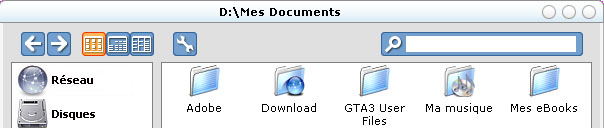
Heres a screeny showing the default Silver theme and the Panther theme...

felixbeta.png

Download here [2.36mb]

Mirror 1: Here

Mirror 2: Here Many thanks to LoofyGun &

Many thanks to hispanic boy

Read the readme before opening the app!

If you find any bugs, please post them in the thread in my forum.

By the way, if you can host a mirror I would be very grateful.

Enjoy! and tell me what you think :)

~alilm

#132724

Pretty good. (Y)

#132725

really digging this one, great work, can't wait for next release.

#132727

Very nice work - I like the feel of this app so far - great work Alim

might be time for a few people to eat their words......

#132729

man great work! Can´t belive that there were so many submissions of finder versions in the last months.

Zecke! :D

But how to change folder directories?..

#132730

:D oh so nice Alim, this is by far the greatest finder clone out there...and when 3 panel browsing is implemented....DAMN.

This is sweet stuff, and easy to configure as well. Very well done.

Again an example of what happens when you let a developer be, and waits patiently while he finishes!

Again Thanks

Cheers

Jon@z

#132732

Originally posted by zeckeheinz@Mar 21 2004, 12:13 PM

man great work! Can´t belive that there were so many submissions of finder versions in the last months.

Zecke! :D

But how to change folder directories?..

To change the shortcut links press F1 to get tp the preferences dialog or click the options button.

And thanks everybody :)

~alilm

#132734

The best one, no dout :rock:

Thanks a lot ;)

Peace

#132738

great work alilm!

poking aroudn with it now.

here is a mirror

and you can add it to your first post if you want.

:)

#132739

OH my God! I love it! Great work alilm ^_^ I like it so much that I already created Jetblack skin for it (+Windowblinds skin for it). It's great.
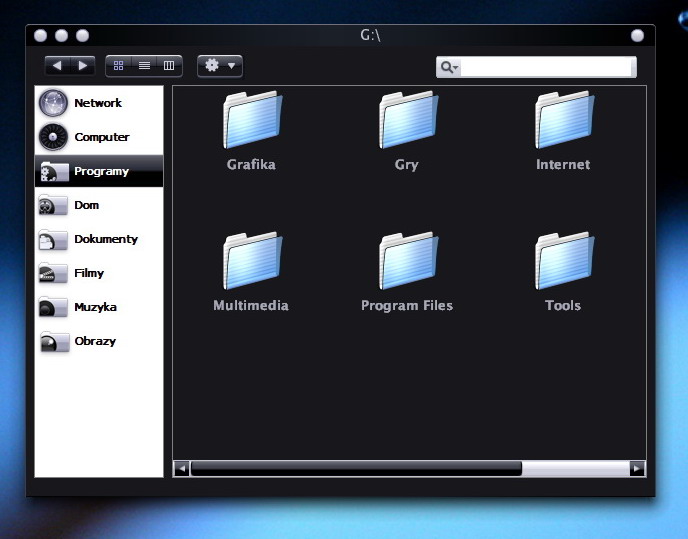
However editing icons in the sidebar is a little bit painful - any chances for png support with separate icons and selection rectangle?

Great work :P

post-2765-1079877509_thumb.jpg

Clip.jpg
Clip.jpg

#132750

Wow thats awesome Pe7er, good job :D

#132756

Moved to aqua apps forum. Some members cannot read the devs board

#132789

Has anyone else skinned it succesfully yet?

#132793

Lovely app Alilm as always :woot: thanks a lot !

-Aviel.

#132804

Great App! I loved all of it. And it's only Beta!! I can't wait to see what comes from this.

#132806

Woaw one of the most efficient i tried!!!

bug to repport:

- favorites network folders: when i want to browse a favorites network folder that is no longer accessible (host disconnected for example), Felix crashes... and it's very very slow for browsing a network workgroup...

- The apply skin button doesn't actualy refresh the window, we have to do save settings" to effectively aplly the skin :P

- resizing the window is a bit crapy with the main view pannel

- on right click without item selected (in a blank part), the menu show "copy Felixbeta8051 Folder" (the default location of Felix) is it normal?? it shouldn't appear without item selected isn't it?

Something you may do (i think it has already been requested but...)

- Language package (to allow translation to be made, i can do it for french language if you wish)

- View as thumbnails can be nice to for images

Originally posted by readme.txt

Thanks for downloading Felix 8, I hope you enjoy my program.

I DO :) :)

#132825

whoa this is cool! :D

as to the editing of the folders being hard, i find it quite easy :D

reeeeeal nice. i like this a lot

#132843

WOW

starting-progress is not really fast, but when it´s open....damn, a great feeling. it blows my mind away of thinking about the fact seeing the "3 panel viewing" in an upcoming version.

a hell damn good work.

one question:

i have 4 harddrives. in the preferences i see fields for more than 1 drive but they are not useable. i tried to edit the settings-file with entries like:

Drive1Label=Harddrive C:\
Drive1Link=c:\
Drive2Label=Harddrive D:\
Drive2Link=d:\
Drive3Label=Harddrive E:\
Drive3Link=e:\

but that did not help. could u tell me more about it? or will this feature only be useable in an upcoming release?

and damn, plz keep up this great work.

edit:

my blindness. forget about the drives-question. ;)

#132849

Alilm, it would be very nice of you to show some 'to-do' list. Let people know what they can expect in near future from you ;)

#132852

one question:

i have 4 harddrives. in the preferences i see fields for more than 1 drive but they are not useable. i tried to edit the settings-file with entries like:

Yeah, no matter what you do in Felix 8.0.51 this wont work. Its simply not implemented :P

Heres the to-do for beta release 8.0.60, the next public beta:

  • Add some variation of 3 panel browsing
  • Generallly speed it up
  • Add compatiblity for up to 3 harddrives
  • Maybe a search feature (one's in the works)

#132859

another bug (if it is :P)

on lauching Felix, the view of the default folder is in icons, and it's only displayed in 4 columns and not the entire page...

i'm skining a FlatXP theme, this is amazing

post-7384-1079894266_thumb.jpg

screen.jpg
screen.jpg

#132862

might be time for a few people to eat their words......

I'm stuffing my face :(, This is easily the best finder released and it don't drain my system that much, Thank you for your wonderful release and sorry about before. :)

#132865

Simply amazing :)

#132869

one quik question: would it be possible to use png´s instead of bmp´s in any further release?

#132870