 Aqua-Soft Forums
wow, what a great release! lol
[release] Xplore 1.0.3 !
Originally posted by ChiLam+Mar 19 2004, 04:13 PM-->QUOTE(ChiLam @ Mar 19 2004, 04:13 PM)-pref file deleted- same outcomestrange, removing the file fixed the issue for me
.
Originally posted by TiG4@Mar 19 2004, 05:39 AMDid you delete yur prefs file prior to launching it?
Yeah, I removed the old version of Finder, removed the preferences file from App Settings and then extracted/setup .03
Edit - Just tried deleting the prefs file again and redoing everything and still have the same problems.
Did you include those new lable icons or was that juno's own creation? After the download...there's no change in my icons....
Just wondering...
Originally posted by borninhalloween+Mar 19 2004, 04:21 PM-->QUOTE(borninhalloween @ Mar 19 2004, 04:21 PM)Did you include those new lable icons or was that juno's own creation? After the download...there's no change in my icons....Just wondering...
Everything is working for me....this is one more step closer to be the greatest mac clone ever made. :rock:
The only thing left is the search bar and the view button... that will make this complete.
:woot:
this might be a dumb question but how do you get the folder icons to change to match the ones im using with style xp?
Originally posted by homebrew31182@Mar 19 2004, 01:08 AMthis might be a dumb question but how do you get the folder icons to change to match the ones im using with style xp?
edit shell32.dll... this app reads icons straight from shell32
^not to sure how to do that?
Originally posted by ChiLam@Mar 18 2004, 11:43 PMyup, mee too. exiting the prog takes me bout 4sec
-pref file deleted- same outcome
I just downloaded Duckie / Ji Eun's icon pack for XPlore, which require you to remove the text, and that made the app's exit a bit quicker. You should try it... besides, it looks cool (Y)
Originally posted by GillBates@Mar 19 2004, 06:26 AMI just downloaded Duckie / Ji Eun's icon pack for XPlore, which require you to remove the text, and that made the app's exit a bit quicker. You should try it... besides, it looks cool (Y)
Thanks dude (Y)
This is an amazing Application.
tig4, please do me a tiny favor, make the app start up with MY computer running.... i thought it would be changed already in the new release but it still doesnt load it up, i gotta do it manualy!!!! :rant:

Thanx :rock: (Y) You Rawks!
GOKU take your little red man :rant: and shove it. 
J/k, Ill release that just for you how about that, IM me and Ill send you a copy
For those of you that wanted My Computer to be displayed on startup of the app downlaod this and replace your exisitng Xplore.exe. In the next release you will be able to customize it but until then here ya go
broken Link 
Try the second link mentioned, the first wasn't updated for some reason...
there is two different colors in the buttons, is not the same blue, and this is something I'd noticed in the other finder clones. Is that supose to be that way?
VERY NICE WORK.
I did some new buttons, got this: I think it looks great Cheers
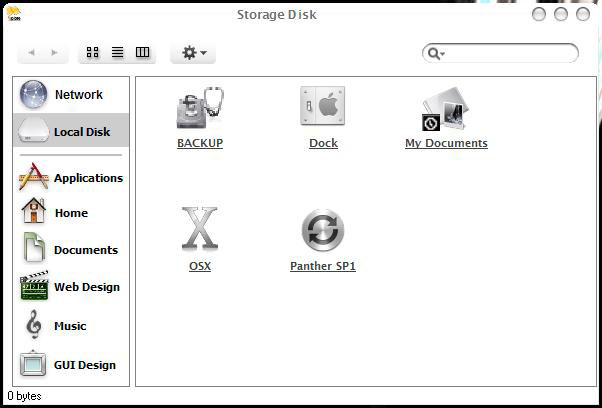

 You should zip those up and share em
 TiG4, w4$uP?
I the 6otz kewlz roxwests 4 yoz 4ppz, re94rdless of w0t w3 th3 talked aBout l4ast nitEz.
first, if u could have the app buttons, including the blue selection in the left panel become grayish each time its inactive it will really really own. Many things are necessary to help this app look GOOD, but therealduck here is ACTIVE and INACTIVE mode. Achieving those in yourz neXz release will boost the look and feel in quite a lot.
the inactive and active modes apply to the toolbar buttons, they become transparent, and the SELECTION BLUE BAR in the left panel - it becomes gray. There are exceptions but I can provide the images later.
Yeah very great app....My favourite since I'm hanging here....
(What about shortcuts.....  .............. CHHHHHHHHHHHHHHHHHH)
Please make the searchbar a bitmap not part of the program
Originally posted by Flarex@Mar 20 2004, 12:08 AMPlease make the searchbar a bitmap not part of the program
It's got to be functional...surely?...(Don't call me Shirley).