[release] Bzfinder Panther 0.60

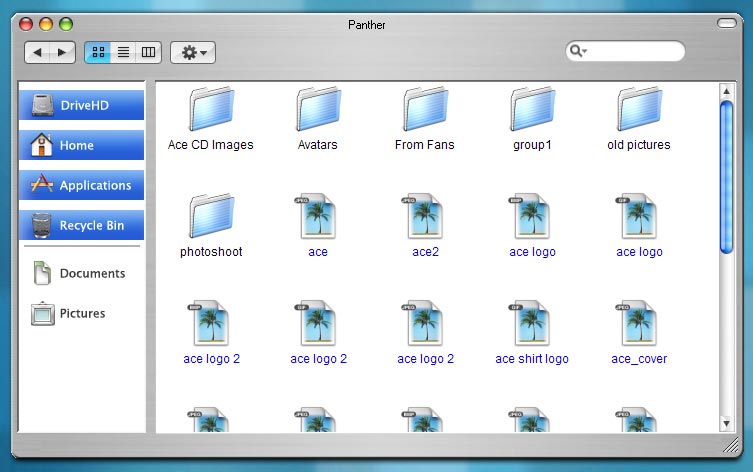
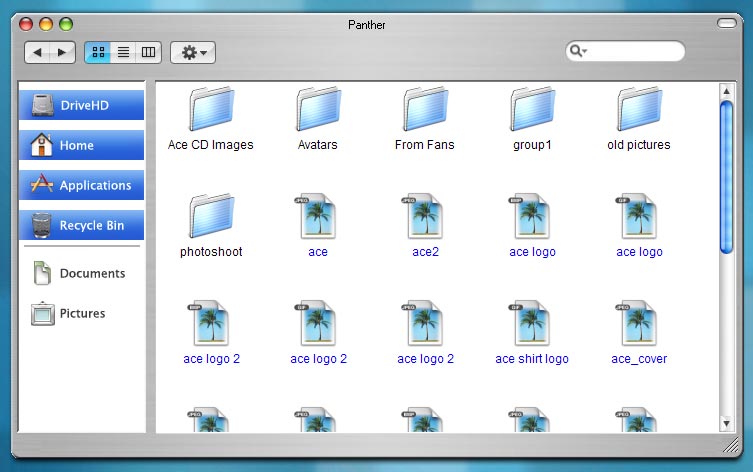
Ok, here is my promise BzFinder Panther 0.60

asbzpanther.jpg

This app:

-Accepts shadows generated by YzShadow and WindowFX (Don´t forget to set on yzshadow options the property offset to an inner side to 5)

-Drag and drop, copy, move... on navigation.

-Window is resizable, minimizable, maximizable...

There are few things to be implemented yet. Enjoy !!!! :)

There is a new update. Check it here !!

#129768

holy ****

this is a joke, right?

OMG!

3 Finders in one week?

:: passes out ::

Nice work man

keep it up

can't wait to see those options working.

#129769

ok, so developers are trying to give people heart attacks.

:lol: Muy bien logrado Okeh ;) Felicidades!

#129771

Dayum, this is nice

Few things I noticed

Mouse overs on glyphs and back and forward buttons dont work (I know you said some stuff wasnt implemented yet, but thought I would mention it)

When you mouse over any of the links in the sidebar, the blue highlight stays there even if you click somewhere else.

Other than this minor stuff, it looks great

#129772

the war goes on, heh.

Realy good work there Okeh,

keep it up guys :woot:

hmm, just one thing,

why not go together and make one realy good finder insted off 3 or 4 differt one, just my 2 cents :smartass:

Peace

*********eDited*********

i found one thing, donno if u allready knows this,

but when i drag the window, the shadow stands :blink:

i use winFX 2.12 by stardock

hmm.JPG

#129791

3 Finders in a Week??? ive only seen 2

Anyway this is very nice, its acctually fun that Xplore has things that Bzfinder doesnt and Bzfinder has things that Xplore doesnt have .... You guys should work together

#129793

Originally posted by Sputnikk@Mar 15 2004, 06:21 PM

the war goes on, heh.

Realy good work there Okeh,

keep it up guys :woot:

hmm, just one thing,

why not go together and make one realy good finder insted off 3 or 4 differt one, just my 2 cents :smartass:

Peace

*********eDited*********

i found one thing, donno if u allready knows this,

but when i drag the window, the shadow stands :blink:

i use winFX 2.12 by stardock

You use WindowFX, on the shadow options the "Hide shadows while moving and resizing" must not be clicked.

#129797

Mac related pointers for realism:

1. Cut down or lessen the spacing on the toolbar

2. remove the 'mouseover' on the toolbar(Mac OS doesnt have that)

3. Change 'Recycle Bin' to 'Trash'

4. move the seperator under the drive icon and the Trash to the bottom.

5. Move the search field over to the right edge

6. make sure the icons on the toolbar ar 32x32(they only get to be 16x16 if there are alot of alias's in the toolbar)

7. Have the app call LucidaGrande or Lucida Grande as the main font.

that should do it

thanks again

#129801

Thanks Duckie ;) the problem was that I have a Mac but I don´t have Panther. I have Jaguar...

:D

#129805

Originally posted by Okeh@Mar 15 2004, 01:41 PM

Thanks Duckie ;) the problem was that I have a Mac but I don´t have Panther. I have Jaguar...

:D

let me know what you need, I have alot of resources

also, open up iTunes on your mac and look at that toolbar

it works the same

#129807

Originally posted by Okeh@Mar 15 2004, 09:41 AM

Thanks Duckie ;) the problem was that I have a Mac but I don´t have Panther. I have Jaguar...

:D

not having panther is just like not having a mac ;)

great job! :rock:

#129809

too... many.... choices.... cant... decide...

"head explodes from over stimulation"

This is incredible... I was happy last week with the jaguar verision of bzfinder.. then xplore now panther! Let the finder wars roll on!

Thanks for all the hard work!

#129816

Duckie, could you provide me the back and forward buttons when the mouse is over? I´m faraway from my Mac now...

#129819

Originally posted by Okeh@Mar 15 2004, 01:56 PM

Duckie, could you provide me the back and forward buttons when the mouse is over? I´m faraway from my Mac now...

yes, where do you want them?

wait...I'll post them here...

#129829

and the rest

these are pngs, so they have the real transparency

#129830

Thanks Duckie and Seph !!

#129834

Holy crap this thing is sick. This app is so fast, I love it.

I noticed a bug. In the picture below I'm in Pictures, but I hovered really quickly over the other buttons and they stay like that until you hover over another one.

Anyway, thanks for putting in your hard work. This is awesome!

post-3582-1079374389_thumb.jpg

Untitled_1.jpg
Untitled_1.jpg

#129835

Originally posted by johnny5w@Mar 15 2004, 02:13 PM

Holy crap this thing is sick. This app is so fast, I love it.

I noticed a bug. In the picture below I'm in Pictures, but I hovered really quickly over the other buttons and they stay like that until you hover over another one.

Anyway, thanks for putting in your hard work. This is awesome!

that will be, most likely, gone in the next release. We informed him that the mouseovers arent like that in Mac OS so it should be removed

#129838

I was shocked to know this app is skinned which gave it the edge over Tig4 pimp tight's app. REALLY IMPRESSIVE! (Y) (Y)

However, one thing i noticed and its something I've already seen in other old apps, hoping this wont show up again is the startup of the app. :(

Alilm used to have apps like that which had a quick build up on a screen, quickly showing all the width/height borders being calculated by the app, finalizing with the window fully open. In my machine it happens really quick, but its VERY noticable. Regardless of whats the reason, it MUST NOT happen cause honestly, I'm SUPER tired of it.

Please try to get rid of it in any way possible, cause unfortunatly it may not be the #1 choice of users if competative apps dont have that feature. my 2 milion dollars. :(

#129839

Originally posted by Okeh@Mar 15 2004, 02:12 PM

Thanks Duckie and Seph !!

you're welcome

let us know if there is anything else you need

#129840

Originally posted by Duckie@Mar 15 2004, 06:14 PM

that will be, most likely, gone in the next release.  We informed him that the mouseovers arent like that in Mac OS so it should be removed

Oops, my bad. Sorry about that. >.<

#129842

Originally posted by johnny5w@Mar 15 2004, 02:18 PM

Oops, my bad. Sorry about that.  >.<

not a problem

nor is it your bad....I found that 'bug' too, but I figured he'd kill it anyway after my suggestions

#129843

CANT.....CHOOSE.....ONE!!!!!!!!!!!!!!!!!!!!

NOOOO

*explodes*

;););););)

#129924

Awesome Finder, Okeh. Thanks.

#129928