[release] Powdermount For Avedesk Desklet

Hi,

finally I've time to finish and release my version of mountchecker desklet.

Here the screen shot:

docklet.png

The base is the same as original version, but with this desklet you can decide what you want to put in the label that will appear.

For example:

in the original version the label show only the drive letter and the volume label.

In this version you can format what you want to view; in the screenshot I've used the volume label, the drive letter and the drive total space.

I've implement a little string pharser (very little) that support some tags and replace them with requested values.

You can set this string in the same tab where you can choose the drive letter and if leave the format string blank, the desklet use it's standard label.

I hope you like it.

Download here

Cheers,

Marco.

#106624

Great work !! thanks (Y)

Aviel.

#106635

thanks, will try it out.

#106640

Damn you, I h8 Avedesk!!! Put it on Samurize.

#106643

Originally posted by hax0r_foX@Jan 28 2004, 07:18 PM

Damn you, I h8 Avedesk!!! Put it on Samurize.

wow!

Sorry: I'm going to code it... <_< but can you explain to me why I would have to damn for this?? <_<

#106648

Originally posted by hax0r_foX@Jan 28 2004, 06:18 PM

Damn you, I h8 Avedesk!!! Put it on Samurize.

Respect please. ;) Thanks for sharing. :D

#106651

Very good again Marco (Y) , you :rule:

I only want to say btw that porting this to another app will need my permission, because the original code is done by me -_-

#106654

Excelent plugin for an amazing app. One feature i would like to see though is an option to display a graph or free space, or mabe a %.

#106688

wow :woot: :bow:

#106726

Originally posted by lostspyder@Jan 28 2004, 08:01 PM

Excelent plugin for an amazing app. One feature i would like to see though is an option to display a graph or free space, or mabe a %.

Indeed! A feature to incorperate the crni(samurize) vbs script to count files

and give free space woud be nice. I guess thats a request for AveDesk in general though. oops. :rolleyes:

Nice desklet work

~Ob¹

#106729

Can you guys please enlighten me as the exactly what the mount checker does? What exactly does it mean to "mount" a drive. I would say it's safe to assume it doesn't mean humping it ;-)

#106751

Originally posted by oc-athlonxp.com@Jan 28 2004, 03:28 PM

I would say it's safe to assume it doesn't mean humping it ;-)

Unless it's your pr0n backup... :canadian:

#106759

It's a shortcut that could be set up to a drive, most likely your cd / dvd drive. The desklet is only visible when a cd is in the drive, otherwise it will be invisible.

If you add it for every cd /dvd drive in your system, you will get the effect of shortcuts appearing on your desktop when a cd is inserted and disappearing when you eject a cd.

#106766

dammit!! I can't see labels on any of my desklets!!! Someone plz help me!! :rant:

#106808

I'm sure there's help somewhere bundled together with the download... Andreas is a very careful person. ;)

Why not you appreciate his help by looking through it first? -_-

#106820

one thing:

READ THE DAMN MANUAL!

Why the hell did i write it!?

I know this is not nice but Andras keeps getting PMs and emails about things that are explained in the manual!

If Andreas wasn`t lazy to write this program, why are you lazy to read the manual?

Come on people, you`re not retarted!

#106821

im not sure if this is just me but i can't right click the drive anymore..

with the orig ver of the mount checker(packed with avedesk 1.0 final) i was able to right click.. and get the explorer menu but now it wont come up..

was this on purpose or is this a bug or is it just me???

other then that its a very nice update from the orig...

#106829

VERY COOL!

#106830

Sorry, it is actually an error of me :shy: I included some wrong source-code with the installer, but corrected it within 5 minutes after the release. I guess Powder got the wrong source code :rolleyes:

I will ask Marco to update his desklet with the new source (at Marco, if he reads this, it won't take long, cause a built-in function has been changed).

@proença: Hiya John :)

#106834

Originally posted by AndreasV@Jan 29 2004, 12:06 AM

I will ask Marco to update his desklet with the new source (at Marco, if he reads this, it won't take long, cause a built-in function has been changed).

No prob. Andre: I would have asked you tomorrow! :)

wait for your mail ;).

@at all:

I hope to implement file/dir count in the next version.

Thanks for your feedback!

Marco

#106883

YES!! Right-click is like Y'z Dock, and total control over labels. Thank you AndreasV and ThePowderRanger!!!

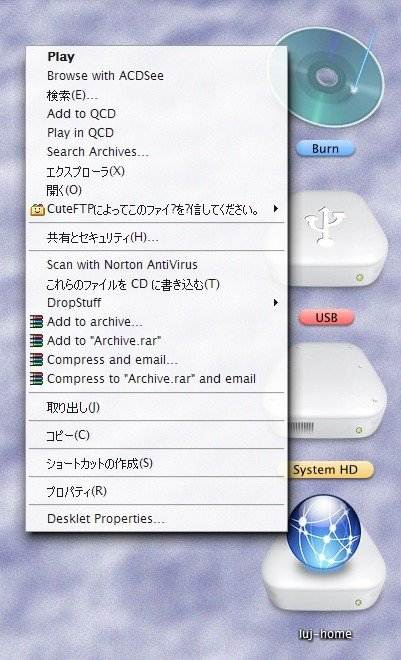
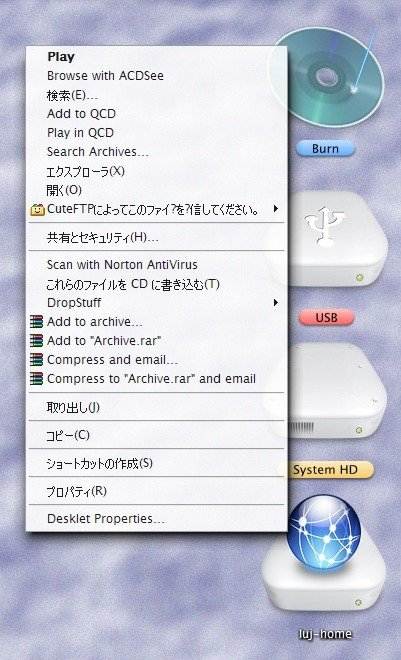
Ok... have been playing for a few minutes now... right-click is only sometimes like Y'z. Sometimes it's... nothing. Anyway in the attachment everyone can see the beautiful right-click menu with AveDesk Properties at the bottom!!!! This is new, right?

post-5545-1075337333_thumb.jpg

Clipboard01.jpg
Clipboard01.jpg

#106906

Originally posted by ji eun@Jan 29 2004, 08:48 AM

Anyway in the attachment everyone can see the beautiful right-click menu with AveDesk Properties at the bottom!!!! This is new, right?

Not new. It's been there for a while.

#107032

Looks fantastic PowderRanger :), but I'm having some trouble w/ %f and %t not showing any sensible values.

I get ywww and such w/ umlauts over the letters. If I set it as such: %D -%f; then I would get something like this "C --q1.2"

#107044

@Powder: You only have to use the to this post attached DeskletSDK.cpp file and recompile it.

DeskletSDK.cpp

Attachment: DeskletSDK.cpp

#107054

Originally posted by mimeryme@Jan 29 2004, 07:52 AM

Looks fantastic PowderRanger :), but I'm having some trouble w/ %f and %t not showing any sensible values.

I get ywww and such w/ umlauts over the letters.  If I set it as such: %D -%f; then I would get something like this "C --q1.2"

I'm looking for fix it, because I've found also this bug on one of the my machines and still searching the solution. Sorry.

Stay tunes ;)

#107083