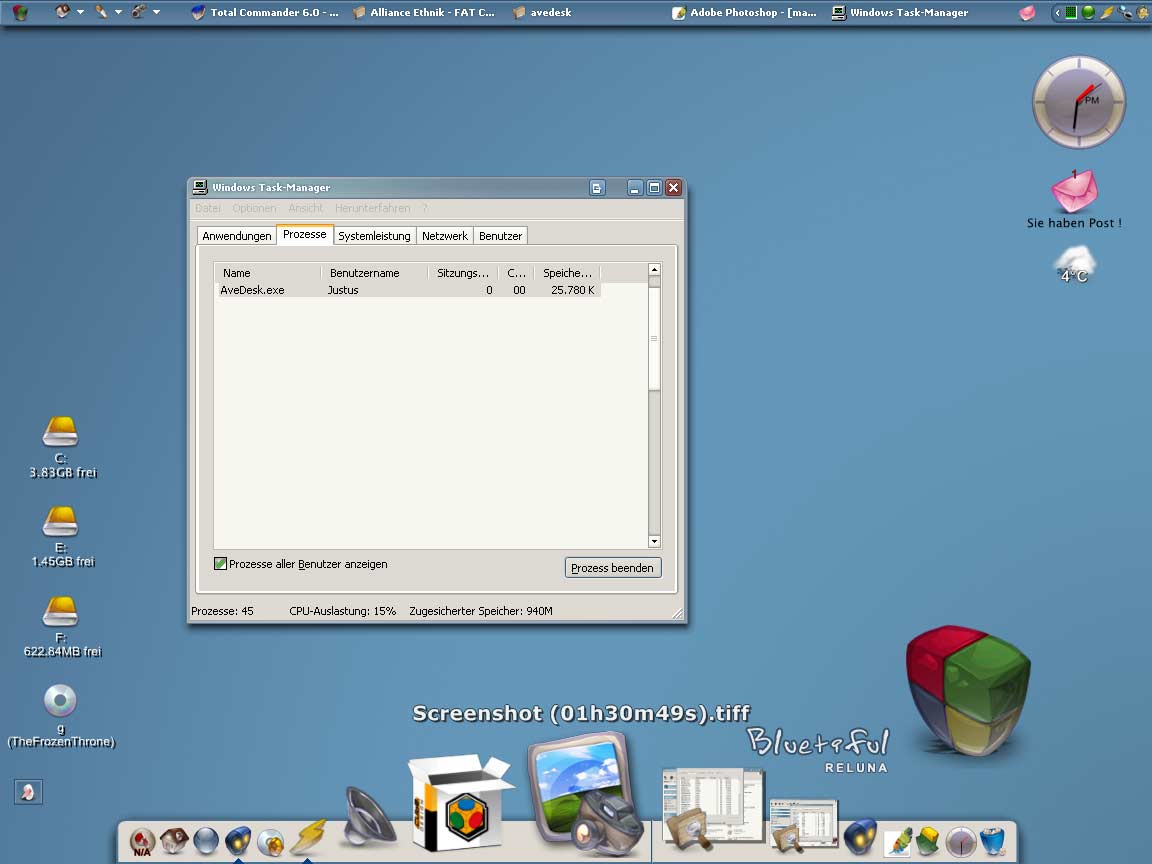
Avedesk Memory Usage?

I was wondering how much memory does AveDesk take on your system cause i feel it hungry:

i got a laptop, celeron 1,7GHz, 512Mb ramDDR, WinXP SP1a

i have

SysStat => weather

SysStat => weather forcast

2*SysStat => HD monitoring (the space left and 2 LED on the HD for the activity)

SysStat => Connection monitoring

PowerStatus

MailChecker

all this takes me about 15mb!!! wouarf...

tou can see the screenshot on: my website

http://kerin444.free.fr/index.php?category=windows

#104167

i have 3 items and i use about 5. but dont worry, we have been promised a resource friendly release with 1.1

-The Unknown

#104180

yeah i know Andreas told me for the memusage on 1.1 :)

i was just wondering if every body had as many desklets as i got and if there memusage was the same...

what kind of docklets do you have?? cause i guess SysStat takes more than a shortcut :P

#104205

i have 2 mountcheckers (4 my CD/DVD's), and a drive space monitor (4 my HD).

-The Unknown

#104222

I have 2 mountcheckers and one HD shortcut. Usage is absurdly low: the last few times I checked it's been like this... consistently. Simply amazing app.

post-5545-1074962696_thumb.jpg

Clipboard.jpg
Clipboard.jpg

#104255

im @ 9,802k with 3 mount checkers and a weather docket. Its all good tho, barley a pice of my 1.5 gigs :6

#104278

I'm at 7,700...Three shortcuts and clock.

#104713

For all you low-resource-apps-lovers, here is a screenie of the latest build of v1.1:

mem_usage.jpg

#104721

Sweet!

I finally ditched Samurize. One shortcut+PNG+dive space label was too slow.

The next release looks promising. All I really need is a drive space monitor that shows how much is taken up on my laptop's harddrive. From the looks of it, a single drive space monitor shouldn't have any problem!

#115265

av-9402.jpg is the living god!

edited for accuracy :P

#115300

That's not king, it is Jozsef Kiprich a legendary hungarian soccerplayer who played for Feyenoord Rotterdam in the beginning of the nineties. For Feyenoord-fans, he is a living god. :canadian:

@realitybath: :lol::lol: at the edit :)

#115303

not that good, eh? (powderchecker labels on mouse-over)

hoping for 1.1 ;)

#115311

Avedesk Usagei think he was talking about you Andreas :lol:

Anyway this is mine

#115313

@Brainbug:I know, it has been fixed in version 1.1, really -_-

@Tarik: :lol:

#115324

Hey kerin & AndreasV,

I have just started to get myself more familar with this very neat, promising app, in fact on my 800 Mhz Plll-320MB sdram (maxed) WinXP SP1 laptop, I did try out kerin's AveDesk Installer, and when just having (just) the 'Shortcut Desklet' applied, my usage was @ 10.5 k...

I was just looking to get the Crni Panther labels 'look', but I guess that I will wait for AveDesk 1.1 to be released...

#126116

the CRNI labels are in the 1.0 AveDesk GahbmwM5

#126130

Yes kerin, I see that they are included in your AveDesk 1 Installer...thanks...

Now after reviewing a whole bunch of the various threads on the AveDesk Forum, I will start to 'fool around' with it...

The Read Me Manual (included) is good, and to-the point with some very helpful tips & information...

;)

#126167

Hi Kerin,

Ok...I have it almost figured out, but I will post a pic:

AVEDESK.JPG

The top HD icon is a shortcut desklet and the path is set up fine, so all is good here...

But the Folder icon is also a shortcut desklet and the path is currectly set to the 'bottom folder icon' which is not a AveDesk shortcut desklet, but it has all my .lnk (shortcut icons inside)...

If I delete this bottom non AveDesk folder, then the actual AveDesk Desklet folder (of course) will not work...so how do I get all the .lnk files into the AveDesk folder, so that I can delete this folder and keep my Desktop looking nice & clean...lol

I'm pretty sure Kerin that you also were very helpful in providing a solution to a Yz Dock Path issue that I had with a Network Connection 'shortcut' @DT2...

Thanks, and I hope that I have now made this clear...

Oh yes, the bottom non-AveDesk folder icon is the original Windows Desktop Shortcut Folders icon that I have renamed and added a new icon imagine...

#126260

it sounds like you have linked your AveDesk object to the shortcut and not the folder.

-The Unknown

#126276

lol...yes theunknown, as I am still getting myself familarized with this very neat app!

What I have just done, and it works for all intensive purposes, is just move the bottom non AveDesk folder to 'My Docs' so my Desktop now has just the two clean Panther Crni labeled icons, and just changed the path of the AveDesk shortcut desklet to the new location of the .lnk file folder...

I'm sure that there is another simple solution, but hey I'm happy...lol

:rolleyes:

#126278

hey, if i get u right, your plan is, by clicking on the avedesk-shortcut desklet to have an folder opening with all yourself inserted shortcuts to your progs.

sounds simple to me. put all your shortcuts (ink) into a folder, place this folder somewhere (or even better take your "quick launch" folder), set the path into the avedesk-desklet and u should be done. is that this u have planed?

#126285

Hmm, I think the 1.1 shortcut desklet should include an easier option for settings shortcuts to folder. :rolleyes:

Oh well, back to my PowerPC assembler labcourse :(

#126290

Originally posted by Brainbug@Mar 9 2004, 05:43 AM

hey, if i get u right, your plan is, by clicking on the avedesk-shortcut desklet to have an folder opening with all yourself inserted shortcuts to your progs.

sounds simple to me. put all your shortcuts (ink) into a folder, place this folder somewhere (or even better take your "quick launch" folder), set the path into the avedesk-desklet and u should be done. is that this u have planed?

BrainBug,

Yes, this is/was my plan for my original WindowsXP desktop shortcuts folder, what I did was to setup a AveDesk Shortcut Desklet to have same 'imagine icon'--->it matches my AveDesk HD Shortcut Desklet icon...have the path to my AveDesk Shortcut Desklet Folder, and then just moved the original to another location on my system...

So now I have the nice, clean Crni Panther labels, with only two AveDesk icons, and they both function (opening up) the way I want them to...

AndreasV,

Yes 'University Studies' are very important, and definately looking forward to Ver: 1.1...

P.S. All WindowsXP 'shortcuts' have the file extension--->xxxx.lnk (this is a lower case l not lower case i...lol, yes it does get confusing)

#126388

25 mb :blink:

using 4 powdermount, mail and weather.

post-3308-1081424405_thumb.jpg

screen_s.jpg
screen_s.jpg

#141542

25 mb 

using 4 powdermount, mail and weather

Memory-usage has been decreased in the upcoming 1.1 version.

#141598