[release] Memory Cleaner V. 0.2 Final

As I've promised, here is the new version of MemCleaner. :D

Look at che change log to see if your request have been included, if no post your feedback and wait for new release. :lol:

Rel 0.2 01/20/2004

- Reduced self memory usage.

- Personal settings and selected processes are saved on exit program to Settings.XML.

- Adjustable timer interval for cleaning cycle.

- Added skinning support.

- Switchable skin support to allow system theming.

- Right click on process list to select/deselect all items.

- Right click on systray icon to manage program actions.

- Mac-style processlist (with current sort column with uniform back color).

- Systray icon changed.

Download here

Cheers, Marco. ;)

#102794

Good work ! thanks (Y)

Aviel.

#102797

Thanks for updating this wonderful neat application!

Downloading... ;)

#102826

Ohhh! Good work man!

Useful AND cool looking!

#102864

My freinds and I love this tool :rule: Beautiful job Keep up the good work

#103036

I just d/l it and it don't work, I guess it's my bad!

Anyway, what happens is that I try launching the program, and it comes up with an application initialization error.

Any ideas?

Thanks

#103122

:woot: WoW Amazing Work !!! ... you have done a Grea Job dude !!! iLove this app Keep it Up (Y)

#103124

Very nice, PowderRanger.

I still have two (minor) issues, though - it'd be really nice if there was an option to not show the dialog on startup, and to have it automatically "grab" processes whenever it encounters a new one.

The memory usage is much better now (~620K)... Is it still written in .Net?

Other than the two "feature requests", I'm ecstatic with Memory Cleaner 0.2. Thanks, and well done :D

#103339

@ gone2far:

have you installed MS .Net framework 1.1? :blink:

@ Stevie_BM:

Yes it's still in .Net lol, I'm currently use a version that starts in hide mode. For the second request...I hope it's a good idea and I think I will include in the next version ;)

A little news: MemCleaner will switch his name to PowderCleaner in the next ver. under suggestion of AndreasV :P!

Thanks to all and have a lot of fun!! :D

#103542

hey powderRanger can you add the option "start in minimize mode", coz it will be very usefull... . will you please ?

thanks :)

:rule:

#104059

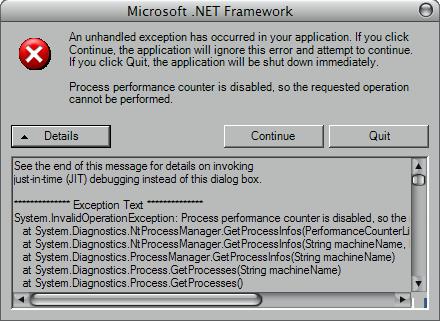
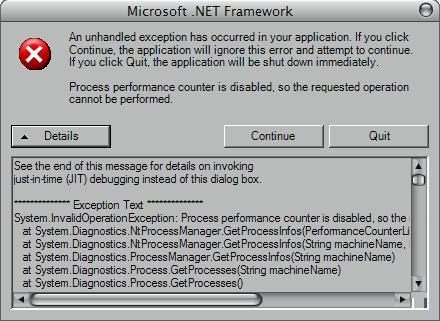
my memcleaner was working fine for 1 week, but now here is what i got

post-304-1075265875_thumb.jpg

memcleaner.JPG
memcleaner.JPG

#106375

Originally posted by ChiLam@Jan 28 2004, 05:57 AM

my memcleaner was working fine for 1 week, but now here is what i got

mmmmmh.... :blink:

It seems that your system doesn't run correctly the ProcessMonitor service....if you heaven't installed new progs or disabeld manually the service, it's a strange fact...I'm going to catch in MSDN. I think that you have already restart your system, yah?

BTW: have you installed MemCleaner on your server :D ??

#106891

i can't find any ProcessMonitor service in the services.msc.

and im not on server too.

#107051

Originally posted by ChiLam@Jan 29 2004, 08:11 AM

i can't find any ProcessMonitor service in the services.msc.

and im not on server too.

OK: I've found the problem, even if it doesn't come from MemCleaner but from .NET/Windows. I'll fix in next release.

BTW: have your system account administrator privileges? Otherwise some processes cannot expose to their property to the program, generating therefore an error. ;)

#107097

yup, i have admin privileges.

does it have anything to do with "password protected" account?

#107266

Originally posted by ChiLam@Jan 29 2004, 07:11 PM

yup, i have admin privileges.

does it have anything to do with "password protected" account?

Nah, nothing....

was only a informative question...thanks ;)

#107284

HEY man.... what`s up !!

Well dude i`ve been using this cool app. since the begining

i`ve noted a few bugs aver here :(

it still can`t remember wich app i checked before... BUT the WEIRD part.. is that it only happens with a few Exe`s ... Example.. it happens with : Savanna Browser, Object bar, Corel Draw ..... maybe (only) when i have tons of apps checked.... who knows.... but...

man this app is Amazing but .. this bug is really anoying :(

keep it up man... cheers ! :canadian:

#108508

Originally posted by IngeneerMind@Feb 1 2004, 02:33 AM

HEY man.... what`s up !!

Well dude i`ve been using this cool app. since the begining

i`ve noted a few bugs aver here :(

it still can`t remember wich app i checked before... BUT the WEIRD part.. is that it only happens with a few Exe`s ... Example.. it happens with : Savanna Browser, Object bar, Corel Draw ..... maybe (only) when i have tons of apps checked.... who knows.... but...

man this app is Amazing but .. this bug is really anoying :(

keep it up man... cheers ! :canadian:

Thanks for report, IngMind, but I think this is problem a little extended above what have you seen.

In fact, Windows call it's processes basically in 2 ways: by ID and by name.

Some apps (multithread) starts some threads with the same process name, so it's little hard to save the exact process in a INI file.

Therefore, in the next version, I've plan to include a "Include new processes automatically", so you don't need to check every time the processes.

But, I ask you to be patient, because my work projects are very hard in this period :shy: and I don't know when I can put my hands on it.

Thanks ;)

#109007

do not Worry Podwer Ranger, you have done a GREAT job So far !!! keep it up man !!

and Good luck ! :)

#109280