Official Wishlist For .objectdock 1.x

I`ve been using OD ever since the version 0.65 and i must say that with 1.0 it really reached maturity. I know that OD is freeware and that Jeff and guys at StarDock don`t take OD as top priority but there are few things i`d like to see implemented in the next version of OD.

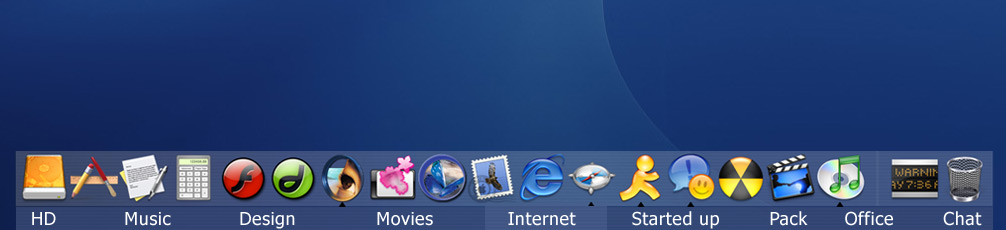
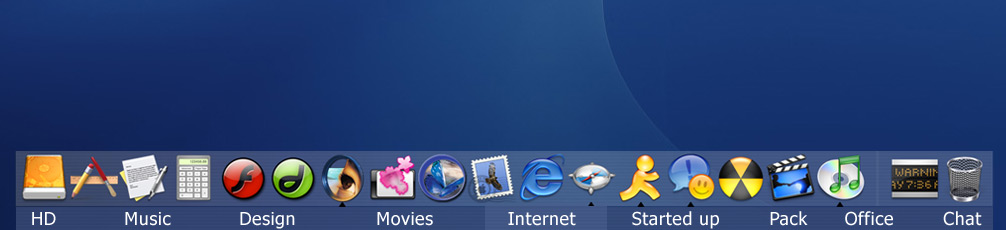
First is the idea by Orange about a "sub dock" or dock tabs that would enable users to have different OD configs for Internet, Games, Progs etc. It would be great if that tab could also be hidden and/or disabled so those who don`t like it, simply don`t have to use it. This would make OD much original than any other dock and i`m sure it would attract even more users (and in the end, possible StarDock customers) (see the pic below)

Second is an option to detach taskbar part of OD or have two ODs running at the same time so we could use one as a taskbar and one as a normal dock.

Third is an option to preview dock themes (like it was possible in Yz via a docklet). I have lots of themes and i never know how excatly do they look untill i apply them and it takes lots of time to find the one i want. I think the whole point of themes is to have more than one config, but if you can`t easily find the theme you`re looking for, it turns from fun to a problem.

Fourth is just an eye candy but a good one i think. The implementation of autofocus in 1.0 is one of the options i could not live without but when always on bottom autofocus is on, the transition looks a bit harsh and "cut". It would be great if show/hide dock could be done via fade in/fade out effect (with an option to disable this for users with slower machines). This would be another WOW over the other docks.

Fifth is an option to edit/make attention effects. I`ve had this idea ever since multiple attention effects came out. Some users complain about icons jumping too high, some don`t like this, some don`t like that, so why not let them make/edit the effects themselves? This would be yet another + for OD.

The only bug i found and would like to see fixed is to stop icons running over the edge of the screen when zooming. If the dock is in the corner of the screen and you mouse-over it, the icon(s) that are the nearest to the edge of the screen, go behind it and can`t be clicked/seen.

Thanks to Jeff for making this great prog and for listening.

More ideas and suggestions are welcome :)

PS I know about drag-to-dock (to run or move/copy a file/prog) request, but it`s been requested many times by now.

PPS This is one big request post :D

post-1068-1074551964_thumb.jpg

RuleDock_by_Orange.jpg

#102445

I'd like to have multi-user support. I could set up different configs for my sister and my dad.

#102451

1. I would like to see implemented the ability to tile foregrounds. It will create

endelss possibilities for theme making.

2. Also it would be nice if we could have settings to resize and position icons within the dock.

#102471

Originally posted by ntchemist938@Jan 20 2004, 12:04 AM

1.  I would like to see implemented the ability to tile foregrounds. It will create

endelss possibilities for theme making.

I think it's already there...

#102484

something i realy miss is an highlightment of the windows that have been to "attention"... because when the animation is finished, you don't know if a window was requesting focus...

another thing is less memory usage :P

OD rocks

#102498

nice thread unv. ;)

i, for one, miss the smoothness control that yzdock had, it was something like 'transition smoothness' controls |

expand for magnification -< no transition________ smooth >-

Reduce for magnification -< no transition_________smooth >-

that would be great, it gives the dock a lot of 'warm' factor :)

The only bug i found in 1.0 is that the autofocus is not perfect at all. Sometimes you have to move the mouse in and out the dock to get it work properly.

Thanks for your time jeff. :)

#102505

ya, i was able to make the magnification almost perfect with y'z dock, thanks to that panel, here in od, the magnification feels too light, not sharp enough.

Theres not much other things i'd wish for the dock, except maybe tabs, and if at all possible the genie effect, but that would probably make apple shut down od. :(

#102548

An official OD menu, because while KKmenu is fantastic, and I appreciate the hard work gone into it, it would be nice to have a menu integrated into OD properly, and FOC ;)

#102595

Originally posted by Viper@Jan 20 2004, 03:09 AM

An official OD menu, because while KKmenu is fantastic, and I appreciate the hard work gone into it, it would be nice to have a menu integrated into OD properly, and FOC ;)

I know you can do this by "long clicking" on a folder. But maybe you could specify folders where popping up a submenu is the default behaviour.

My wish --> An integrated tray docklet where the icons can be used just like the real tray. Maybe tiling them 4 in a square like kkmenu.

#102686

the MOST important feature I think that we must have is: an option to

seperate the dock to 3 parts:

APPZ

TaskBar

SysTray

so U can have 1 big dock for all or 3 seperate small docks around the screen...with display properties for each! :rule:

#102727

One useful feature would be to add a little arrow somewhere to hide the dock, instead of using auto-hide, just like in Gnome.

#102770

Originally posted by toavs@Jan 20 2004, 03:56 PM

One useful feature would be to add a little arrow somewhere to hide the dock, instead of using auto-hide, just like in Gnome.

why would you do that? :blink:

but it`s your suggestion ;)

#102944

-Place the taskbar between Appz and Recycle bin, (like in moby, or the real Mac Dock)

-Force exit option in taskbar for hanged aplications. (Like in Mac Dock)

-Less Memory Usage...

-Aladdin effect when maximazing windows from the dock.

-Built in docklet to manage usb drives.

...keep on thinking... ;)

B-Sided

#103091

Originally posted by Ludge@Jan 20 2004, 04:38 AM

I know you can do this by "long clicking" on a folder. But maybe you could specify folders where popping up a submenu is the default behaviour.

My wish --> An integrated tray docklet where the icons can be used just like the real tray. Maybe tiling them 4 in a square like kkmenu.

I agree completely on the long clicking thing. Would be fantastic if a short click to bring up the menu could be specified as the default behavior.

I agree about the tray docklet, but instead of tiling 4 (or however many) of them, how about having an icon that when you clicked on it, a menu like the "long click" menu popped up, with all your systray icons in it?

/karp

#103161

MobyDock's "ignore list" feature (it keeps the icons you specify from appearing in the running tasks section). If you have OD set so clicking an icon brings the existing window to the front instead of creating a new instance, this feature can really save some room on your Dock.

When OD starts up, make it perform whatever program code occurs when you check "Autohide" (the magnification tends to get stuck unless you turn on "Autohide" and turn it back off once the Dock has loaded). Why should users have to load ObjectDock with a batch file to solve this bug?

While the Dock is animating, both the icons AND labels should appear on top of all other windows.

Thinner separators. :)

Be able to have the running tasks show up on the left side and open folders show up next to whatever icons the user has placed in a special section on the right (the user may choose to put items like the Recycle Bin in this section).

#103199

Originally posted by jrkarp@Jan 22 2004, 06:03 AM

I agree about the tray docklet, but instead of tiling 4 (or however many) of them, how about having an icon that when you clicked on it, a menu like the "long click" menu popped up, with all your systray icons in it?

/karp

But then you can't see all the icons by default. And the icons are there to notify you of things. Well, mine are anyway.

Another wish... for command prompt windows to show up in the running tasks section. At the moment they don't unless they were already running when you started OD.

#103315

I would really like to have the possibility top have multiple dock, say left-bottom-right.

#104697

well... If I can request :D

A better engine

Disable that sort of blink when the dock is hided (when you unhide and hides again, it blinks). If you dont know what Im talking, place some icons in the range of magnified size is and you will see... Or run some app maximized with black background and you will see the blink.

Respect where the exe file is executed (The path of the exe file located).

Auto Window Ordening when is setting a docket (when you are Always-On-Bottom and try to configure a docklet like SysStats, the setting window goes to bottom too and it hides!!).

Less memory uses.

Position Margin (like yzdock, I REALLY miss that feature).

Autoposition/Respect the original position when the resolution change.

and some another request than I dont remember at the moment but later may be later I will remember...

#104895

Originally posted by Mad_Mike@Jan 22 2004, 10:36 AM

MobyDock's "ignore list" feature (it keeps the icons you specify from appearing in the running tasks section).

yes, exclusion list (good for use it with your iTunes or messenger docklets)

and integrated recycle bin docklet, with drives eject options........ and place the running apps betwen the taskbar and the recycle bin.

Did I mention exclusion list?

#109262

Originally posted by Mad_Mike@Jan 22 2004, 11:36 AM

MobyDock's "ignore list" feature (it keeps the icons you specify from appearing in the running tasks section).

I absolutely aggree with that!

#109392

I can't believe no one has requested the ability to drag documents onto icons, to open them. This is something yzDock can do, and I really miss it. (And, please, if it is possible somehow in OD, do tell!)

I'd also like to see the running items to the left of the Trashcan, at least as an option. I'd rather have the Trashcan always stay at the far right.

#111260

Originally posted by Tom McBaum@Feb 7 2004, 10:38 PM

I can't believe no one has requested the ability to drag documents onto icons, to open them. This is something yzDock can do, and I really miss it. (And, please, if it is possible somehow in OD, do tell!)

I'd also like to see the running items to the left of the Trashcan, at least as an option. I'd rather have the Trashcan always stay at the far right.

i agree with that too, in yz you where able to drag stuff to the recycle bin, open psd's by draging it to the ps icon...etc.

just a note.

#111365

Originally posted by Tom McBaum@Feb 7 2004, 06:38 PM

I can't believe no one has requested the ability to drag documents onto icons, to open them. This is something yzDock can do, and I really miss it. (And, please, if it is possible somehow in OD, do tell!)

I'd also like to see the running items to the left of the Trashcan, at least as an option. I'd rather have the Trashcan always stay at the far right.

I've been asking for this forever and Unbeliever put that as a PS in the original post for this thread, so I didn't write it down yet again....but I really would like to see that too.

#111451

1.Editable Height Bounce jump

2. Ability to drag Folders into the dock and acess them trough the dock

3. Taks to the right of the bin, and the bin on the far right

5. I think that is all

#111456

well 2 more features I'd like to see (other than the one I mentioned earlier) :

1) labels like in AVEdesk or even customized ones

2) when hovering over the dock, cursor should change to a hand since it's pointing on a 1-click-link.

#115550