[preview-release] Systemx V0.1 Alpha

Features:

- Fully customizable Icons (currently 32x32 pixel PNG ONLY !!! Do not use any bigger or smaller png's)

- Fully customizable background Themes (Striped, Brushed and Milk included)

- Not every icon is functional (will be implemented in the next version)

- No Drag&Drop Feature (next version)

THIS IS JUST A TEST-RELEASE! LINK WON'T BE UP LONG! Grab it now and help me bugfix this thing.

EDIT: SETUP UPDATED

hopefully the nasty error disappears with the latest compilation.

grabby the new file here: show me the FRESH money

#102264

Wow! A real replacement for the control panel, cool!

#102270

Great news kawika! ;)

Thanks... downloading it... NOW... :naughty:

#102283

I have this possible bug:

screenshot-9380.jpg

Prompt reply is appreciated :D

#102292

I get the same...???

#102336

I get the same bug and if you keep hitting ignore I get 3 more files not found. After that it still loads though.

#102342

thumb-9384.jpg

Biggie Working for me

Maybe something with .Net or Wintasks

#102344

Originally posted by XJOSHATTACKX@Jan 19 2004, 03:20 PM

I get the same bug and if you keep hitting ignore I get 3 more files not found. After that it still loads though.

exact same situation here

works like a champ. i am looking forward to the later releases. what features are on the table for the next release, or even for the final?

#102346

Works good nice and fast when clicking everything pops up nice

Good Stuff

:D

#102348

wasnt the eventual goal to have it work like the real System Preferences, as in the stuff would all show up in the window, so it wouldnt have to open up the Windows windows ;)

this is the idea i got from the other thread about this project

#102351

should we post error reports here, or would you rather us pm you or email you or something else?

#102372

Work good for me :D thanks

Aviel.

#102381

Working very nicely for me. In fact, I don't get the errors you guys got... but I need to restart the system though. ;)

Looking forward to updates! Thanks again, kawika. :D

#102394

i guess i'll just post an error report here

clicking appearance opens themes, not appearance

my account links to the accounts, not the account that is currently active

the quicktime properties open minimized

thats all for the errors i have found, if i find any more, i'll edit this post

#102415

i'd really would like to try this one out. but may i be a pain? i don't like Setup programs :banging:

is it possible to distribute this (even moreso because it's a pre-release) in Zip format instead of setup?

#102425

it takes 2 seconds to install it :blink: ...

#102438

oh jesus.

so many replies. i'll look into the setup bug first thing tomorrow morning.

distributing without the actual setup would be a pain, since you ppl would need to have to register several visual basic runtime files, the zlib.dll and a png active x manualy.

good news would be that everybody who already installed the alpha-version won't need the setup program for further updates anymore.

so i'll have two releases from now on. a full setup and an update version (zip-format).

REQUEST ONE:

I still got some icons missing.

Would be cool if anyone would happen to have these Icons laying around somewhere:

... Security-Icon

... Appearance-Icon

... Remote Desktop-Icon

... Accounts-Icon

REQUEST TWO:

please give me screenshots of where the faulty links should go at (actual Windows XP Control Panel). Since I am on a german system, i am having difficulties finding the correct settings for the icons. (like account & accounts)

REQUEST THREE:

where should these go to:

... Dock

... Appearance

... CDs and DVDs

... ColorSync

... Sharing

... Universal Access

... Classic

... Startup Disk

glad you like it so far.

future implementations would be:

... full in-program control of all functions (1:1 port of OS X System Preferences)

... resizing of SystemX (1:1 port)

... drag&drop to favourites (1:1 port)

... optimizing startup-speed

... figuring out the setup-bug

... reading the whole damn registry to find all the settings

...

... placing the easter egg in there (the guy who helped me figuring out the png-problem, will be pm'ed on how to access it)

... uhm, lots more, which i can't think of right now, since it's 1am and i haven't slept in like 24hours

hopefully, the next release will take place this week, if my requests can be handled by then ;-)

have fun with it ...

#102493

where should things link to:

dock- this is a sketchy one, there are lots of different docks, so this would need to be customizable per user.

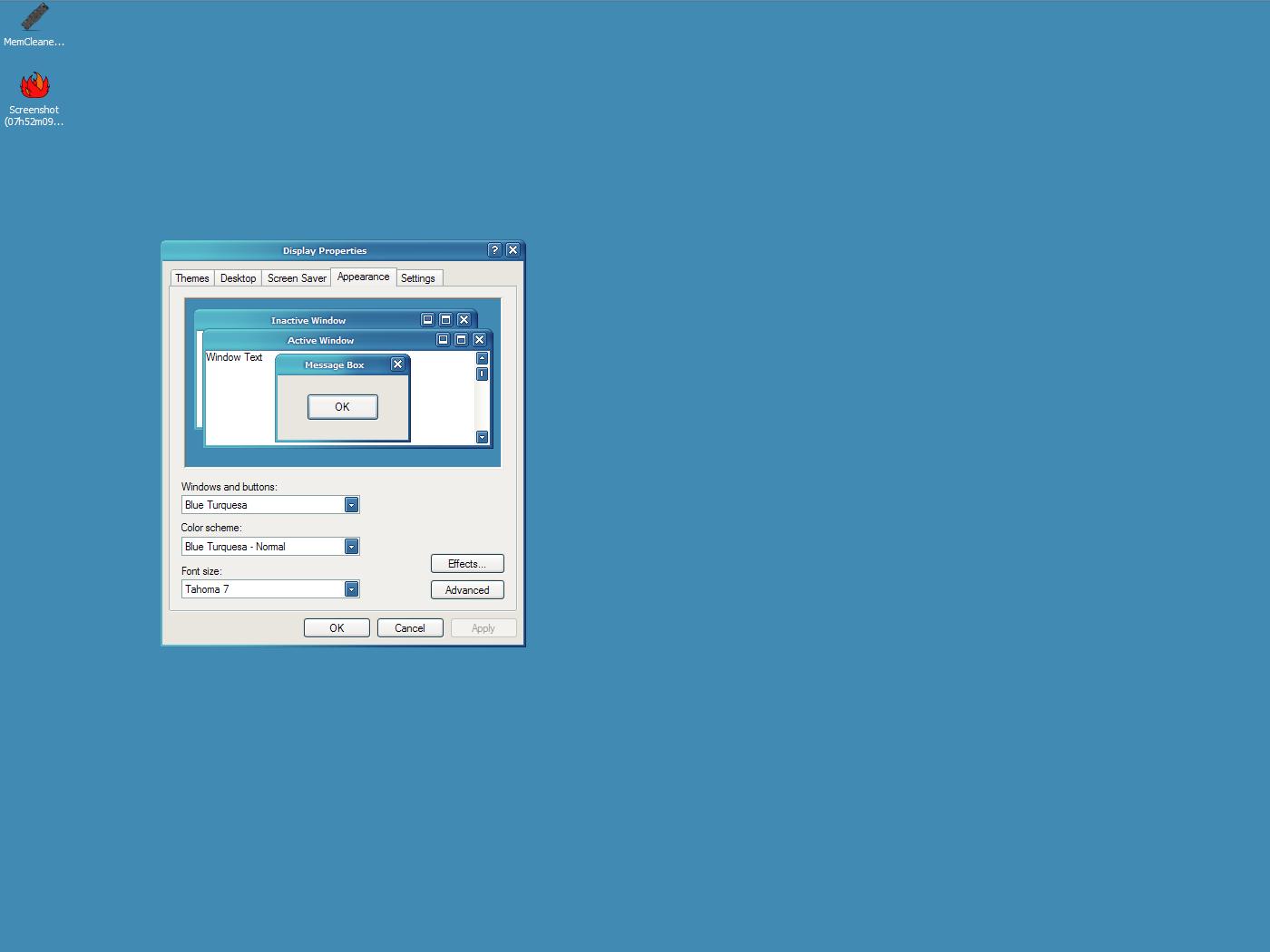
appearance- there is a tab in the same dialog box that says appearance.

cd's and dvd's- default options for when a cd is inserted (i dont know how to get to this)

colorsync- no idea

sharing- no idea

universal access- no idea

classic- there is really no use for this in windows

startup disk- there is a file called boot.ini that should be in the highest level of the main windows drive

the attached image is what the appearance tab should link to

post-6747-1074556880_thumb.jpg

Screenshot__07h52m30s_.jpg

#102503

Looks and works great...I ignored the missing file messages at install and it works fine...many thanks.

#102508

systempreferences100303.jpg

well Here is the Panther one hope this helps with location of the icon links

#102515

it's a shame... it's not that i have anything against it, it's just that most of the DLLs that should be registered can usually (not always) be accessed if stored on the same folder as the EXE. it happens a lot. i don't like registering too many DLLs around lol :D

might try this later on :)

looks very cool, btw.

#102569

It's pretty cool, congrats!

How about this:

cd's and dvd's- Autoplay properties/defaults?

colorsync- customizable per user, Adobe Gamma could be put there

sharing-sharing&security properties for c:/?

universal access- Accesibility options

classic- command-prompt window or properties?

startup disk- c:/ properties?

#102587

HEY!

check this out:

might help you in your dream...

http://latourfl.com/panther/systemprefs.html

#102618

To further the REAL look and feel of the Panther Sysprefs, here are some pointers.

1. Desktop/Screensaver should be combined as well as keyboard/mouse

2. Add Expose'

3. Icons, Icons, Icons

4. Remove the 'My Account' and just use 'Accounts'

5. Change Internet to '.Mac'

6. Change 'and' in Date and time to '&'

7. Replace or rename 'remote desktop' with something Mac related.

8. Alphabetize the rows

those should do it.

So far, GREAT app

I'm including a pic of my sysprefs that i updated to look like Panther

#102627

Looking great, definitely nicer to look at than icky Windows Control Panel ;)

Can't help you out on the icons as I'm only a wannabe-Mac user myself. But great work, can't wait 'til it's finished. :bow:

#102706