[help] Windows Explorer Fonts

Hiyas,

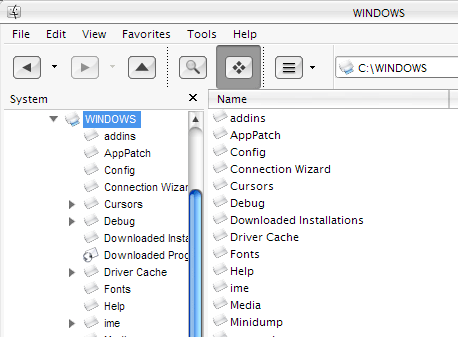
I'm not sure if anyone else experiences this, but on my laptop in Windows Explorer there are two different fonts displayed, one on the left folder panel and one for the right file panel... I want them to be both 'Lucida Grande', but for some reason the left one is Arial or something else.

In Display -> Appearance -> Advanced -> Icon, I've the font set to Lucida Grande already

Any help would be greatly appreciated :)

post-357-1074190212_thumb.png

Explorer.gif
Explorer.gif

#100329

you can try changing the default system font to lucida grande by doing this going into the registry, finding:

HKEY_LOCAL_MACHINE\Software\Microsoft\Windows NT\CurrentVersion\FontSubstitutes

and changing the values in "MS Shell Dlg" and "MS Shell Dlg 2" to lucida grande. reboot.

that'll change the system font all over, but i'm not sure if it'll do what you want. there might be another solution, so i'll keep looking.

#100330

I'll give that a try immediately, thanks!

Hmm that didn't work, I have a feeling there's something stuffed somewhere, that's prolly why its displaying another font... after those changes its still the same... hmm

#100332

The changes to the registry that dreamz mentioned will definately change the system fonts, so the problem could lie in the visual style you are using, it could be calling for a version of Lucida Grande you haven't installed, I've seen many different versions - Lucida Grande, LucidaGrande, Lucida Mac, Lucida Mac Bold, Lucida Grande Bold....the list goes on and it is quite ridiculous to tell you the truth. What I usually do is go into my .msstyles with styleBuilder and change ALL the font info over to either Lucida Grande of Lucida Grande Bold, depending on whether it needs to be bold in a certain area. I don't install all the other varied fonts or deal with them so as not to clutter up my fonts folder and to make things much cleaner.

Also one thing not mentioned which I'm sure you know but I'll mention it anyway, any font changes to the registry don't show until after rebooting.

Hope this helps! (Y)

#100519

DOH! I didn't see dreamz' instruction to reboot 'til just now, sorry! And what happened to the "edit" button, I would have just edited my last post but there was no edit button..... :rant:

#100520

edit is under your avatar. beside the 'quote' scroll

#100532

I had this problem with certain visual styles awhile ago. Even Dreamz' fix didn't work, so I learned to live with it. After some time, as always, the system got unstable so I reformatted and since then this problem has never returned. Maybe off-topic, but I think the trouble began after tampering too much with the Fonts folder on my Japanese XP. Some of the fonts included in VS zip packages do not support non-Roman characters.

#100550

Thanks for your help guys, I gave Max Power's suggestion a go by editing the visual_style_name.xml file that StyleBuilder extracted, made sure all the FONT tags were assigned 'Lucida Grande' ... opened up StyleBuilder, clicked apply and bingo! It worked! Its so great to be part of such a friendly and helpful community, thanks again!

Just to add, you were right, there were many entries of 'LucidaGrande' without a space in between ;)

#100552

Sweet! Good for you, man. (Y)

#100553

nice! i learned something! :lol:

#100561

Originally posted by corykg@Jan 15 2004, 09:46 PM

edit is under your avatar.  beside the 'quote' scroll

@corykg: Thanks, not used to this new set-up. :(

You're welcome people! Where I work I deal with fonts all day long on a Mac and believe me, they're a real pain! Every time I see that a new visual style includes a whole pile of these Lucida fonts I go nuts! :rant: I use the Lucida Grande truetype font I created directly from the original Mac font for both the regular and bold weights on all the visual styles and I never have a problem such as the one that started this thread.

#100622