
Samoonrize

Hi, this is my first post so... don't be too cruel...

I remember that someone (maybe tourmalet) asked for a docklette similar to the MoonDock by Gary C. Martin, so I decided to play around with samurize... and the result is in the screenshot.

In the zip file you'll find also a script to show only the moon on your desktop.
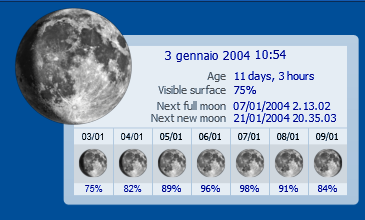
samoonrize.png

I guess that the visual basic script could be easily ported for ObjectDock.

Credits:

To Gary C. Martin for the idea of MoonDock, a MacOS X Dock application you can find at http://osx.garycmartin.com, and for the moon images (permission

granted).

To Oliver White for the public domain Visual Basic routines I used as a starting point to write the visual basic script that computes the moon age, you can find the script at the following URL

http://www.freevbcode.com/ShowCode.asp?ID=3336

Regards.

#98759

I told you that was my first post... i forgot the link...

to download go to www.samurize.com, download section, miscellaneous category.

Sorry...

#98762

Thanks for the link, parkaboy. ;)

And welcome to A-S! :who's your daddy:

#98780

Glad to be here silencedge.

I have fixed a prob with the international date format in the vbs scrip and re-uploaded the zip file.

#98784

Great work, and welcome

#98786

Originally posted by parkaboy@Jan 12 2004, 11:40 AM

Glad to be here silencedge.

I have fixed a prob with the international date format in the vbs scrip and re-uploaded the zip file.

You're most welcome. ;)

Thanks for the update. Shall be downloading it once I get home. :lol:

#98788

Hi Parkaboy

Welcome to the board. This looks absolutely wonderful. AndreasV did say he would try to make this for ObjectDock, but he has been rather busy recently with his marvellous AveDesk :D

I'm not able to get to my PC until later, (stuck on my Mac - how terrible :rolleyes: ) so cannot try it at the moment.

Once again thanks for your work and hope you enjoy AquaSoft.

Tourmalet

#98791

Thanks alot, this is going into my weather config! As if I dont have enough crap already...

#98826

Wow, outstanding first post ;)

Thank you!!

What do you mean dont be too cruel?!!?!? <_<

#98829

Welcome to our humble abode. Enjoy your stay and make yourself feel at home. Would you like something to drink? Water? Tea? Jack and Coke?

This is a neat little script. It always the little things that count.

@ Seph - :D

#98866

Powerful first post, indeed great start (Y) Hey people, another Samurai around :lol: Thanks for the script!

#98936

Not that I myself would need to know anything about the moon except that it's not falling to earth but this is a great widget! It makes me wanna download it just for the hell of it! I think I just might too. (Y)

#99166

Tnx parkaboy, Great Work!!!!

Grande Parkaboy Bel lavoro, finalmente anche noi poveri pizzaboy facciamo qualcosa di positivo.

#99293

Thank you all guys :D

Thank you for the welcome, I'm really happy to know you appreciate samoonrize (yeah I know it's a script not so useful ;))...

Just one thing to wizard... I think the download link in the homepage is not correct, it links the orignal vb script by Oliver White and not samoonrize... anyway...

Any bug to report?

#99367

Absolutely beautiful job parkaboy!

I just want to add a suggestion for what people could link the moon icon to. In the original MoonDock, if you click on the moon you get a window displaying some detailed moon phase information. Screenshot: http://osx.garycmartin.com/moondockhelp/mo...kfullscreen.jpg

There is a similar and very small application for Windows that essentially does the same thing. It's called MoonTool, get it here: http://www.fourmilab.ch/moontoolw/

The only thing it lacks is the moon phase names (e.g., "Waning Crescent," "Waxing Gibbous," etc.). It has a similar custom date and time feature that MoonDock has, however, it's inconveniently located within options. Also the icon in the app is low quality and it doesn't have the neat feature that displays the name of the moon detail you're mousing over (as seen here: http://osx.garycmartin.com/moondockhelp/helphint.jpg).

Fortunately, the author has made the source code available (hint, hint ;)).

Anyway, hope this proves useful,

::evildoer

#100464