 Aqua-Soft Forums
Does any one know how to get rid of these border? Msstyle btw.
Thanks in advance.
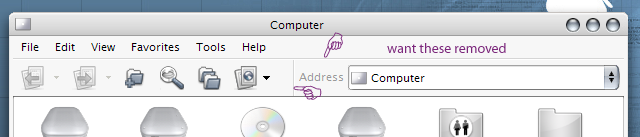
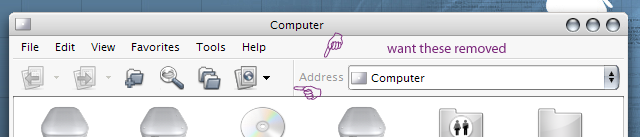
Does any one know how to get rid of these border? Msstyle btw.
Thanks in advance.
3dcc might help.
see this thread: http://www.aqua-soft.org/board/index.php?s...c=9332&hl=lines
You're not the first person to ask that question. And you wont be the last.
The survey says.. no. You can't.
Well, Deleted is kind of right but there are ways around it.
With an unskinned gui you can change the shadow and darkshadow properties you'll find in 3dcc (or whatever those things are called).
With a msstyles file you would need to go into the file with an editor and change the things manually.
The only problem is when you get rid of those lines (by making them same color as other elements) certain parts of the gui are also affected. So while you're making the title area nicer, you sometimes end up making the menus or some other area unusable.
it might only work with this lh msstyle but i know of a regkey that came with it that at least gets rid of the top line (but makes your menubar move to the bottom) i am on my mom's computer so i can't post a copy of the regkey but if you go here you can get it with the longhorn pdc msstyles theme.
But KoL's Panther theme or generally themes with bitmap as background don't have those borders. Is it because of the bitmaps overlapping them or what?
So say I throw in a white bitmap, would that solve the problem?
You must give the EdgeHighLightColor and EdgeShadowColor the same Color how your Toolbar.
Path:
GLOBALS-EdgeHighLightColor= 246 246 246
Rebar-Band-EdgeShadowColor = 246 246 246
the BMP's use as the background for the toolbar don't overlap these borders.
the BMP's are used as the background , the text, button images, and the borders are drawn overtop, by windows.
the way that the better MSStyles seem to get rid of this, is to make the borders a colour that blends in with the pinstriping.
if you put a white background on the toolbar, you would have to make the border colours WHITE to make them dissapear.. just as if you made the background all red, you would have to make the border colours red.
the border is drawn by windows, based on RGB values, so there is no way to replace the border, with a BMP. (it's been tried to have a Magic Pink BMP for the border, to make it "Invisible")