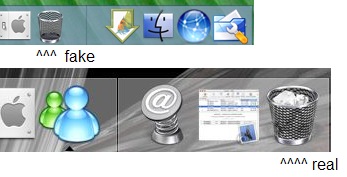
Od Trash Position

Sorry for my english and sorry if this question was already been asked.

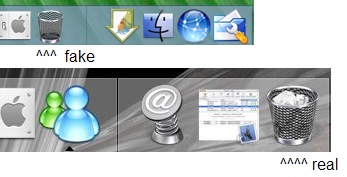
But don't you even annoyed that Recycle Bin icon in OD isn't in the correct place, on the right side of the dock, rightner that tray icons?

Any way to fix it? Any docklet or smth. else?
post-1896-1070237862_thumb.jpg

trashposition.jpg
trashposition.jpg

#84531

youll have to edit some files, i dont know which ones!

#84533

Not exactly sure what you are looking to do here, but if you are complaining about the task bar you can go into the settings and place it on the left side of the bar or remove it totally. If you need to just move the recycle bin that can be done by just dragging it to the location you desire.

#84540

i don't think it cn be done even with a docklet, although i thought of an idea that not only could put a trash icon on your dock but also could put a trash icon on windows 3.1's desktop. try opening a trash window and minimizing it. in windows 3.1 it will put a trash icon on your desktop and in od it will put a trash icon on the dock. it will be on the taskbar (though i don't think you can have it on the right side all the way)

#84569

Yeah... That's bad.

I wonder there's still nobody emailed Stardock 'bout that problem. They just can add feature for placing Dock Taskbar not just to left or right side, but in MIDDLE of dock.

They almost 100% imitating real macos dock, and now this... bug (can't call it otherwise)...

#84594

The right side is reserved to display open applications, so right now its not possible to position the recycle bin on the far right.....you could always not running anything. ;) :banging:

#84613

i guess you can make it by editing the INI file and mofify the order of the items you got...

try to look at this cause if it's possible, this is the only way (if dragin the icon doesn't work)

#84642

I think you'll just have to settle with Mobydock for the time being. (Y)

#84841

No, thanks - MobyDock doesn't suit me at all. Too slow, too buggy. Uncomfortable. While OD just WORK.

#84996

Originally posted by Minsky@Dec 2 2003, 04:00 AM

No, thanks - MobyDock doesn't suit me at all. Too slow, too buggy. Uncomfortable. While OD just WORK.

Are you sure? Give Moby a second chance by updating your graphics card driver-

preferably from the GPU manufacturer and not from the brander - you will

notice a huge change in speed, stability and therefore usability.

Even on a 2000 model GeForce 2!

I know that OD just works but I noticed that it is not hardware accelerated and

eats more CPU than Moby... (My XP laptop is so fast I can't tell speed and

CPU usage winners between all three)

I am in no way affiliated with or paid by Moby - I just gave it another try and

was positively surprised. Nevertheless, all three docks make a marvellous job

and as a programmer having some experience with GDI+ and DirectX I am

full of eny. Honestly,

herd

#85181

Actually I did find the answer....go into configuration, click on the Dock Contents Tab, check Dock Taskbar Enabled and set to left. Move the recycle bin to the right hand side and voila.....

#86926