 Aqua-Soft Forums
How to change Trillian Pro Skin font size?
How To Change Trillian Pro Skin Font Size?
for the skin i'm using, there is a skin config editor, but you can try editing the txt or xml files in the theme folder.
which xml files ?
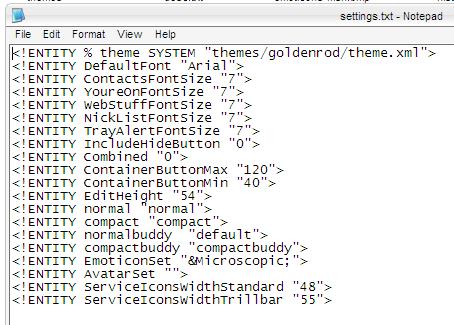
well, i don't know about your theme, but for me, the values are located in settings.txt. anyway, if you look around all the files, you'll come across some code (see image). just change it accordingly.
maybe someone else can be more specific, especially if they're using the same theme. sorry about that. just wanted to give you a head start. 

ahh darn dreamz got it before me 
all you have to do edit colors.xml
<!-- Fonts -->
          <font name="group" source="MS Shell Dlg" type="MS Shell Dlg"              size="7" bold="0" />
          <font name="default" source="MS Shell Dlg" type="MS Shell Dlg"             size="8" bold="0" />
          <font name="hover" source="MS Shell Dlg" type="MS Shell Dlg"               size="8"  />
          <font name="recent-online" source="MS Shell Dlg" type="MS Shell Dlg"      size="8" bold="0" />
          <font name="recent-offline" source="MS Shell Dlg" type="MS Shell Dlg"     size="8"  />
          <font name="blocked" source="Tahoma" type="Tahoma"          size="8"  />
          <font name="maybe" source="Tahoma" type="Tahoma"           size="8"  />
          <font name="expanded" source="Tahoma" type="Tahoma"          size="8"  />
as you can plainly see you can change both the font, font size and boldness of the font.
-zoot
Originally posted by zoot@Nov 30 2003, 11:39 AM-->QUOTE(zoot @ Nov 30 2003, 11:39 AM)all you have to do edit colors.xml<!-- Fonts --> <font name="group" source="MS Shell Dlg" type="MS Shell Dlg" size="7" bold="0" /> <font name="default" source="MS Shell Dlg" type="MS Shell Dlg" size="8" bold="0" /> <font name="hover" source="MS Shell Dlg" type="MS Shell Dlg" size="8" /> <font name="recent-online" source="MS Shell Dlg" type="MS Shell Dlg" size="8" bold="0" /> <font name="recent-offline" source="MS Shell Dlg" type="MS Shell Dlg" size="8" /> <font name="blocked" source="Tahoma" type="Tahoma" size="8" /> <!--QuoteEBegin
[b] <font name="expanded" source="Tahoma" type="Tahoma" size="8" />as you can plainly see you can change both the font, font size and boldness of the font.
-zoot
zoot
Thank you very much. (Y)