[request] Desktop Slide Show Applet

I was hoping to have a little applet or something that slides through a folder of images and displayes the pictures on my Windows desktop. There's a Samurize imagemagik script that does it, but I can't get it working. Anyone have anything similar that looks decent?

Thanks

#83905

Hey, every ****ie who has ever been here just called, they'd like their overused and over-appealed requests back. Also, the SEARCH feature called, he'd like it if you two saw each other more often.

#83906

Hey, every ****ie who has ever been here just called, they'd like their overused and over-appealed requests back. Also, the SEARCH feature called, he'd like it if you two saw each other more often.

The Goatse man called, he'd like his rectum back. ;)

Quit flaming ****ies, and elevating the search feature as the God of Knowledge. Its very inadequate.

Running search for term "slideshow". Returned topics: 15. Relavent topics for this query: 1. And that 1 topic had to do with imagemagik.

So...you may wanna use one of the sidebar programs floating around. Those have such a feature.

#83912

I thought xp had one. I remember this because I was using it for...uhh.....pictures :P and it would change every 15-30secs.

#83923

powertoys.

#83927

maybe judge could walk you through the setup.

here are some threads about wallpaper changers. not quite the same, though: http://www.aqua-soft.org/board/index.php?a...llpaper+changer

#83929

The Longhorn sidebar can do it.

If you google for longhorn and sidebar i think it throws up a program that can emulate it for xp.

#83976

Originally posted by Relativity_17@Nov 29 2003, 01:32 AM

The Goatse man called, he'd like his rectum back. ;)

Quit flaming ****ies, and elevating the search feature as the God of Knowledge.  Its very inadequate.

Running search for term "slideshow".  Returned topics: 15.  Relavent topics for this query: 1.  And that 1 topic had to do with imagemagik. 

So...you may wanna use one of the sidebar programs floating around.  Those have such a feature.

If those were the results you got, you must not know how to use the search, either. I searched for 'slideshow' and found the following relevent results:

- Desktop Changer

- Wallpaper Switcher

- OS X Screensaver (Note - not exactly a thread on the wallpaper switching, but it details how you can use the Nostalgia screensaver in conjunction with another program in order to yield the desired wallpaper switching effect.

I'm sure there's more, but I have to run out. That search took me a grand total of 32 seconds to do the search, and then to skim the results, and then to check out a few of them. The search feature is the best tool available to ****ies. If they'd use it every once in awhile, I'd have less of a sense of deja-vu when reading the forums. I stand by my statements.

#84029

I think you misread, as I wasn't looking for a wallpaper switcher or a screensaver, but some kind of desktop app, along the lines of the samurize script. I did indeed search and didn't come up with anything like that except for the samurize script, which isn't my cup of tea. It seemed like a simple enough thing that people would have made small little applets along those lines, but I couldn't find one.

I may regret saying so, but there's no reason to fly off the handle. I did a search, didn't find what I was looking for, and made a simple request. It's not like I didn't search or that I titled the thread so that you didn't know what I was looking for (i.e., the thread misrepresented what it was about); indeed, I used the word applet so there would be no confusion (but obviously there has been) and to make it as clear as possible. If you didn't want to say anything constructive you didn't have to read the thread in the first place, because the title didn't misrepresent what I was looking for. It's not my fault you misintrepreted. As I said, I tried to make it as clear as possible: I'm NOT looking for a wallpaper switcher or anything and I couldn't find anything along the lines of what I was looking for.

In anycase, I apologize for wasting your time in writing out (vitrolic) two posts and doing a search.

Thanks to the slightly more civil people for the the recommendations of the longhorn style sidebars...but those make me puke :) I ran smart bar or something for a while and it ate my resources like crazy.

#84185

Does Powertoys have one? I know there was a slideshow program that you could burn to CD, but an applet that sits on the desktop sounds like the kind of thing that ought to be in Powertoys. The only powertoys I've used in ages are Tweak and the CMD here addition.

#84189

Originally posted by kikuchiyo@Nov 30 2003, 04:15 AM

Does Powertoys have one?  I know there was a slideshow program that you could burn to CD, but an applet that sits on the desktop sounds like the kind of thing that ought to be in Powertoys.  The only powertoys I've used in ages are Tweak and the CMD here addition.

Hi there,

Get Imagemagick from www.samurize.com, install Samurize, install Imagemagick and send me an email, I'll help you in configuring this thing. :lol:

#84250

i think he wants something similar to PictureDesktop or TaskDesktop, but like with the images constantly changing.

I've never heard of a power toy that does that not in full mode.

#84432

Originally posted by Pe7er@Nov 30 2003, 03:47 AM

Hi there,

Get Imagemagick from www.samurize.com, install Samurize, install Imagemagick and send me an email, I'll help you in configuring this thing. :lol:

kikuchiyo's already tried the script, but if you could help, that'd be great! pe7er to the rescue. :)

maybe when i try and configure it, i'll give you a call. :lol:

#84434

I'm all set and waiting to help you! :D I'm the ImageMagick monster-master :brucelee:

#84436

help me too :P

i'm interested in this app.

I can probably get it to work with time, but then again, time is money right? (except in this case there's no money) so time is nothing.

ANYWAY!

I cant even get more than one script to run on samurize :S

#84440

alright I've got it to run. I've read the read me and it's telling me to customize desktopweather.vbs..

Is this right or did the dude get his thing messed up.

Plus I've got .83 beta

#84451

i doubt imagemagick requires editing desktopweather.vbs, since they're unrelated, so i would venture to say that you probably do not need to edit it.

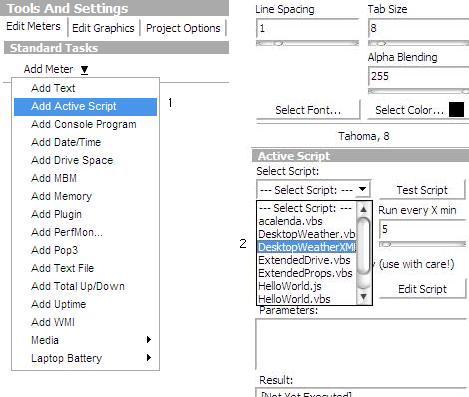
in any case, you can have multiple scripts by adding in another script using the "add active script" function. just choose another script in the dropdown list.

and you should be v1.0 from www.samurize.com. there are lots of improvements.

and for desktop weather, you should use the xml version (also at samurize.com).

#84458

perhaps you could help me then/

Because I'm sure I editted everything correctly.

I've got V.1.1 and I dont have the add active script option. This is so wierd. I can only choose one script at a time.

I dont really need the Weather script. Just helping with the ImageMagick would be great.

#84460

i see what you mean. you should have v1.0 of samurize, not the script.

the add active script option is in the samurize config editor, not the script itself. see images.

this is how you add scripts into your config. just add one and that's it. then repeat the process to add more. :)

post-1312-1070227780_thumb.jpg

adding.JPG
adding.JPG

#84463