Milk Widget With Built In Installer

IMPORTANT: Please don't try to copy the files yourself as the widget won't work.

Have you ever not quite got the hang of Samurize and DesktopWeatherXML?

Have you downloaded a widget and thought Where do I begin?

Well, here is a Milk widget for your Samurize. It contains a mini installer (using a vbs file) that edits all the relevant bits so that you don't have to. You'll be presented with a number of questions that will build up the scripts and configs for you.

Big Thanks to Judge (for the original DesktopWeather Script for Samurize) and Badboy (for his XML version).

Without further ado...

Milk%20Samurize.jpg

Info:

General: I've included standard meters that you might want to include, but you can easily edit as necessary.

Weather: Uses a slightly modified Weather XML script. Modified so that text doesn't overrun and also restarts itself when updated (yes without having to edit anything).

Winamp: Uses AMIP and WADA (don't worry the direct links are included in the readme file as well as detailed installation instructions) to scroll the current track info and its progress. The script also starts winamp automatically when you click the little black arrow at the bottom of the Weather script.

Installation:

Read the readme file included for detailed instructions on how to make the widget work. Once done run the 'Samurize Milk Installation.vbs' file and answer any and all questions asked.

Hope you enjoy ;)

Tadis

Edit: Duuh, the links... :banging:

The First link contains Badboy/Judge's DesktopWeatherXML PNGs as well and works out of the box so totals at 2.74MB, if you are unfamiliar with Samurize or have had trouble in the past I'd recommend downloading this one. The second, is the Milk Widget on its own and downloading this one assumes that you already have the DesktopWeatherXML script in the default installation paths, this is a 197KB download.

The Milk Pill 2.74MB

The Milk Pill (Diet) 197KB

#82364

Are you planning on providing us the download link? :)

Edit. Thanks, great work.

#82365

link?

EDIT sorry didnt see the previous post

#82366

GREAT NEWS!... but... wheres the link? :blink:

#82368

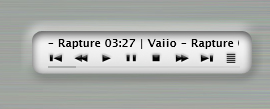
The Milk Controls are to follow shortly, (need some work).

Preview:

post-3229-1069703027_thumb.jpg

Controls.jpg
Controls.jpg

#82370

hi!

WoW! :woot: :woot: :woot:

Thanks! :D:lol:

#82386

Wow :woot:, looks great.

Downloading now, Thanks (Y).

PS: Great idea with the 'mini installer', saved me plenty of time :bow:.

#82392

Tadis, i just have a small comment...

If you want to stop the installation process, it doesnt allow you, it will keep on opening VB instances of that same stage until you enter some info (happened to be with the input WADA, cause i wanted to stop it since i dont use winamp)

#82394

:(

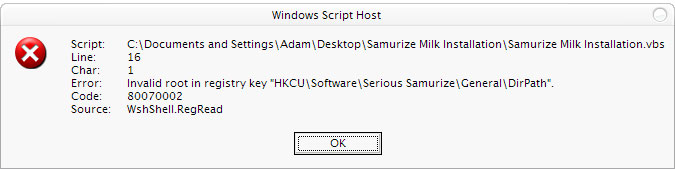
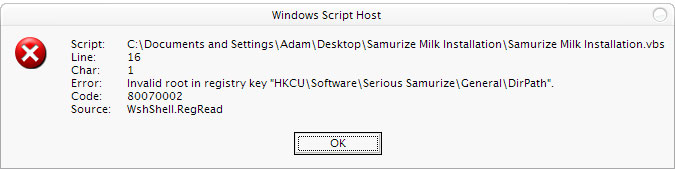
I get the following error when I run the install script:

post-1670-1069707243_thumb.jpg

error.jpg
error.jpg

#82399

First of all, this release look awesome! :moon:

Secondaly, is it possible to get iTunes control instead of Winamp?

#82409

I'm downloading it right now. 2MB! Wow, this must be alotta stuff. I personally like the self install, because a Samurize illiterate like me can do it. I don't know why, but I can never get Samurize configs to work properly.

#82411

@Adster

Have you got Samurize Installed? because the key in the error is the standard location of samurize as it is installed by the official Samurize Installer. Therefore, that error should only occur if it cannot find samurize on your system :blink:

@Seph

Sorry for that, that is one of the down sides to scripting. But, just so you know, I inserted a break before anything is actually 'done' to your system, i.e. after all the questions are answered it then asks you whether you want to proceed with install or if you want to exit.

You can choose to exit here, rather than at every question.

@Wizard

Yes, sorry for the size, I've included the PNGs from Judges DesktopWeather scripts for good measure (just thought I'd stop recurring posts of why there aren't any pics and why it doesn't work out of the box), I'll upload one without the unnecessary PNGs in a few minutes.

@All

Any other feedback, i.e. is it working as it should for anyone? :shy: :blink:

Let me know, so that I can make any fixes necessary

#82412

Originally posted by Tadis@Nov 25 2003, 07:31 AM

@Adster

Have you got Samurize Installed? because the key in the error is the standard location of samurize as it is installed by the official Samurize Installer. Therefore, that error should only occur if it cannot find samurize on your system  :blink:

.....

Hi Tadis,

Yes I have downloaded and installed "Serious Samurize". I had to reboot my machine to complete installation, but it is definitely installed.

Do I need to run it first?

#82415

Since you have the Bezel for Winamp, why not add the controls to that window? Since its already displaying the track information, that bit won't be needed. I'm sorry if you meant this new control thing to be a different release, if thats the case then disregard this post.

#82417

Ah, got it. Since it wasn't installed before, I had to run the Samurize config first. Once I did that, it ran fine. ;)

#82423

i dont have winamp so now i have to download that and a bunch of plugins! :rant: can u make a version (minus) all the winamp stuff... pweese :(

#82442

@Spykes424

It will still work for you. There are two modes to this widget (as can be toggled by clicking of the little toggle arrow (see screenshot in first post)

Only when you change modes does Winamp come into effect. So you can still use it, when asked to choose your winamp folder or to choose the Now Playing/Progress file just select any folder/file on your computer (dont worry it won't harm it).

Does that make sense?

@sciphan

I was going to include that, but i've had so many requests to release as is that I thought it best to release as is. Also, I built the installer from scratch (with the help of MSDN) and I'm still learning how to script so it would have taken me longer to have those built in to this release.

I'll release the controls separately later, this release is mainly to take the pressure off. :D

#82449

Looks great.

#82489

Damn Goooooooooooood! (Y)

Nate: where is your perfect butt? :moon: :naughty:

#82501

Still attached to me I think, I'm flattered you noticed :) Truthfully, I am trying to find an avatar that I feel represents me.

#82502

Thanks dude, I am inlove with it. :wub:

#82531

Originally posted by Ripper@Nov 25 2003, 04:20 AM

Thanks dude, I am inlove with it. :wub:

I'm confused, Nate's Butt or the Milk Widget??? :lol::lol::lol:

Thanks for the kind comments guys.

Edit: I've just uploaded the Lite version (i.e. without the weather PNGs) for those that already have DesktopWeatherXML.

Well, it does seems like no one is having severe problems!? which must be a good thing! :D

#82578

Tadis:

Thank you very much for releasing this widget w/ installer!

This is a real time saver. (Y)

Regards,

monkeytrainer

#82588

Nice work. What about a "NOW PLAYING" for iTunes?

Thanks.

#82673

@Tadis

could u plz make a horizantals version

like this u have present at aquaxp.com

thank u

mfg

xp-schrotter

#82677