Desktopweatherxml Help?

I downoladed this weather program for Samurize and ive had another one before and have never really had problems with it. Click here to see the script that im talking about

Was wonderinf ive anybody can help me get this started

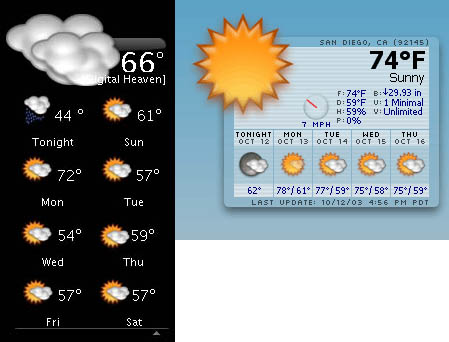
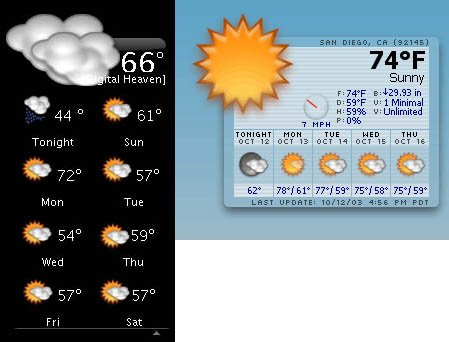
*the imgae below is the one im having trouble with. the one on the left was the old one but the new script on the right is the one that im having trouble with*

Thanks
post-5600-1069620005_thumb.jpg

weather.jpg
weather.jpg

#82080

what problems are you having?

did you configure the script completely (changing zip, location, instance, etc.)? did you getcachefiles? did you try deleting temp xml files?

#82083

well i just cant get the temp or anything to show up. and i did change the script but nothing. it always shows N/A

#82084

nevermind, after 2 days it finally decided to work but the images jsut dont show up and the background doesnt either

#82086

ok, apply the function: getcachefiles and then test it. it should say true.

if that works, try out a meter, like finding the current temperature.

and don't forget to go into the scripts folder and delete the .xml files (they're temp files) and let the script create new ones. test it out and it should work.

the images? did you add in the temp images? go to add graphic > 32bit png or something and select the temp images, with 0 corresponding to today, 1 for this evening, etc. (or something like that). the background is also a png, so just add that as well.

#82087

i did everything there except the image things, i thought they would just add themselves in there like the other script. thanks alot dreamz :D (Y)

#82088

yeah, you have to add the images.

glad you got it working. :)

#82089

yup me too, once again thanks for your help :)

#82090

Originally posted by dreamz@Nov 23 2003, 02:58 PM

yeah, you have to add the images.

glad you got it working.  :)

man you should become the official help on this board or something. you always know whats wrong or where to get something!

#82168

:lol: i just try to help whenever i can. :)

#82231

man you should become the official help on this board or something. you always know whats wrong or where to get something!

That is very true. Dreamz, you deserve a badge 'helper' or 'life-rescue'. Keep it up and thanks for your time :bow:

#82375

hi,

ok, apply the function: getcachefiles

how can i to make this option? :wub:

thanks

#82868

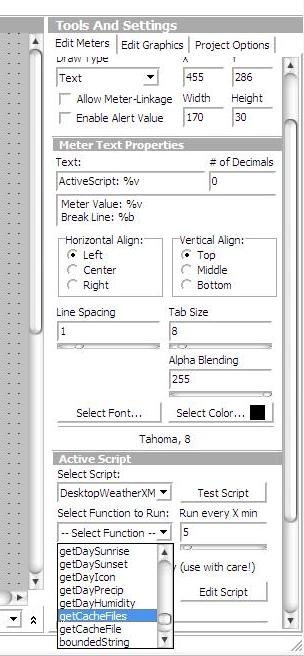
open up the config editor and go to "add active script" and you should see the function in the dropdown list corresponding to the script. :)

see the attached image.

and you guys are too kind! :D

post-1312-1069803403_thumb.jpg

getcache.JPG
getcache.JPG

#82872

:bow: dreamz is at it again :D

#83013

open up the config editor and go to "add active script" and you should see the function in the dropdown list corresponding to the script.

see the attached image.

ok ;) .one more question. For to change the images i selec reload config,can the WeatherXML to make automatic?.temperature is ok,it change automatic

sorry :shy: my englihs is very bad

thank you very much

#83078

Originally posted by skam@Nov 26 2003, 01:56 PM

ok  ;) .one more question. For to change the images i selec reload config,can the WeatherXML to make automatic?.temperature is ok,it change automatic

sorry  :shy: my englihs is very bad

thank you very much

If you download the latest version of samurize you can add dynamic PNGs (they will change automatically: no need to reload).

To do this add an active script and change the type from text to png then change the default image and set it to reload every so often.

#83127

yea!it is working now,thanks your help :bow:

greetings ;)

#83180

So how do I know if mine is updating properly? The bottom says last update was 6:52 pm and it hasnt changed yet? and its 8:18 here now? Have I done something wrong?

Also, mine wont take the "old" or "new" image change in the .vbs file, no matter what I do they show up as the .pngs from the new folder?

#86942

Hi,

how can i've french version for desktopweatherxml ?

#87040

hexum, which script are you using? v1.2? i haven't had any problems with v1.1 and using the old images. make sure everything is properly placed, the script is properly configured (with correct paths). i could take a look at it also.

and i don't know about the updating, since i have my own config, but what was the time value you set for updates? you can also manually reload to update it. also, are the temps/images incorrect? perhaps the script crashed and is no longer updating. delete the temp .xml files and then reload.

all4f1, what do you mean french version? you mean temps in france? you can change your local id in the script. please elaborate.

#87118

not temp in france but different text in french with "fr.weather.com" ?

#87123