 Aqua-Soft Forums
how do i get my desktop icons 92 pixels WITHOUT changeing the start menu icons??
how do i get rid of the > arrow thing on the shorcuts?
how do i get my desktop icons 92 pixels WITHOUT changeing the start menu icons??
how do i get rid of the > arrow thing on the shorcuts?
some one!!
You can only change your desktop icon size to that high with a registry hack.
For the arrows, get TWEAK UI from microsoft.com and it alows you to do that and many other really useful tweaking things. Tweak UI is a Windows XP power toy, though they have versions for previous OS's.
i'm rehashing an old topic (but doesn't that mean i searched the forum (Y))
i changed my icon size to 72, but i don't want the start menu to be that big, but the default size. is there a way to do that? that portion of the original question was never answered...
thanks much
As far as I know, in XP mode, not Classic, you can make the left side 'recent programs' list smaller in start menu properties.
As for the right side, you can reduce the quantity of listed items also in start meny properties to make your start menu smaller.
For example:
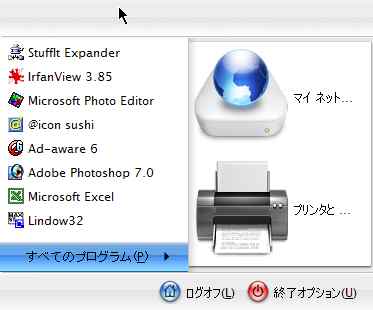
I use Desktop X 2 for the big icons, Desktop X 2 come with a sofware - Icon X, and you can change only the desktop icons size.

Originally posted by narn@Nov 20 2003, 03:51 PMHow?
Go to desktop properties-> appearence-> Advanced and change the icon size to 72. If you wan't bigger than those you must use a registry tweak.
If you want different sizes in different places you need to use third party apps.
Originally posted by LoofyGun@Nov 20 2003, 02:12 PMIf you wan't bigger than those you must use a registry tweak.
How? :banging:
Search for it man, you cant pretend to go "how" for the rest of your learning experience over here right? 
Go to xicons.com help section and search there
How now brown cow,
I found this on a forum somewhere and saved it in .txt for when I used to regularly screw up my icons. Someone also has made a registry hack that does this for you, but I forget where to get that. A guy like Photo768 has the registry skills, PM him, he might have it.
(Someone's) original post follows:
--------------------------------------------------------------------
you could try this
[HKEY_CURRENT_USER\Control Panel\Desktop\WindowMetrics]
"IconSpacing"="-2400"
"IconVerticalspacing"="-2400"
"Shell Icon BPP"="32"
"Shell Icon Size"="128"
But you will have all icons 128x128 so in folders you can use the tiles view and your start bar to get them small you can just use classic unless you want them that big
---------------------------------------------------------------------
Well, that's it. You should have no more questions on this topic.