[help]hdd Not Being Recognized By Pc

Well, my yesterday post about my pc shutting down very slowly was a proof of how probles can become not such a problem as soon as something worse happens...

I left my external 160 gb maxtor usb2 HDD to be defragmented while i went to bed... this morning, when i woke up the defragmetnation had been stopped when the alarm to wake me uop kicked it (i think)...

After that, i cannnot acces the drive, all my files are there, including over 30gbs of music... :rant: some apps are running from there at startup and most of my modded icons (standalone, not shell32 or anything like that) are running off it too...

At the moment im running pC inspector file recovery which can in fact find, see and save my files to a diff hard disk drive, but...

1.- it is taking AGES!!!!!!!!!!!!!

2.- my other HDD will probably not be able to hold all that data...

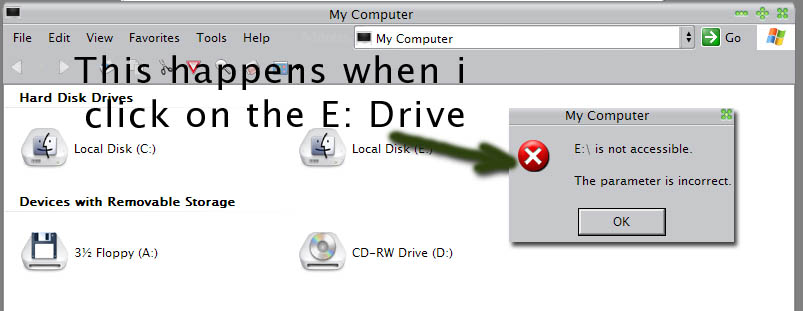
Everytime i try to double clik the drive on my computer (at least is being mounted!) iget this "e:/ is not accessible, the requested operation could not be performed because of an i/o error"

I think i am doomed...

Is there anything i can do!?!?!?!?!?!?!?!?!?!?

ANY help.. ANYYYY is very very veeeeery much appreciated, you guys can feel what this might feel like, cant you?!

Cheers....

Desperate Seph

#75968

the results of my conversation with my friend:

(16:06:37) wikedme2001: if it's a 160 gig drive it must have been partitioned yes? or is it serial ata? because windows doesn't support that drive on ide as one solid drive

(16:08:37) biomechagirl: Ummm, I dunno 0_o

(16:10:03) wikedme2001: hmm well... defragmenting moves information, so the obvious possibility is that it started moving somethign important and got stopped and that has screwed the drive over... but other things are running from the drive..so that is strange... can the person access the drive through a command prompt

(16:10:56) biomechagirl: I don't know - I'll leave him a message on the board?

16:11

(16:11:58) wikedme2001: if he can access the drive through command prompt then the drive is ok and windows is f***ing up somehow...

(16:13:06) biomechagirl: I'll suggest that

#75974

THanx biomecha girl ;)

ill try that right away!

I reckon the HDD is ok because this program called file recovery is indeed reading the file and saving them into my c drive...

Thank a lot!

#75981

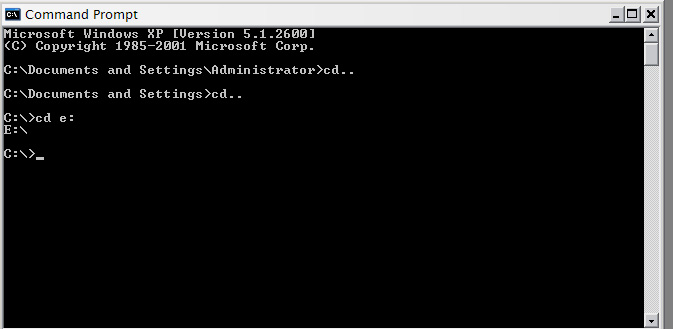
well, i tried what Liron suggested... this is what happens, as soon as i move to e in command, it will automatically change to c!

:rant:

post-1423-1068476753_thumb.jpg

Untitled_1_copy.jpg
Untitled_1_copy.jpg

#75992

OMG! weren't you the one asking me why I didn't believe in defrag utilities? The tables are turned hombre... :lol:

On a more serious note, I think your HDD is fine. The partition is intact too since you claim to be running some programs off it. Well you could try a disk repair tool like the one from Norton.

#75994

It looks like it is recognizing it but it is not using it. If it were not to find it, then you should get a "The system cannot find the drive specified" error.

Nevermind, I totaly forgot the proble that you were have, I'm no good with this type of stuff. I just have three words. Off Site Backup. It works wonders.

#75995

yeah sid, thats ecaxtly what i told Ji Eun!!

First of all, let my sh##ty luck serve other aqua softians... dont defrag!! specially not your External HDD... Damn Murphy! his laws hate me... or love me...

Anyway, what i think is that when the defragmenter got stopped or crashed, the index tables got messed up... the program i used (stopped for now... trying to get some other less dodgy way of fixing this) does succesfully read the strucure of the disc and does save files in the other HDD, slowly but it does...

#75996

ok, this is a screenie of what happens when i click the HDD icon...

post-1423-1068477642_thumb.jpg

Untitled_2_copy.jpg
Untitled_2_copy.jpg

#75999

The reason you can't switch to the drive using "cd e:", Seph, is because that's just changing the directory that's current on the E drive...

Try something like "dir e:" to list the folders on the E drive...

Or just "e:" to change to the E drive.

If you want a hand bud, you know where I am...

if it's a 160 gig drive it must have been partitioned yes? or is it serial ata? because windows doesn't support that drive on ide as one solid drive

That's not quite accurate. As Technet's File Systems Overview points out:

Originally posted by TechNet

In theory, the maximum NTFS volume size is 264 clusters minus 1 cluster. However, the maximum NTFS volume size as implemented in Windows XP Professional is 232 clusters minus 1 cluster. For example, using 64-KB clusters, the maximum NTFS volume size is 256 terabytes minus 64 KB. Using the default cluster size of 4 KB, the maximum NTFS volume size is 16 terabytes minus 4 KB.

But "you must use dynamic volumes to create NTFS volumes over 2 terabytes".

#76001

Are you sure you haven't screwed around with file permissions on the drive? Just check to be sure.

#76003

yeah because i ge the same message in another comp too... plus i have not touched that at all... ill give it a look anyway, i have nothing else to loose... >.<

Thank you very much for the support guys... i REALLY appreaciate it...

Seph

#76005

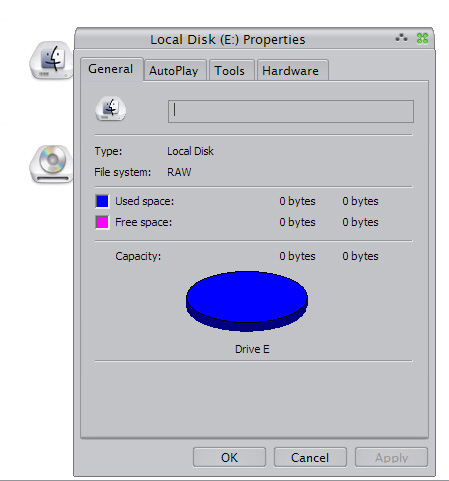
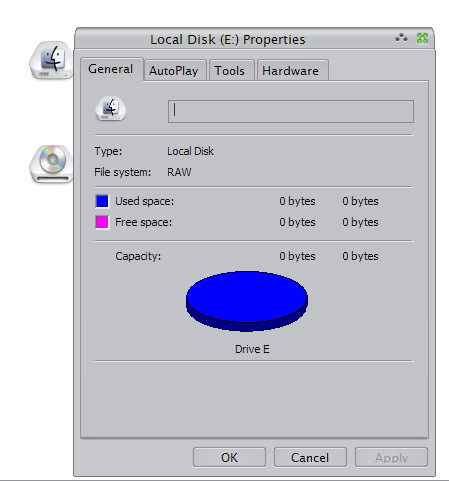
Ok this is what heppens when i click on properties of the disk... before it would take like 10 min to show the damn right click menu.. now its all snappy but USELESS...

post-1423-1068478157_thumb.jpg

Untitled_3_copy.jpg
Untitled_3_copy.jpg

#76007

i highly recomend acronis recovery expert. It sounds like something in your tables got screwd up. Its probaly an incredibly easy fix, prolly would take 10 seconds. Partition magic would probaly be able to do it too. Look for a 'fix' partition thing. probaly (i like that word)

#76031

hmmi dont have any of those programs man, do you guys know of a free program that fixes disks? i tried CHKDSK in dos and it did NOTHING...

#76076

have you seen this link?

http://www.experts-exchange.com/Storage/Q_...Q_20767520.html

what does the drive look like when you go to disk management (run > diskmgmt.msc)?

not sure if this applies, but how is it recognized in bios or device manager?

can you run a diagnostic test (download from the manufacturer's website)?

#76354

here's a freeware recovery program

http://download.com.com/3000-2248-10118664...tml?tag=lst-0-3

never used it, so i can't verify it myself... has a 80% positive feedback from 203 votes, so it seems like it should be OK. hope it can help.

#76365

Ill check that out Dreamz and WookieTv thats what im using at the moment!

Thanx for all the help!

#76379

Ok guys, i wanted first of all to thank you all for the support and ideas...

I got myself an extra 80gb HDD (internal) to which im transferring all the files that were previously on my external one... (they wouldnt fit on my 40 gig HDD in which i run my OS).

I just advise you guys never to try and defrag an external drive, im guessing that the power down (saving mode) set by the bios to lower de electric current flow to usb and firewire is what got my HDD to loose all access... prolly the index tables were dropped when the process was halted...

AAAAaaaanywho...

If you guys ever encounter this problem or any problem regarding data loss on a HDD, i really recomend you try this freeware posted by Wookie tv (also found in expert advice.com(thanx dreamz, i had seen that already ;))).

Cheers

Seph

#76471