 Aqua-Soft Forums
Whenever I start the windows the objectbar windows comes up and ask me to pick a theme, is there anyways that the windows wont come up everytime?
[help]startup For Objectbar
this might work.
choose a theme then unload objectbar.
it should ask you if you want to save changes.
click yes then restart.
hi thanx for the suggestion. But when I unload the bar, it never asked me about saving the changes, and after I restarted the computer, objectbar still comes up. Any other ideas?
You could try making a small change to get the bar to ask to save,then click yes.Maybe that will do the trick.
Naw,,I wouldn't have that App on my machine if you paid me.
Originally posted by yuicheung@Oct 30 2003, 10:49 PMProblem Solved...thanx
Does any of u have problem with Kazaa when u run the objectbar?
in objectbar general options, exlude all the exes and kpps that kazaa uses, and you won't have kazaa crash.
I did already, and that error still comes up.
From my experience in Stardock's IRC channel, they're pretty against piracy of anything at all (not just their own stuff). Maybe it's an intentional 'feature.' :banging:
Originally posted by yuicheung@Oct 31 2003, 05:46 AMI did already, and that error still comes up.
Make exclusion for 'kazaa.kpp' .That should do the trick.
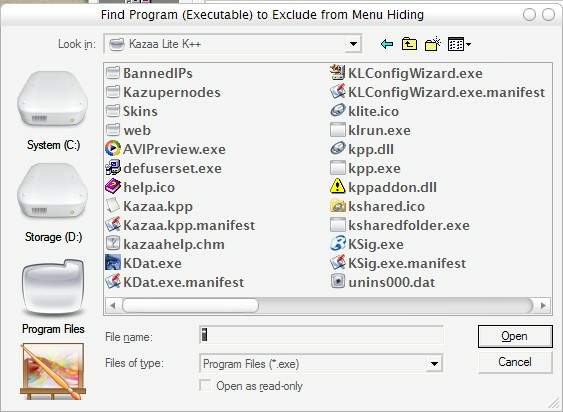
I dunno how to exclude kazza.kpp, they only allow exe to be excluded.
Just type '*' in file type box and hit Enter , then you can exlude whatever you want 

Thanx alot!