 Aqua-Soft Forums
Originally posted by impulseman36@Oct 29 2003, 05:48 PMMy last response was spell and grammar checked in MS Word. Need I say more?
See you in three days.
Anyone else feel like testing me? :godpunk:
-godpunk
Originally posted by impulseman36@Oct 29 2003, 05:48 PMMy last response was spell and grammar checked in MS Word. Need I say more?
See you in three days.
Anyone else feel like testing me? :godpunk:
-godpunk
thank u for the progress that has been made thus far....
when i use the program, the name itunes does not show up completely, it only says itune and the s is partially obscured. someone make a better barskin for the program. this app has so much potential. i have no idea why apple didnt make the bar like the mac one in the first place. otherwise thanks for the great work and i know future release of this program will so rock!
You've (partially) answered my prayers for a better looking titlebar for iTunes for Windows.
Now, what I want to know is: why doesn't my skinned iTunes titlebar look anything like your screenshot on page one of this thread?
Yours: great looking green/amber/red "gummies" on the left, iTunes title in the center looks perfect, miniplayer allegedly skins, etc.
Mine: Cut off gummies with ugly squares around them, ugly cut off iTunes text in title area, 1246-pixel-wide "iTunes.bmp" (titlebar overlay) looks terrible on smaller monitors; miniplayer mode doesn't skin properly.
Is that screenshot real? If so, where's the evidence? Did you upload the wrong skin folder or something?
Perhaps more to the point, does anyone know how to fix any of the issues mentioned above? I've resized the brushed metal bitmap to a more sensible size, but the other glitches don't seem to be as easy to fix. The gummies and iTunes title bitmap in the Skin folder don't seem to be the ones that load when the skin starts up (although mousing over the controls causes my modded (12x13-pixel) gummies to show up "after the fact"). Where are the "default" bitmaps hidden that load up when the titlebar skin first initializes? I tried looking in the iTunesLD file with Reshacker, but they didn't seem to be in a typical resource format.
Keep at it -- please!
Originally posted by godpunk@Oct 30 2003, 01:39 AMSee you in three days.
Anyone else feel like testing me? :godpunk:
-godpunk
Ok, question 1) How much wood could a woodchuck chuck, if a woodchuck could chuck wood?
Question 2) If Peter Piper did indeed pick a peck of pickled peppers, wtf is a peck of peppers, and why the hell was he picking one?
Bonus question: Why can flamebait never learn?

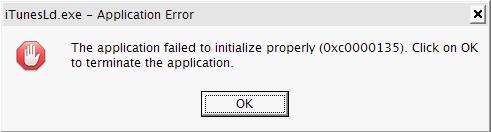
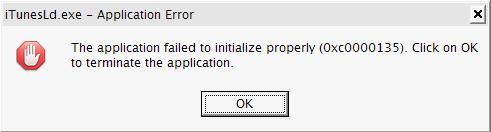
I still can't get this to run. I have followed the readme and when I run iTunesLd.exe , I get the following:
"The app failed to initialize properly (0xc0000135). Click to terminate ..).
Originally posted by SpidercrabX@Oct 30 2003, 10:14 PMI still can't get this to run. I have followed the readme and when I run iTunesLd.exe , I get the following:
"The app failed to initialize properly (0xc0000135). Click to terminate ..).
that's not even a .NET Framework error 
maybe you have a problem with the .NET framework...do other .NET apps work for you?
I get the same problem! :cry:
i dont get it, it works almost perfect here :cry:
well i removed some useless references (the 2 dll files for example ) and fixed some memory issue...
hope it works now 
I still get the same error with the new version.
Works fine for me, your not alone localhost (:
Originally posted by localhost+Oct 30 2003, 07:33 PM-->QUOTE(localhost @ Oct 30 2003, 07:33 PM)
Originally posted by localhost@Oct 29 2003, 06:37 PManother update, fixes the "iTune" problem

the post i quote is the one that worked for me localhost, the new file doesn't.
it looks good when it starts up(so it works initially), and then it resizes incorrectly(quite often the opposite from how i'm resizing), and the buttons function incorrectly.
i'm not using the always on top mod when i test your mod, in case it would conflict with yours.
just a heads up.
Yay, mines looking good (Y) , only problem is that it locks its position when in full mode. I can't move it at all, i can resize it though. In miny mode it works perfect. Your last release fixed most of my problems. Great mod (Y)
keep working on it, it will get there and finally itunes will b the way it should be....
This is awesome.
Yeah, so there is some problems. . .so what, at least someone is trying to get this to work. When I first downloaded iTunes for Win, the first thing I said was: ugly, not as good looking as the Mac.
It also stopped me from persueing my iTunes for MMJB skin.
LocalHost. . .you're doing an aweswome job man. Keep up the good/great work!
This is exactly what the second gen. iTunes needs.
Thank You So Much!

(I'm for one am all for the "hidden" menu's man, did the same thing in my skin)
WHOOOOOOOOOOOOOOOOOO!!!!
Hey guys. Well, honestly I'm not into that hidden menu thing. I mean, If it were a real hidden menu, without that empty space under the titlebar, I'd dig it. But it's not, so I want to be able to leave the menu as it is.
So, localhost, could you make this a separate mod?
Originally posted by miSka@Oct 31 2003, 03:39 PMHey guys. Well, honestly I'm not into that hidden menu thing. I mean, If it were a real hidden menu, without that empty space under the titlebar, I'd dig it. But it's not, so I want to be able to leave the menu as it is.
So, localhost, could you make this a separate mod?
yeah I would like one of those too, but really the only thing I would like to skinned is the fonts and the traffic lights in the mini-mode.
-zoot
Originally posted by miSka@Oct 30 2003, 10:39 PMHey guys. Well, honestly I'm not into that hidden menu thing. I mean, If it were a real hidden menu, without that empty space under the titlebar, I'd dig it. But it's not, so I want to be able to leave the menu as it is.
So, localhost, could you make this a separate mod?
just don't extract the "iTunes.exe" localhost provides and use your original "iTunes.exe"
Originally posted by mwdsl55+Oct 29 2003, 06:46 PM-->QUOTE(mwdsl55 @ Oct 29 2003, 06:46 PM)
Originally posted by startal+Oct 31 2003, 01:50 PM-->QUOTE(startal @ Oct 31 2003, 01:50 PM)Originally posted by mwdsl55@Oct 29 2003, 06:46 PM
sorry
what's my problem is i can't run ItunesLD.exe even with the latest version,when i hit it, it says the app failed to initialize properly(0xc0000135),click on OK to terminate the app.
Originally posted by localhost+Oct 30 2003, 07:33 PM-->QUOTE(localhost @ Oct 30 2003, 07:33 PM)