
[help] Start Menu!

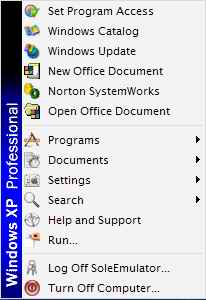
i've been trying to find a way to remove the part {windows xp professional} in xp start menu and make it blank....but i need a head start to find my way and begin modding...can any one help me on this...please :cry: :cry: :cry:

Cheers

THESOLEEMULATOR
post-4871-1067254481_thumb.jpg

.jpg
.jpg

#69903

your looking for BITMAP 166 and 167 in explorer.exe.

-The Unknown

#69914

hey TheSoleEmulator if you just want that little thing blank you cane do it in te classic startmenu preferences (on the startbutton click right) without hacking the explorer. Just select in the menu use small icons in the startmenu and the ugly windows xp bar will be gone ;)

good luck

Naughty Dogg

#69922

WOW...haven't thought of this :shy:

Thanks Naughty (Y)

#70138

I definitely recommend replacing it with something easier on the eyes. I love my Start Menu now that I've replaced the bitmap. :rock:

Oh yeah, you may have to refresh a few times..

#70264

if you're too lazy to hack, you can always use tclock2, which also lets you change the start button bitmap, put a bitmap over the clock, change clock display, adds transparency to the taskbar and start menu, gives you more desktop options, etc.

get tclock2 here.

#70265

To get rid of the Windows text along the side of the start menu, just right click an empty part of the taskbar and select properties. Somewhere in this diag box (under the 'start menu' tab in WinXP) select 'show small icons in start menu'. This should solve your problems without having to install any software other than your basic Windows installation.

#70279