PNG Or ICO?

Hi all!

When docks were first introduced in Windows, we had no choice but convert our ICOns to PNGs. Recent releases support both file formats though. So now what?

I was wondering about the format I should release my icons in (and also about whether I should keep 2 separate collections of icons), and thought about the advantages and disadvantages of each one.

Apps like Samurize need PNGs.

ICOns can be used throughout Windows, not only in docks.

PNGs need less space in your drive.

PNGs need less space in the hosting server.

PNGs download faster.

ICOns (usually) contain all necessary resolutions to be displayed properly.

PNGs are cross-platform.

PNGs can be displayed in browsers.

Many icons are meant to be used in the dock only (various apps icons).

Many icons are meant to be used in Windows only (folder icons).

PNGs look better than ICOns in thumbnail view.

ICOns look better in Icon/List/Tile view.

Most of us can convert a PNG to ICOn (and vice-versa)

NOT ALL of us can convert a PNG to ICOn (and vice-versa)

That's all that has crossed my mind. What do you think?

#68498

I like png's because:

1) They are smaller than 7 sizes of icons in one file

2) You can always change them yourself to icons in need to.

3) Programs are starting to use png's rather than ico's

4) You can alsways go... wait for it...

ping!

#68501

i use y'z dock (tried moby & hated it) so i have no use for png's

snow e.2 :rule: is only in .ico

i allready have a ton of icons in .ico (ok bad excuse...)

and

ICOns can be used throughout Windows, not only in docks.

so put that in you pipe and smoke it (j/k!!!!!!!!!11) ;)

#68512

icons coz i can view it in tile n icon mode. only disadvantage is its 2 times bigger than pngs. otherwise icons all the way (Y)

#68522

I've been downloading for awhile now just Mac format iconz.

From Mac you can convert to ICO with Sruffit and Iconworkshop, from ICO to PNG is no problem with @ icon sushi, and when I finally do buy a Mac I will have all these icons ready to go in native format.

It's labor intensive but you get pretty much all the icons you want in all 3 formats this way. :D

#68552

I prefer ico's although I do provide 256px. PNG's with most of my sets. My work will probably be far outdated by this time, but I think 128px icons will be viewd as small someday. Monitors and resolutions aren't getting any smaller. I think 256 will be the next level for some time :blink:

:cheers: Smith

#68554

I prefer icons for the simple reason I have so many of them versus PNG files. As far as I can tell there is no visual diference between the than when they are used. Of course with MobbyDock still blurring them so bad who can really tell. I really wish its drawing engine was more like yzdock. :blink:

#68637

fyi mobydock is not blurring icons.

check the mobydock release forum.

i have posted a comparison pic.. check it out.

and they are all .ico files.

but back to the subject at hand... .ico files for me.. just got rid/converted all my pngs. ;)

#68651

Originally posted by ji eun@Oct 24 2003, 01:16 AM

I've been downloading for awhile now just Mac format iconz. 

From Mac you can convert to ICO with Sruffit and Iconworkshop, from ICO to PNG is no problem with @ icon sushi, and when I finally do buy a Mac I will have all these icons ready to go in native format. 

It's labor intensive but you get pretty much all the icons you want in all 3 formats this way.    :D

Man, just use IconWorkshop's feature to Batch Create windows icons from selection and batch create PNGs from selection. It takes like 2 seconds.

Now, I say, for hosting purposes, PNG is the way to go IN MOST CASES. If you want your icon to look different when they are smaller (like the default OS X .BMP icon for example) you should give them out in ICO format. When you give them out in ICO you also control the quality of the resizing filter so that some idiot doesn't make the icons look like sh##.

#68742

Originally posted by ZeroSquirrel@Oct 24 2003, 09:43 AM

Man, just use IconWorkshop's feature to Batch Create windows icons from selection and batch create PNGs from selection.  It takes like 2 seconds.

Exactly that's why I like png's much better. It's easier to create ico's from png's than it is the other way.

#68744

With Iconworkshop 4.03 it's pretty much just as easy either way. What I was talking about was just selecting the Mac icons in the explorer and using both of those functions on them. (ICNS --> PNG and ICNS --> ICO)

#68748

I'm a .ico person, as I don't use a dock. Simple ;)

#68799

Originally posted by ZeroSquirrel@Oct 25 2003, 12:53 AM

With Iconworkshop 4.03 it's pretty much just as easy either way.  What I was talking about was just selecting the Mac icons in the explorer and using both of those functions on them. (ICNS --> PNG and ICNS --> ICO)

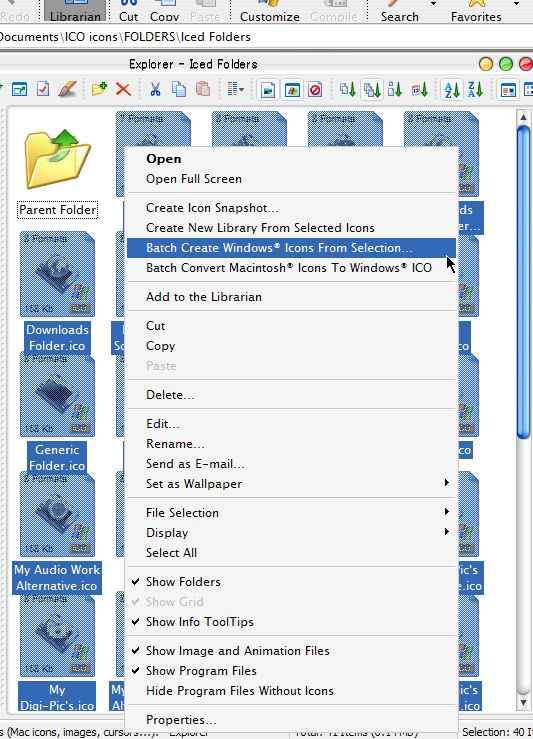
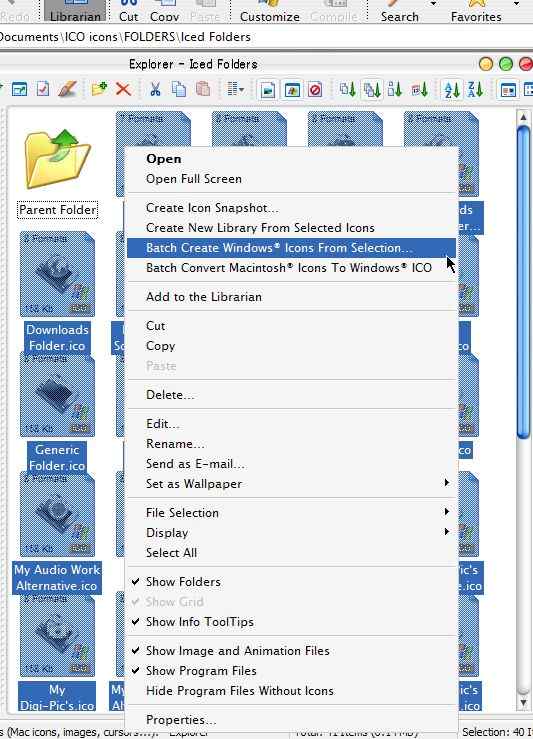
Whoah whoah, I've been using Iconworkshop for awhile now, I thought I knew it pretty well... there's a way to batch convert ICO to PNG???? I know how to batch convert mac to ICO no problem.

But please tell me exactly HOW to convert (batch or otherwise) ICO to PNG with this program. Here's my rightclick menu as is with a bunch of ICOs selected in the explorer window.

post-5545-1067049684_thumb.jpg

Clipboard.jpg
Clipboard.jpg

#68925

Do ICOs work on linux? ;)

PNG is a patent free open format (designed to compete with GIF), ICO is a proprietary Windows format, I wonder which one is better. ;)

#68928

So far I have been trying to acquire both .ico and .png icons for the various themes I have installed. I assumed I needed both because I use Y'z Dock and for some reason thought the image quality of Png's was alot higher. Here is where maybe you could help me out a little, I am really pretty much a complete N00b in all this. my thing is hardware. Do I need to bother with Png's? for as an example I am running Packs sysfiles, snowE2 shell32.dll and explorer, KoL's Milk msstyle, Y'z toolbar w/ milk, and goin nuts trying to find pngs for my dock to match. Are the ico files I already have up to the task? sorry to be so wordy, just been trying to figure it all out for awhile and alittle frustrated. :nuts:

#68930

@ji eun

:: IconWorkshop 5.03 here... Check your version of IW first.

:: Select multiple .ICOns right click and pick "Batch create PNG, PSD or BMP Images from Selected Icons..."

:: A dialog pops requesting more information. Pick "Windows XP (32-bit colour)", "128x128" size, "PNG" and "Preserve Transparency".

:: Click "OK" and you're done. The PNGs are placed in the same folder as your ICOns.

:: Good luck!

@Mr.Sortof

:: Both ICO and PNG have the same potential in picture quality, so you can't get a straight answer about which one looks better by default.

:: In docks (Yz and the rest) size matters! When you have a small picture and try to resize it to something bigger, you have a noticable loss of quality. Not when you have a big picture and want to scale it down. That's why we need pictures as big as possible, generally using a 128x128-pixel size as a standard for use in our docks.

:: ICOns contain multiple sizes of the same picture in a single file. You have to check your icons about the maximum picture size they contain. (we can tell you how if you don't know). If you have a big ICO, you don't need to get an equally big PNG.

:: Good luck!

@Contra

:: I was looking for a thread to tell you that I love your signature picture. It's... it's just so.... so YOU!!!

:: By the way, "better" depends a lot on your needs. I feel PNGs are "better", too, but I can't assign a PNG as a folder icon in my Windows machine. (That's why this poll was started!)

Have a nice day!

#68936

Doh!! (missed the update to 5.03)

Great Scott this is terrific!!!! Thanks for the heads up Ken.

#68951