Restart Samurize Without Ghost Icons

Hi All,

Recently I've been asking around the Samurize forums for a way to restart or refresh a client without having to violently terminate it. The reason for this is that I hide most of my systray icons so its a pain having to mouseover all the leftover 'ghost' icons when using the Desktop Weather configs.

Anyway, MarcJ came up with the idea to use the TASKKILL command so in response here is what I came up with:

Modified, See below at the later post

Please feel free to tidy up the code (i've never used vbscript before) just make sure to post it here so that I can update mine as well!!! :lol:

Edit:

Just in case you don't know what to do with this, insert it into notepad and save it as a .vbs file inside your Saumrize scripts folder, then edit your config accordingly.

Alternatively, you can edit your DesktopWeather(XML) and paste it at the bottom, then edit your config to run the function every so often.

On the permission front I'm not sure if I need permission from Judge for including this bit on how to incorporate the function into his script, if so i'll remove it until permission is obtained.

#68289

i'm not able with vbscript, but your script does'nt work for me

#68297

Have you changed the INSTANCE name and the path to your Samurize Folder?

#68300

Works great. Thanks a bunch.

#68324

Originally posted by Tadis@Oct 23 2003, 10:55 AM

Have you changed the INSTANCE name and the path to your Samurize Folder?

Yes I have change instance and also the path, but it still doesn't work for me

#68337

@Bicet

OK try the follwoing:

Dim WshShell, oExec
Set WshShell = createobject("wscript.shell")
WshShell.run "taskkill /IM Client.exe", 0, TRUE
Set oExec = WshShell.Exec("""C:\Program Files\Samurize\client.exe"" ""MilkWeather""")

1) Insert the above code into a separate .vbs file.

2) Edit the Path and Instance.

3) Double Click the file.

To Incorporate it into your samurize config:

4) Add a text meter and 'Allow meter linkage'.

5) Link the meter to the vbs file

6) Save and reload your config and double click on the text meter

Hope this helps ;)

#68340

This one is working also for me, but I don't know why the other is not working, sorry but I don't know anything about vb.

Here's what i do with the other:

1. Inserted the first code in restart.vbs

2. edited path and instance to mine

3. doubleclick on restart.vbs

4. Added Active script

5. Selected restart.vbs

6. selcted ReSTARTM as function to run every 1 min

7.saved and reloaded config

Can you tell me what I have to do, where is the problem? Tnx

#68348

Workin' good! Thanks for doing this dirty work :lol:

It's sooo useful with ImageMagick! (Y)

#68636

Originally posted by Bicet@Oct 23 2003, 05:03 PM

This one is working also for me, but I don't know why the other is not working, sorry but I don't know anything about vb.

Here's what i do with the other:

1. Inserted the first code in restart.vbs

2. edited  path and instance to mine

3. doubleclick on restart.vbs

4. Added Active script

5. Selected restart.vbs

6. selcted ReSTARTM as function to run every 1 min

7.saved and reloaded config

Can you tell me what I have to do, where is the problem? Tnx

@Bicet

I've tried to figure out your problem (not knowing anything about vbscript myself) and I think the first code I posted doesn't work for you because it's in a function whereas the second code is not inside of a function... anyway I think that is what the problem was :goku's job:

@Pe7er

Thanks mate, by the way what is ImageMagicK?

@Anyone who knows about vbscript

Can anyone help here? :nuts:

#68640

ImageMagick is a script that shows images on your desktop. Something like Saqla's DtopPicture3,but with slideshow feature.

#68642

Originally posted by Tadis@Oct 23 2003, 11:12 AM-->
QUOTE(Tadis @ Oct 23 2003, 11:12 AM)
Dim WshShell, oExecSet WshShell = createobject("wscript.shell")WshShell.run "taskkill /IM Client.exe", 0, TRUESet oExec = WshShell.Exec("""C:\Program Files\Samurize\client.exe"" ""MilkWeather""")<!--QuoteEBegin
[b]

1) Insert the above code into a separate .vbs file.

2) Edit the Path and Instance.

3) Double Click the file.

To Incorporate it into your samurize config:

4) Add a text meter and 'Allow meter linkage'.

5) Link the meter to the vbs file

6) Save and reload your config and double click on the text meter

what am i doing wrong here? i get this error when i dble click the file i created (i named the vbs file i created 'killweatherxml)

my file was copied from above, but i changed it to instance WeatherXML, the path was the same. but the error is pointing to line 3:

WshShell.run "taskkill /IM Client.exe", 0, TRUE

#68773

@Wookie

I'm not sure why yours is doing that, sorry :(

try running the command "taskkill /IM Client.exe" from a command prompt to see if it works that way.

By the way you have to leave all the """'s in for it to work for some reason.

@Everyone

OK seeing as the most popular use for this is going to be in a desktop weather config, here is a breakdown of how you implement it into your script:

First, open notepad and paste the following code into it:

Dim WshShell, oExec

Set WshShell = createobject("wscript.shell")
WshShell.run "taskkill /IM Client.exe", 0, TRUE
Set oExec = WshShell.Exec("""C:\Program Files\Samurize\client.exe"" ""Weather""")

Next, edit the path and instance name to match your config settings, then save it as Restart.vbs into your \Samurize\Scripts Folder.

Then, edit your weather script (Should be called DesktopWeather.vbs or DesktopWeatherXML.vbs and will be located in your Scripts folder).

Go down to the Function 'GetCacheFiles' and replace the line 'RestartClient' with 'ReStartM'.

Then, scroll to the bottom of the file and add the following Function:

Function ReStartM
Dim WshShell, oExec
Set WshShell = createobject("wscript.shell")
WshShell.run """C:\Program Files\Samurize\Scripts\Restart.vbs"""
End Function

Making sure to change the path of the Restart.vbs if different.

Now, save the script file and reload your config. Hopefully, your client should restart cleanly everytime your weather is updated.

Hope this helps, let me know if you guys have any problems

#69018

i'm trying it this latest way and for some reason, mine still just does not like that 3rd line:

WshShell.run "taskkill /IM Client.exe", 0, TRUE

:cry:

#69060

@wookie

I've been trying this out for the past few days and the way I described gave me no problems what so ever, so I honestly can't figure out what is going wrong for you my friend :(

#69098

Tadis, your way worked for me but a little bit to well I can't start up my samurize client. It starts and then closes itself. Any suggestions?

Edit nevermind I figured it out. I am using the second method.

#69476

Can you elaborate?, I need a bit more info

Edit:

By the way are you following the second set of instructions (I'm going to delete the original method to avoid confusion)

#69511

I pointed badboy to this thread ( For those who dont know, he's the creator of the DesktopWeatherXML Script. ) in the Samurize forums, and he's since released an updated DesktopWeatherXML 1.2 with this new script in it.

Unfortunatly for Tadis, there is no mention of his work in the readme file, so maybe a quick PM to badboy would clarify any territorial issues before they become too big.

Nonetheless, go to the Samurize fourms and grab the updated weather script and see if it works. I just installed, and I noticed one person on the Samurize forums was having problems with the script starting a whole new instance without killing the old instance.

I'm hoping that by maybe working together, we could produce a Desktop weather script that works for more than three days, and doesnt create unnecessary icons in the taskbar....

*TYT dreams the dream of magic and gold...*

TYT

#69730

:cry: what no mention?

And I learnt vbscripting from scratch to make this work!

Anyway, I don't mind as long as my buddies at Aqua-soft know that I did it first!

@TYT

Yeah, I had that problem too (restarting a new instance without closing the old one) but the modified method that I posted does fix this issue (i.e. calling a separate vbs file from the desktopweather script)

@Everyone

Has anyone else tried my script (a few comments would be nice :rolleyes:)

Tadis

#69962

Well, in all fairness, I did post a mention in the Support forums thread that you did create the "Kill tray icon" script for this, and that people should stop by here and say thanQ.

I was feeling a bit bad that nobody knew you made it..... :(

TYT

#70123

my bad Tadis.. i will be sure to have you listed in my credits for the idea of the new restart function.. :)

#74401

@Everyone

Has anyone else tried my script (a few comments would be nice)

Yes, I do, but I use it in this fashion.

Function restartClient
 Dim WshShell, oExec
 If RESTART Then
   Set WshShell = createobject("wscript.shell")
   WshShell.run "taskkill /IM Client.exe", 0, TRUE
   Set oExec = WshShell.Exec(SAMURIZE_DIRECTORY & "\Client.exe " & INSTANCE_NAME)
 End If
End Function

#74969

Originally posted by Tadis@Oct 25 2003, 11:49 AM-->
QUOTE(Tadis @ Oct 25 2003, 11:49 AM)
@Wookie

I'm not sure why yours is doing that, sorry  :( 

try running the command "taskkill /IM Client.exe" from a command prompt to see if it works that way.

By the way you have to leave all the """'s in for it to work for some reason.

@Everyone

OK seeing as the most popular use for this is going to be in a desktop weather config, here is a breakdown of how you implement it into your script:

First, open notepad and paste the following code into it:

Dim WshShell, oExecSet WshShell = createobject("wscript.shell")WshShell.run "taskkill /IM Client.exe", 0, TRUESet oExec = WshShell.Exec("""C:\Program Files\Samurize\client.exe"" ""Weather""")

Next, edit the path and instance name to match your config settings, then save it as Restart.vbs into your \Samurize\Scripts Folder.

Then, edit your weather script (Should be called DesktopWeather.vbs or DesktopWeatherXML.vbs and will be located in your Scripts folder).

Go down to the Function 'GetCacheFiles' and replace the line 'RestartClient' with 'ReStartM'.

Then, scroll to the bottom of the file and add the following Function:

Function ReStartMDim WshShell, oExecSet WshShell = createobject("wscript.shell")WshShell.run """C:\Program Files\Samurize\Scripts\Restart.vbs"""<!--QuoteEBegin
[b]

Making sure to change the path of the Restart.vbs if different.

Now, save the script file and reload your config. Hopefully, your client should restart cleanly everytime your weather is updated.

Hope this helps, let me know if you guys have any problems

I've trid what you said, it seems to work but samurize restart bt without loading the DesktopWeatherXML.ini loaded...in other word samurize restart but without widget loaded...

What have I done wrong ?

#75031

@titoudoc

Did you change the instance name in the Restart.vbs file as I stated? Because the symptoms you describe are associated with opening a new 'instance'.

I'm not trying to insult your intelligence or anything but here is what you need to change (just in case you don't know this already! ;) ):

In the last line of the restart.vbs file you created change the follwoing from:

Set oExec = WshShell.Exec("""C:\Program Files\Samurize\client.exe"" ""Weather""")

to:

Set oExec = WshShell.Exec("""Your Path\client.exe"" ""Your Instance Name""")

Let me know how you get on

#75045

and what should I write in instance name ?

desktopweatherXML

brushedweatherXML

in other word should I write the name of the .ini ?

#75053

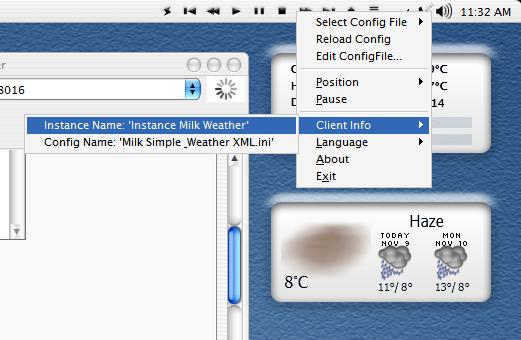
OK, the name of the instance should be the same as in the shortcut that originally calls it, which may defer from the ini filename, to find the correct instance name do the following:

BEFORE the restart script is executed (i.e. exit samurize and double-click on the shortcut that you use to start it) right-click on the systray icon

Then click 'Client Info', the name of the instance to be used in the should be displayed.

Therefore my instance name is 'Milk Weather' (remember to take out the word 'Instance')

post-3229-1068377793_thumb.jpg

Snap.JPG
Snap.JPG

#75405