 Aqua-Soft Forums
Originally posted by liquidbrain+Oct 20 2003, 05:11 AM-->QUOTE(liquidbrain @ Oct 20 2003, 05:11 AM)
[Tips N' Tricks] Apple's Itunes For Windows
Okay ladies and gentlemen - he's the reason for the color tone change.
It's a GAMMA issue. iTunesWin isn't ANY darker than the original itunes, it just LOOKS that way to us because we're viewing screenshots of iTunesMac on a PC monitor.
To verify this, download this program (link is direct to download) which allows you to view pictures and switch between win (default) gamma settings and emulated mac settings. If you try to view a screenshot of iTunesMac, and switch it to "mac gamma", you'll see that both iTunes are the exact same shade of grey.
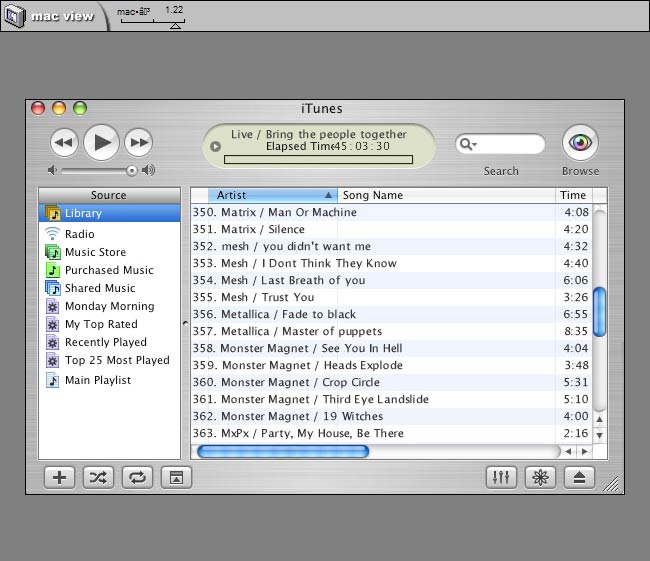
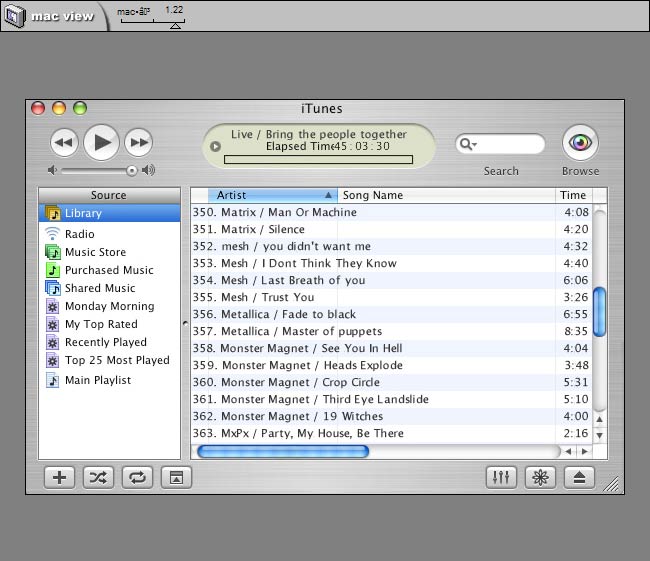
If you're too lazy to check this out for yourself, here's a screenshot of duckie's QCD itunes skin when switched to Mac emulated gamma settings. Bring your iTuneswin up next to this screenshot and see they're just about exactly the same (please excuse the questionable compression).
Originally posted by lecter@Oct 20 2003, 03:08 AMIf you disable the Ipod service (assuming you don't own one), memory usage for Itunes drops by about 50%
Disabling in Windows or in iTunes?
timmyeatworld - "my preferred formatting is 01-artist-track" That is precisely what it frigging DOES NOT DO. It names it "01-track" or "01-tra". :rant:
Originally posted by devnull_@Oct 20 2003, 02:10 PM
Disabling in Windows or in iTunes?
In Windows, of course, if you look in Task Manager you'll see "Ipodservice.exe" running.
iPod service can be disabled in services.msc.
iTunesHelper can be disabled from running in the registry. It's one of the Run keys.
Originally posted by Liron@Oct 20 2003, 02:44 AMOkay ladies and gentlemen - he's the reason for the color tone change.
It's a GAMMA issue. iTunesWin isn't ANY darker than the original itunes, it just LOOKS that way to us because we're viewing screenshots of iTunesMac on a PC monitor.
To verify this, download this program (link is direct to download) which allows you to view pictures and switch between win (default) gamma settings and emulated mac settings. If you try to view a screenshot of iTunesMac, and switch it to "mac gamma", you'll see that both iTunes are the exact same shade of grey.
If you're too lazy to check this out for yourself, here's a screenshot of duckie's QCD itunes skin when switched to Mac emulated gamma settings. Bring your iTuneswin up next to this screenshot and see they're just about exactly the same (please excuse the questionable compression).
now THAT is one fine and informed post
Cheers to you good person!
Does anyone know a way to force iTunes to read WMA? I've got a lot of misc albums in it and don't want to have to redo them?
Help is appreciated 
This site has a list of shortcuts for the visualization effects for iTunes. Most of them work in the windows version as well. Winstons iTunes Cheat Sheet
Ya i Would liek to knwo About WMA files also.. is there some way or another to make itunes read wma... cuz i have 100's of wma songs that i dont feel like changing to mp3 or w/e.
MAJOR TIP FOR THOSE HAVING THE 'SOUND' ISSUE
You have to open QuickTime and change the sound output from 'DirectSound' to 'WaveOut' It saved my iTunes life, cause I was about to uninstall it 

Chris
Originally posted by GillBates+Oct 19 2003, 11:01 AM-->QUOTE(GillBates @ Oct 19 2003, 11:01 AM)Switch the displayed album art between "Now Playing" and "Selected Song" by clicking the dark gray bar above the song's artwork.Sweeeet dude! =D
To randomize the play list press "Shuffle" and hold down the shift key
Hide the artwork slow, hold down the shift key, don't know why really, but it's nice =D
If you are having difficulty streaming and are behind a firewall/proxy. Open up the Quicktime Prefs->Streaming Transports and Choose HTTP and Port 80.
iTunes uses Quicktime for codecs and streaming.
Double-click on radio, playlist or smart playlist icon (not label) and a new iTunes window pops up!
Originally posted by lecter+Oct 20 2003, 02:28 AM-->QUOTE(lecter @ Oct 20 2003, 02:28 AM)
Does disabling this service have any direct consequences? (ie Itunes not recognizing ipod upon insertion)If it doesn't then I've got one less service to run...
If you don't have an iPod, it is completely unnecessary to run the iPod Service.
However, if you do, I would suggest setting the service to Manual and see if iTunes will recognize and sync. If this doesn't happen, set it to Automatic and start it.
Side note:
When starting, stopping, disabling, etc. services; please do so through services.msc.
Sometimes I'd rename the files after I already added them to my Itunes library. Over time this becomes a problem as in I have a lot of files in the library that don't exist anymore.
Is there anyway to force Itunes to parse through the whole collection and remove the files that don't exist anymore.
hmm that would be very handy actually...
that would be more than handy. i`m working hard on filling the tags but they`re not done yet. when i finish doing them i`ll hv to delete the database in order to remove all none existant files. (i don`t use iTunes` mp3 tagger, i use Ultra Tagger)
I'm glad iTunes didn't incorporate WMA. Apple is one of the only companies willing to stand up to Microsoft's dominance and support CD ripping in both the widespread MP3 format and a non-MS alternative (AAC). If you decided to run to WMA and ditch MP3, it serves you right that you can't use it with iTunes. How many other non-PC consumer electronics products support MP3 and not Windows Media? -most of them.
With all the free MP3 encoders out there, why you would ever switch to WMA is beyond me. I tried using Windows Media at a lower bit rate to see if it actually could bare 'CD quality' below 128Kb/s and it can't. Below 128Kb/s WMA files have noticeable artefacts and distortions.
Windows Media is just another way of Microsoft trying to force its dominance onto everyone else and collect royalties along the way. The only thing saying Windows Media is superior to competing second generation audio compression formats is Microsoft's advertising. It's no surprise that the newest format of Windows Media is only available on a PC running Microsoft Windows; even Windows Media Player for OS X lacks WM9 support.
Hey,
Does anyone know what the deal is with iTunes truncating song names?
e.g. When I let iTunes manage my iTunes folder and put all my music in the iTunes folder it chopped off the end of the song name when I clicked on the song in iTunes. This is really bloody annoying! :rant:
Ed.
I never heard of this happening. What version are you running, what version of windows are you running and are you using any foriegn (sp?, lazy) alphabet?