 Aqua-Soft Forums
Please report and help out with bugs here...
make sure you know what you are talking about, PLEASE!
Please report and help out with bugs here...
make sure you know what you are talking about, PLEASE!
Every few hours or so, my iTunes says it cannot locate the files in my library. It sucks hardcore. I hate that. I really need help fixing it.
All my music is in my My Music Folder, organized as so:
My Music\Genre\Artist\Album\File
But it never can find them after a while. I realize that i can just re load my library, but this loses play count and rating. PLEASE HELP!
iTunes crashes everytime I try and play an MP3. When I try to reload the program, it wont and gives me a crash notice.
try reinstalling. if that doesnt work then, uninstall n reinstall.
Originally posted by Zaph47@Oct 20 2003, 03:10 AMiTunes crashes everytime I try and play an MP3. When I try to reload the program, it wont and gives me a crash notice.
same here. works fine with wavs though
edit:
hey zaph, can you post your pc specs?
Originally posted by abhagwat@Oct 18 2003, 08:33 PMEvery few hours or so, my iTunes says it cannot locate the files in my library. It sucks hardcore. I hate that. I really need help fixing it.
All my music is in my My Music Folder, organized as so:
My Music\Genre\Artist\Album\File
But it never can find them after a while. I realize that i can just re load my library, but this loses play count and rating. PLEASE HELP!
Damn, I get this too:
"The song "X" could not be used because the original file could not be found."
I tryd to edit the XML file but it doesnt work, maybe that info is stored on the binary file?
Originally posted by Zaph47@Oct 19 2003, 06:10 PMiTunes crashes everytime I try and play an MP3. When I try to reload the program, it wont and gives me a crash notice.
Did you uninstall Quicktime 6.4?
Try reinstalling iTunes and make sure that Quicktime gets installed. It needs it for the codecs.
Even though V4.1.1 is now out, if you use v4.1 (really 4.1.0.52) and hit "Help/Check for iTunes Updates", it tells you you already have the latest version.
Whenever I do anything that requires the least bit of cpu usage (clicking a link, starting a program) iTunes stutters, unlike any other player I've tried. I love all the features (AAC encoding!) and this is the only thing keeping me from using it as my default player. Any suggestions for this problem?
Originally posted by johnny5w@Oct 23 2003, 12:40 PMWhenever I do anything that requires the least bit of cpu usage (clicking a link, starting a program) iTunes stutters, unlike any other player I've tried. I love all the features (AAC encoding!) and this is the only thing keeping me from using it as my default player. Any suggestions for this problem?
You have to open QuickTime and change the sound output from 'DirectSound' to 'WaveOut'
trust me
Well I did that and it seems to have helped, but unfortunately it still stutters sometimes. Thanks for the help though Duckie.
*Edit* I'm an idiot. It now only does that when I'm importing songs. Thanks Duckie!
why is itunes incapable of ordering my songs properly...
say i have an album of mp3s i know they are tagged properly cause i did myself, but itunes can't put them in the right order...
edit: ok got it, but clicking on the album tab when they all have the same album name isn't obvious... at least not to me. not good usability apple.
I used Duckies trick to get thte stuttering sound to go away, but i still get it when i move over yzdock... byut when i set it to normal cpu priority it doesnt do it as much (notice the as much keyword here) i tried having itunes on abovenormal too and it doesnt work either.. is like having itunes in normal and yzdock in abovenormal...
Any clues?
Cheers... Seph
Originally posted by Seph@Oct 25 2003, 04:34 PMI used Duckies trick to get thte stuttering sound to go away, but i still get it when i move over yzdock... byut when i set it to normal cpu priority it doesnt do it as much (notice the as much keyword here) i tried having itunes on abovenormal too and it doesnt work either.. is like having itunes in normal and yzdock in abovenormal...
Any clues?
Cheers... Seph
Am I to assume, then, that you've got lotsa things running at priorities other than "normal"?
If so, that's probably the cause...
Playing with system priorities makes for an unstable machine, I always found 
i have two yzdock instances at abovenromal thats all i had till i got itunes and i tried to get rid of the skipping sound and i tried setting it up to high...(abovenormal too) because if i have yzdock at normal while riunning other stuff it becomes sluggish... (yzdock uses main cpu and not so much of graphic card's cpu right?)
hehe... what theme are you using?
my iTunes worked PERFECT (aahh...:woot: ) before I had to reformat my machine because of some registry tuning (tuning? should do some positive effects, so, hmm... registry damaging then...  ) I did...
now, stuttering all the time, especially when firing up an IE windows. now I changed my theme back to Studio28 I used before the reformat and now the stuttering is gone...!
Bug with iTunes 4.2 and iTunes sidekick
when using iTunes sidekick by evolution and going into mini mode it will crash ur system. I checked this 5 times and it always crashed the sys and restarted my comp.
Worked fine for me.
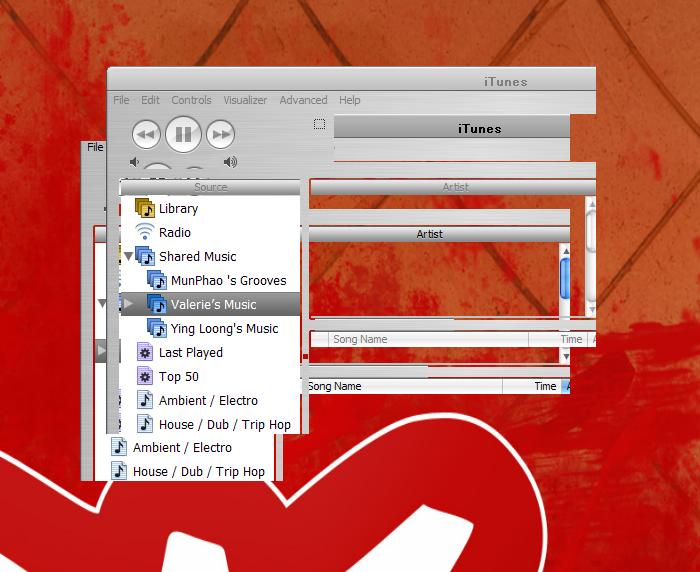
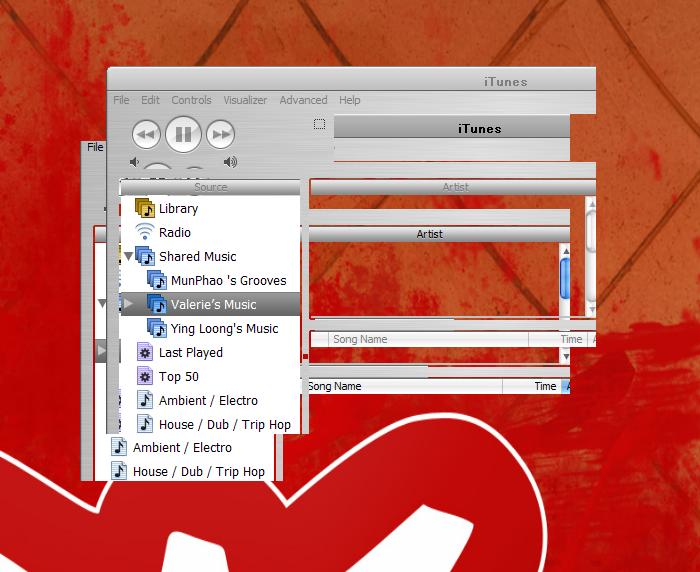
Some of us have mentioned this problem, but I haven't seen any shots of it actually happening, so here's what it looks like sometimes. Pieces of the interface scattered across the dtop, but usually in the lower left corner.
Note, too, that when this happens iTunes (latest version) disappears from the taskbar and even the Alt+tab task switcher, although it is still playing music!!! I recently uninstalled and reinstalled iTunes, so I can't imagine what the hell is causing it (no plugins running, either).
I can minimize my itunes in Minimode like in 4.1
Only with strg +M
That sucks! Is there any other way to solve this prob?
Thx!
Zecke!
Originally posted by ji eun@Jan 22 2004, 04:40 PMSome of us have mentioned this problem, but I haven't seen any shots of it actually happening, so here's what it looks like sometimes. Pieces of the interface scattered across the dtop, but usually in the lower left corner.
Note, too, that when this happens iTunes (latest version) disappears from the taskbar and even the Alt+tab task switcher, although it is still playing music!!! I recently uninstalled and reinstalled iTunes, so I can't imagine what the hell is causing it (no plugins running, either).
that happens if iTunes is a toolwindow and you/some program tries to miminize it.
but i don't know how it can happen without any plugin
I can minimize my itunes in Minimode like in 4.1Only with strg +M
That sucks! Is there any other way to solve this prob?
Thx!
Zecke!
when the titlebar is skinned using Multi-Plugin, the green button makes iTunes go to minimode 
you can download it from here:
Originally posted by zeckeheinz@Feb 28 2004, 03:43 AMI can minimize my itunes in Minimode like in 4.1
Only with strg +M
That sucks! Is there any other way to solve this prob?
Thx!
Zecke!
your avatar is illegal 
when i put any cd into my computer, I tunes recognizes the whole cd as one big track and when it goes online to find the artist information it definitely does not get the right info. WTF?? Anyone have this problem?
Thanks
I'm having problems with my media keys. I'm using a microsoft keyboard, and the latest official software. When iTunes is the active window, it acts like I'm pressing the buttons twice, if it's inactive, it works but tries to make iTunes the active window.
This has happened in all versions of iTunes, and I've reinstalled windows quite a few times (not because of this problem though)