 Aqua-Soft Forums
is there any aqua app for windows... or even windows app such as this wallpaper switcher for mac. Is it possible to be made?
http://www.digitaljames.com/10-14.jpg

EDIT: Post thumbnails next time.
is there any aqua app for windows... or even windows app such as this wallpaper switcher for mac. Is it possible to be made?
http://www.digitaljames.com/10-14.jpg
EDIT: Post thumbnails next time.
i mpretty sure it can be made, i just dont have the skills to hehehe, someone prolly does, conceptwise it cant be that complicated...
BTW that is some fast motherf***er mac theyre running on the screenshot! *drools*
Cheers
Seph
:evil: where can i find the wallpaper shown in this post ?????? wanna have it !!!
Error
changing the wallpaper isnt a problem, there is a powertoy that does this. however its when u try and have the two pictures fade together the problems arrise.
-The Unknown
Ok, im lost. Wasnt he speaking of an app that looks like that changes the wallpapers on demand and with a predefined time set?
If this is what he was asking i dont think there is a NEED for the two wallpapers to fade each other in while the other one fades out...
right?
Seph
Yes, Microsoft Powertoys has this prog. It's running on my comp. It installs as another tab in Display Properties as 'Slide Show' but it's actually a nice wallpaper changer.
Check the pic here and you can see how it functions.


NIIICEE... i didnt know about that app... theres always new stuiuff to learn over here... today only ive learnt like 3 new things HAHAHA... (which could mean im a total idiot, it just makes me feeel happier to think differntly hahahaha)
Cheers Ji Eun
Seph
it would be nice to have an aqua app that would do it like the one in the screenshot though...heh
 ok, no metter if i Click on that bloody "powertoys_wpchanger.exe" that piece of microsoft trash..... it does not install itself or something ... danm !!!!! then i go to add or unistall programs in the confg panel. and there is no "powertoys_wpchanger" or something similar... and then i go to screen properties and there is NOOOO a Slide ShoW .... What`s WRONG man What`s WRONG ??? this things are allways happening to me with this Powertoys..... yeah right !! Power toys..... :rant: i can`t figure out what the hell they call them "POWER" maybe a bad Toy but Power ??? come on !!!!!
please Need help..... need some kind of explanation or someething. ....... <_<
This man needs a drink :wine party: (or not?)
Take it easy, recite the mantra: "It's just Powertoys."
I'm running Japanese version WinXP Home SP1 and this 'Powertoys' is in English and everything is no problem. Maybe, just maybe, it's not a Microsoft issue you're dealing with? If you have already installed it, then RE-install it and make sure to check the option you see in this post's pic.
Hope this helps 
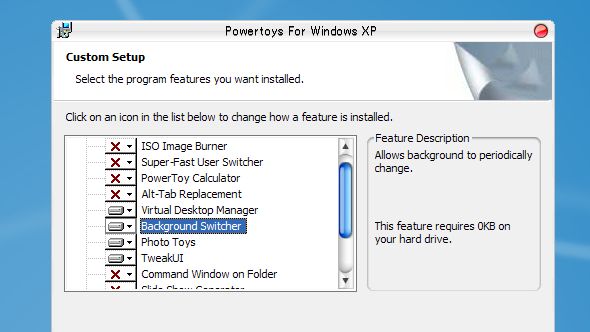
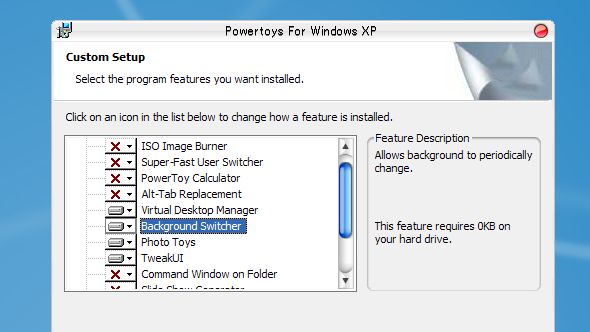
:sh!t:mMMMmm maybe it is because i have not the Sp1 ....... well.... what can i say....
and thanks dude  . don`t Worry think it is because too much of that drinks :blowup:
OK, maybe I'm just thick, but which powertoy is this? The HTML slide show one?
Thanks. I was looking at the wrong bit of the site :shy:
Who wants to know why the wallpaper fading cant be done (in any usable way)?
From an old post:
That "Wallpaper Changer" is not really that, its a Screensaver that fades the pictures. Unix has the ability built in to run a screensaver as a wallpaper (or as the "root window").
Windows does not come with this functionality. There are programs that try to do it (DREMPLES, VITAL DESKTOP), but they all come off hacked and unimpressive. They are very inefficient and remove desktop shadows, transparency, etc.
For this to be easily doable, MS would have to build this functionality right into the GUI next time.
@contra (BTW excellent game, first one of course) - by "VITAL" do you mean "VIRTUAL" then see if we could do this.
#include
main()
{
if ("VITAL" == "VIRTUAL")
{
create webpage("in js","can do this");
}
else
{
return 0;
}
}
No, I mean VITAL.
OK, but who can tell me what exactly are the features that App has (i`m talking about the Mac OS X one "the real one"). please.
coz i have found tons of FREE softwares that change the Wall papers at a specific time. and a another few things. so i really want to know what the real one does. :own:
Its not a piece of software, its actually built into UNIX systems.
You can run a screensaver as your wallpaper.
What people are talking about is the mac has a screensaver that fades through a picture slideshow. Look at the Windows "Nostalgia" screensaver for an example.
This is popular for people to run. It is cool though, I use one like it on Linux, and I like "flux" too.
ooOOo i see. thanks contrasutra.
but, no metter which screensaver i choose ?... can i use .... flurry for example ?. or it has limitations. like it only can make the fade effect.... or so?.
No, any screensaver.
Its pretty good on performance too. I run "flurry" on my dual monitors at like 5% CPU usage.
dude i`ve found one that can put a "flash animated wall paper" it is for free.
we can do "some Mac os screensaver`s clones" in flash and........ what do you think about this app. ?
That could work. Does it leave desktop shadows, alpha transparency, etc?
Sounds like a plan, I don't know flash though.
Got a Link?