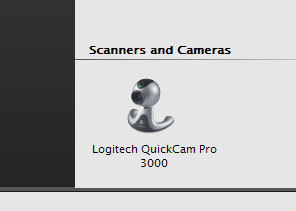
[help] An Annoying Icon

Ive modified like 4 exes and 5 dlls already and changed the icons in them but this icon still shows up all the time!!

Anyone know what file do i have to reshack?

As you can see it's UTTERLY UGLY!!!! it doesnt even have the right size!!

Cheers...

Seph
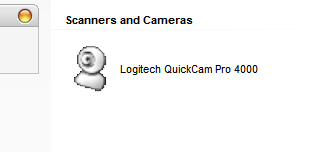
post-1423-1065193633_thumb.jpg

example.jpg
example.jpg

#61655

Look for the .cpl file in your system32 directory.

It will either be there, or if an application was installed with it, it will be in the app directory.

The image is being pulled from the control panel extension/add-on.

Hope that helps.

#61709

Originally posted by rjohnstone@Oct 3 2003, 07:43 PM

Look for the .cpl file in your system32 directory.

It will either be there, or if an application was installed with it, it will be in the app directory.

The image is being pulled from the control panel extension/add-on.

Hope that helps.

I changed the cpl icon, nothing happened to the one tha appears in my computer...

ive tried like 9 files in the ligtech directory...

still nothing

Any other clues?

Thanx

#61710

That one has got me a tad stumped.

I know it's not part of the XP core control panel files, so it had to have been added by the Logitech install program.

Do a search on your entire C: drive for *.cpl and include searching system folders and hidden system files.

I just verified that Logitech's install does add a Control Panel extension and that is where the image is being pulled from.

The question is, where is the file located. .cpl files don't have to be in System32 directory to work.

It's gotta be there somewhere.

Also, if it installed into System32 directory, it may have been added to the system32\dllcache directory which would overwrite any changes you made automaticaly.

#61728

Hmmm ive gone there, ive replaced the icon in the cpl (which by the way is different than the one that appears on my computer) .

...nothing....

Ive modified like 12 dlls and exes from the logitech folder and still no change.. this icon seems to be well backed up!

Someone with a logitech camera has tried this?

I have a logitech Quickcam 4000 Pro

Cheers...

ANy help is appreciated...

#61772

I have a QuickCam 3000, just installed the latest software version 803, the file you are looking for is in c:\windows\twain_32\quickcam, lvWIAext.dll. Replace icon group 2006 with your icon in reshacker and you'll be golden!! (Y)

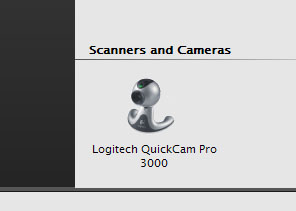
Here's how mine came out:

post-1738-1065245945_thumb.jpg

cam.jpg
cam.jpg

#61776

I would kiss you but cyberspace doesnt allow me!!! (neither does my sexual ;) ) orientation

THANK YOUUUUUUUU!

Cheers

Seph

#61784

Originally posted by Seph@Oct 4 2003, 07:17 AM

I would kiss you but cyberspace doesnt allow me!!! (neither does my sexual  ;) ) orientation

THANK YOUUUUUUUU!

Cheers

Seph

:lol: hehehe are you in your kissing mod today ??

lol come on!!! i`m to sexy to sexy in the Cat Walk .... in the Cat Walk ......

#61788

iiii'm...

...Too sexy to respond.

:P

#61789

:lol::lol::lol: BAHAHAHAHAHAHAHAHAHAH!!!!! :lol::lol::lol:

You're welcome Seph, now let's PLEASE keep away from the Right Said Fred references... :6

#61809