Xwdock 2.0.0.0 - Help & Support

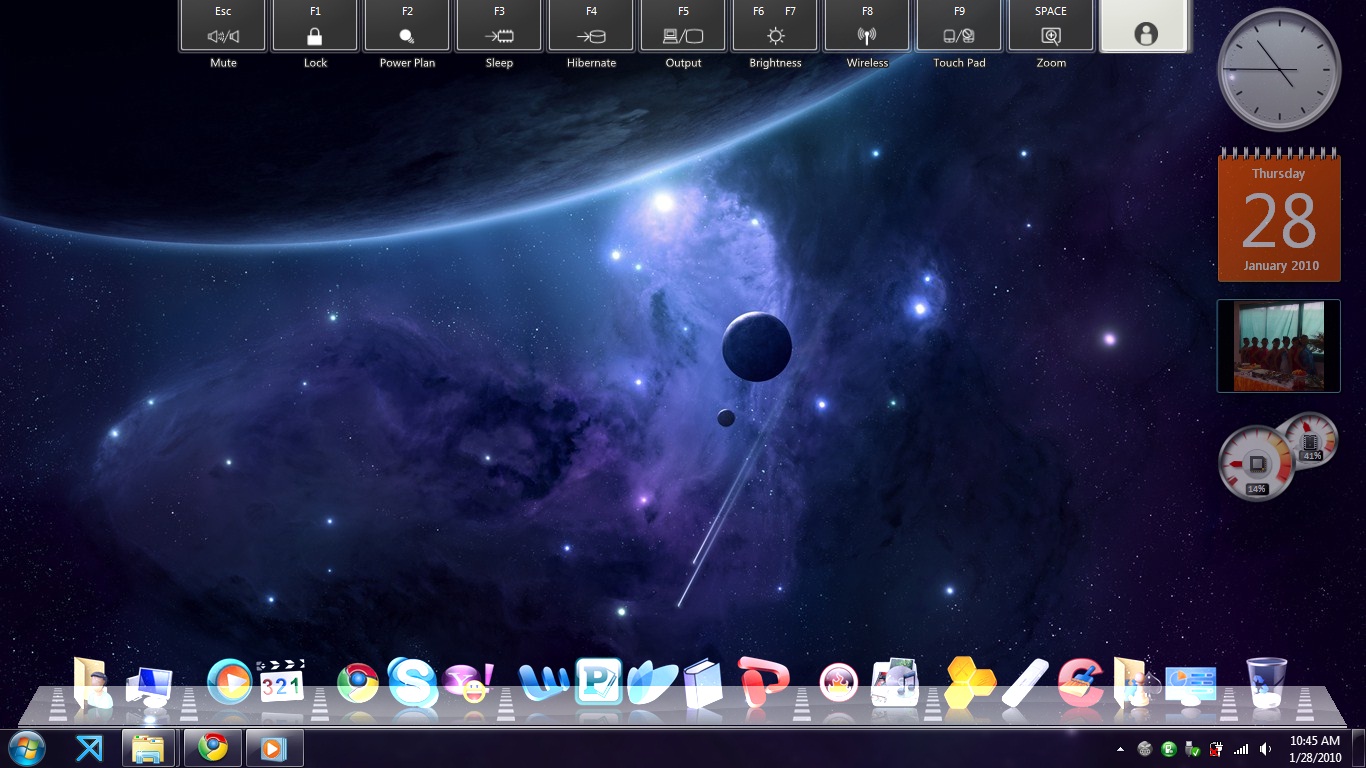
Good day. I saw this little problem. I was just trying to review my old files when I accidentally ran the game Red Alert 2. After exiting the game the dock seems to display incorrectly. I can hover over the mouse and the description displays too but all icons can't be clicked. I have to exit the dock and run it so that I can use the dock again. Please see attached desktop screenshot of mine. B)

post-112396-126464701636_thumb.jpg

XWD v2 Problem.jpg
XWD v2 Problem.jpg

#534372

sorry its me again just wanted to let you know that cant connect my iphone to pc when i use xwd 2.0 but when i quit dock i can connect my iphone.

thanks.

#534381

@Romeooh: no way man, I have xwd2.0 too...and on dock i have iPhone Explorer...my iphone is saw ...no problems...oh..btw do u have WinXP or smth else? Because in win7 is working great

#534383

@Romeooh: no way man, I have xwd2.0 too...and on dock i have iPhone Explorer...my iphone is saw ...no problems...oh..btw do u have WinXP or smth else? Because in win7 is working great

seriously it doesnt work.i use win7 32bit.

#534385

Hello , Great Author ..

I'm a user of XWD 5.6 ...... ;)

It got a few bugs (e.g. XWDKernel.dll 's Global Message Hook AND Rundll32.exe not compatible in Win7) :(

But I'm still using it —— because of its marvelous MINISIZE-WINDOW effect and Icon Maginifying :rolleyes:

I'm so happy to see the XWD 2.0 is betaing... It's really good and faster but a little simple ...

I wanna know whether those two functions aboving :P will be added into next XWD 2.0 or final version .

Thanks for your hard work!

#534389

Hello , Great Author ..

I'm a user of XWD 5.6 ...... ;)

It got a few bugs (e.g. XWDKernel.dll 's Global Message Hook AND Rundll32.exe not compatible in Win7) :(

But I'm still using it —— because of its marvelous MINISIZE-WINDOW effect and Icon Maginifying :rolleyes:

I'm so happy to see the XWD 2.0 is betaing... It's really good and faster but a little simple ...

I wanna know whether those two functions aboving :P will be added into next XWD 2.0 or final version .

Thanks for your hard work!

Thanks. In the next build you won't see these functions, but see others great functions :) And about 5.6 version, it's not supported any longer.

#534390

Thought I would throw this out there, just a minor odd bug I guess.

Dropping the Sticky Notes application (this is on Windows 7) into XWD 2.0 creates a nonfunctional icon(generic application icon), and when clicking on the icon it gives an error:

C:\ProgramData\Microsoft\Windows\Start Menu\Programs\Accessories\Sticky Notes.Ink

Unspecified error

Ok, so I thought, i would drag&drop the sticky notes.exe application itself into the dock...

Dropping the StikyNot.exe program (located at C:\Windows\system32\) does an odd thing, instead of creating a link to the Sticky Notes application, it creates a link to the Desktop.

Now, this, I'm sure is related to how Microsoft integrated the Sticky Notes application into the Desktop environment.

After discovering this, I investigated a few other integrated applications...

Some of which I have found having the same problem as the Sticky Notes listed above are the following:

Sound Recorder

Snipping Tool

Connect to a Network Projector

Those are all I found so far. These are most likely not applications the users of XWD would be using in their dock, so importance of this I would assume is relatively low.

I just thought I would point it out, if it hasn't been brought to light yet.

I would like to also take this moment to say, lets not throw every idea for a request of what we would like to see in XWD 2.0 at Bobah, he has already asked for ideas, and he has also taken things into consideration. Sure, we all have an idea or two of what we would like to see in XWD, but, these are things to implement later on.

Right now, Bobah is focusing on getting the base application(the basics) working flawlessly with our PC, so lets report the bugs, do not forget, this is an early beta and we are the testers. :)

Thanks, and lets help with XWD any way we can :)

#534391

@aka120: I don't know about sticky notes, but you should be able to add sound recorder to it fine... Try dropping it straight from system32? The program itself is called "sndrec32.exe"

I think a way to modify an icon's path would be nice. (I'm supposing that Bobah removed it to keep things simple) and maybe make it convert shortcuts into applications, with working directory and arguments auto-detected.

Edit: just confirmed that sndrec32 does indeed work on my computer at least (running XP sp3)

#534393

@aka120: I don't know about sticky notes, but you should be able to add sound recorder to it fine... Try dropping it straight from system32? The program itself is called "sndrec32.exe"

I think a way to modify an icon's path would be nice. (I'm supposing that Bobah removed it to keep things simple) and maybe make it convert shortcuts into applications, with working directory and arguments auto-detected.

Edit: just confirmed that sndrec32 does indeed work on my computer at least (running XP sp3)

Good to hear its functioning correctly on XP then :)

All the programs i mentioned, repeat the same "symptom", dragging and dropping the application directly from the system32 folder onto the dock, creates a desktop link.

The desktop link does nothing more than open the users desktop folder.

#534394

im still having the issue w/the dock after starting my laptop after its been in hibernation. once i turn it back on, and log back into windows, (running vista 32 bit) all the icons on the dock are invisible and i cant click on them. i had a similar problem with XWD 5.6, except with that, it was totally gone when i logged back on.

#534395

Good to hear its functioning correctly on XP then :)

All the programs i mentioned, repeat the same "symptom", dragging and dropping the application directly from the system32 folder onto the dock, creates a desktop link.

The desktop link does nothing more than open the users desktop folder.

Creates links, and place links on the dock. It's not good for "security" run programes from C:\Windows\....

#534401

@BOBAH13, I just wanna follow-up my post from the previous post. It might help for the next release. :D

#534403

hello,to the creators of xwindows dock 2.0,looks like it's going to be a great dock "congratulations".but just one thing,i recently downloaded it and was running fine for a few days know all of a sudden icons on dock disappeard and most of the dock aswell, just a strip down the middle of the dock is all you can see,i haven't changed anything only thing i've to is added skins.help please! i'm running a windows xp pro..

#534415

hello,to the creators of xwindows dock 2.0,looks like it's going to be a great dock "congratulations".but just one thing,i recently downloaded it and was running fine for a few days know all of a sudden icons on dock disappeard and most of the dock aswell, just a strip down the middle of the dock is all you can see,i haven't changed anything only thing i've to is added skins.help please! i'm running a windows xp pro..

If it's the skin you're using, try changing back to the original skin. Bobah will probably have better advice, but if all else fails, you could try to take a look at the ini files in C:/Documents and Settings/USERNAME/Application Data/XWindows Dock/ and see if you notice any problems (or delete them, which would reset your dock).

#534419

If it's the skin you're using, try changing back to the original skin. Bobah will probably have better advice, but if all else fails, you could try to take a look at the ini files in C:/Documents and Settings/USERNAME/Application Data/XWindows Dock/ and see if you notice any problems (or delete them, which would reset your dock).

already tried all that even deleted it and redownloaded it again without adding any skins or messing with anything just clicked on the installer and still all i get is a strip of the dock. don't understand what is wrong when it was working fine before, except for the running indicators the dock, the only one that would show was the computer indicator.

#534428

Error :o system Windows 7

#534442

Error :o system Windows 7

No need to tell me "Error... What to do??? and so on". If you have problems, please tell me what were you doing that get that error ? If it happens when you start Application, then try to install/download "redistr C++ 2008" and restart app.

#534447

how do i extract the resources from a skin from 5.6 skin to version 2? or port it?

#534468

how do i extract the resources from a skin from 5.6 skin to version 2? or port it?

completely by hand, because the new system is completely different from the old one. For starters, take a look at the files in skins/current/ from your 5.6 installation, copy the relevant files to a new folder, rename them to what they should be, and start tinkering with the settings.

#534469

completely by hand, because the new system is completely different from the old one. For starters, take a look at the files in skins/current/ from your 5.6 installation, copy the relevant files to a new folder, rename them to what they should be, and start tinkering with the settings.

thanks!

#534476

The indicators wont show. :(

#534483

The indicators wont show. :(

I think in the next release it's fixed.

#534502

The indicators wont show. :(

If you drop the exe files instead of a shortcut to the app the indicators work. At least for me.

#534504

If you drop the exe files instead of a shortcut to the app the indicators work. At least for me.

Oh wow, it worked. Thank you. :)

#534511

If you drop the exe files instead of a shortcut to the app the indicators work. At least for me.

but not when you're using folders

I think in the next release it's fixed.

waiting for next release :)

great job!

#534515