 Aqua-Soft Forums
Can't find this anywhere - i'm converting the skin to a neutral gray/white/black (it fits the theme of my forum better).
Is this an image somewhere or a color value in css or the templates?
Thanks.
Can't find this anywhere - i'm converting the skin to a neutral gray/white/black (it fits the theme of my forum better).
Is this an image somewhere or a color value in css or the templates?
Thanks.
Its all a color value in the CSS #search
Just edit it under the CSS area, all the color stuff is at the top.

I have tried this as you can see in the code, to no avail:
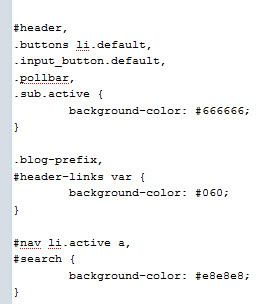
I tested it with a black color value, and it only changes the middle of the actual background, the blue gradient remains - leading me to believe its an image overlay (which i cant seem to find)

thanks for the quick reply.
Ah you're correct.
You need to modify the gradient.
#search {
	background-image: -webkit-gradient(linear, 0% 0%, 0% 100%, from(rgba(182, 198, 212, 0)), to(rgba(182, 198, 212, 1)));
	border-bottom: 1px solid #829ab0;
	padding: 6px 5px;
}
just change the "182, 198, 212" bits to the rgb value of the color you want to use.
I'll have to fix this in the next version so it doesn't remain blue.
Example
#search {
	background-image: -webkit-gradient(linear, 0% 0%, 0% 100%, from(rgba(212, 212, 212, 0)), to(rgba(212, 212, 212, 1)));
	border-bottom: 1px solid #829ab0;
	padding: 6px 5px;
}
Ahh yes. Thanks again for the lightning fast replies.